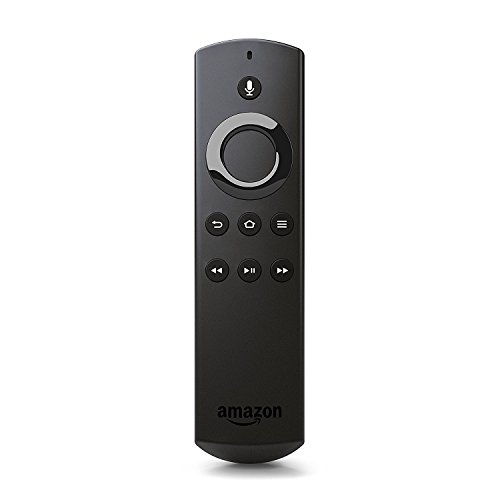

- Compatible with the Fire TV Stick, Fire TV Cube, and Amazon Fire TV (not compatible with Amazon Fire TV Stick 4K or Amazon Fire TV Edition smart TVs)
- Quickly skip to your favorite scenes with standard navigation and playback controls
- Use voice search with the built-in mic to instantly find TV shows, movies, and games
- Ask Alexa to check sports scores or the weather, play music, and more
- Works anywhere in the room without having to point at the TV
- Includes 2 AAA batteries
-
Information
-
Twitter
-
Pinterest
-
Youtube
-
Facebook
Mary Wanjiku
Easy to add the new remote!
Bought a replacement for a remote that the Great Dane decided was a chew toy. It's super easy to add the new remote to an existing Fire TV box (or stick). Just turn on the Fire TV (Home screen) and hold the home button down on the new remote! You will see a notification on the screen that the new remote is now paired wit the fire tv. DONE! I was worried as the instructions tell you to navigate to the settings menu on the fire tv. How the heck do you do that without a working remote?! You don't have to, just hold the home button down until you get the notification it is paired. I just wish the remotes didn't cost nearly as much as a new box did. They are too expensive!
Kelly Johnson
Perfectly paired!!
I needed a replacement for my fire tv remote (1st gen), mine was completely dead, change of several sets of batteries didn’t work and after using my phone app as a remote (stopped working too) I decided to go ahead and purchase. Worked right out of the box!! I did read other reviews and I unplugged my fire tv, took batteries out of old remote, (even though it didn’t work!) This new remote paired automatically and began working immediately!! I certainly can’t say that it will always do that but for me it did! Working perfectly and I love the voice recognition by Alexa, I have an Alexa downstairs and upstairs...so far I’m so pleased with this purchase...I hated paying close to $30 for a dang remote but very glad I did at this point! Will update if anything changes!
Heather England
Same as the original that comes with the firestick
I don't know what happened to my remote. The dog hid it, I threw it in the trash......it was there one minute and gone the next. I had to order another. Even though the remote app works very well, there's something about having a remote! This is the same exact remote that comes with the firestick so it's an exact replacement.
Claire Koenig
Thank goodness!!
What had happened was, my original remote stopped working. I tried new batteries (3 different brands) and that didn't help. So I used the fire stick remote app for months until somehow my WiFi password got changed. See, I needed a remote to type in the new password! I was stuck! I agonized for about 2-3 months before breaking down and buying this replacement remote. I put the batteries in and praise Bast, it worked!!! Life is good again. All is right with the world. Carry on.
Maman Nadeem
Easy to setup
I needed to replace my remote, after looking decided to just get a remote control only. I read in the reviews that some were having problems pairing to their device. I didn't. I took another reviewer's suggestion to remove batteries from old remote before setting up this one. Everything went fine.
Santana Sanchez
Amazon Fire Stick Replacement
Im so glad there is a way to purchase a replacement remote, by itself. No one, but Amazon sells the remote, by itself. I believe, my 1 year old son threw away my remote on accident and it didnt really hit me until after trash day because he started a "throwing away trash phrase" 2 weeks prior by helping me throw away trash in the trash can, everyday. Selling it by itself also makes sense if you lose your remote or even accidently break it.
Teri Fanguy
Received in time!
Works just like a replacement remote should work. You have to: Take out the batteries from the old remote if you still have it. Once you put the batteries on the replacement remote, unplug the power source from the firestick/box. Plug the power back in and wait until the home menu comes up on the screen. Then press the home button on the remote (I had to leave it pressed for maybe 2-3 minutes before mine connected) Then enjoy your new remote!
Pierre Francois Du Plessis
We love Alexa and Fire TV!
This remote is great and still works even after being chewed by our puppy. We bought a replacement remote, but this one still works too. We don't have cable anymore, but we do not miss anything since you can get anything on TV with this, although Live TV subscription is required if you want actual live TV. I hate commercials, so I don't need live TV, I have plenty of free movies with my Amazon Prime TV and free apps such as Tubby. Hulu is also accessible with this stick, so it's really all I need for my TV viewing.
Rodica Liliana
❤❤
I had to get a second remote because the first one was eating batteries to the point of having to replace daily. It sucked the life out of an entire box of batteries in just a couple weeks. I contacted Amazon and they had me purchase a new remote and then they took care of me. I love Amazon
Amy Thurman
This replacement remote initially didn't respond, but now it does!
My daughter and grandchildren were home to visit when my original Firestick remote completely disappeared! We hunter everywhere for it and nothing! So I ordered a replacement which came in 2 days. When I finally had time to set it up, it worked from the controls, but wouldn't respond to voice commands. I don't have a lot of time during the school year to fiddle with such problems so I set it aside and didn't try it for a few weeks (used an app on my phone or my echo dot when I wanted to use voice control). Then I picked it up again to see if I could get it working and surprise! It worked immediately with no fiddling and no issues! I bought a bright red cover for this one so it won't disappear as easily as the original!