
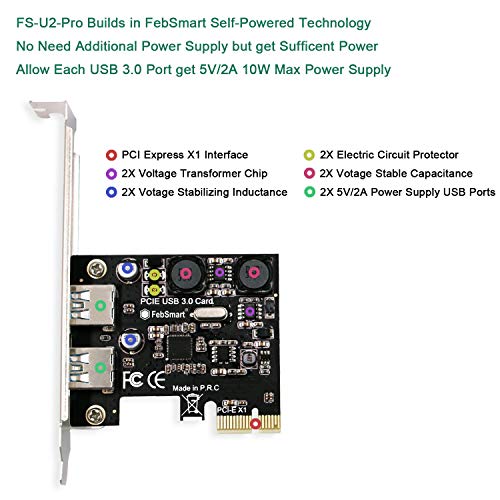
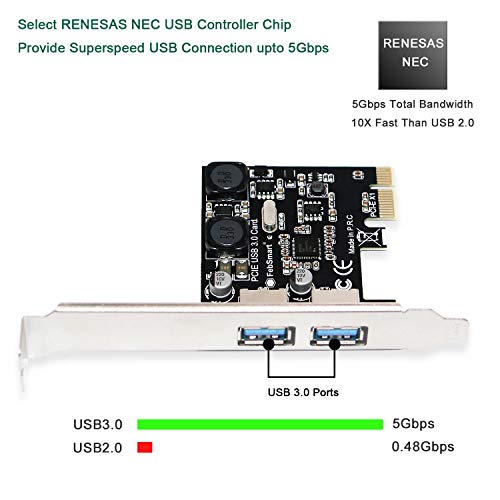


- 1. This FS-U2-Pro will add 2-USB 3.0 ports on your desktop computer by PCI Express(1X) slot.The super fast USB 3.0 ports will provide 5Gbps max data(total) transfer speed for video,audio,photos or files.
- 2.Build in FebSmart Self-Powered Technology: Users do not need to plug any additional power cable on board (only PCIe slot) and get each ports 2A (4A in total) max power supply for high power-consuming data device like Hard drive discs etc. Enjoy super easy installation with Plug & Play use.
- 3.Based on RENESAS NEC high performance chipset with more technology. 2X added power module provide 2X2 ampere current ensure adequate power supply for USB device.2X electric circuit protector and voltage stable capacitance protect data and device safety than ever.
- 4. Compatible System:1.Plug and Play on Windows 10,8.1,8(32/64bit) and Windows Server 2012,2012R2,2016,2019.2.Need to Install Driver on Windows XP,Vista,7(32/64bit) and Windows Server 2003,2003R2,2008,2008R2(32/64bit),NOT for MAC OS.Comply with PCI Express X1,X4,X8,X16 slot.
- 5. Buy with 30days money back, one year warranty, Lifetime tech support. Get prompt tech-support at support@febsmart.com or visit www.febsmart.com
-
Information
-
Twitter
-
Pinterest
-
Youtube
-
Facebook
Debbie Elrick
Works fine but to make sure it works get your driver from the Febsmart website.
Overall very happy with this card. I wanted a card that did not require separate power supply and included short bracket as this was going into an older small form factor quad core with limited power options on the motherboard. Physical install was straightforward with no issue. Windows 10 did not recognize the card but there was power at the USB ports. I used the supplied disk to install the supplied driver. It still did not work. Went to the Febsmart website and downloaded driver. Installed that driver and the install noted it was repairing a corrupt driver. The driver I downloaded worked perfectly. In short get the driver from the website and don’t use the disk
John Case
Basic USB 3.0 card that works great
I put these in an older server to support an external USB 3.0 enclosure for backups and it just plain works. Didn't have to install any drivers (Windows Server 2016) and it detected just fine. So far so good. Unlike a lot of USB 3.0 cards that have a plug to provide additional power, this one does not. Which works great for me since the server I used doesn't have any standard power leads anyway. But just know about that ahead of time... don't plan to use these for any high power devices - only low power (USB 2.0 limits) or devices that have their own power supply like a larger external enclosure. It comes with a half-height bracket you can swap out, which I did. Easy change out for the full height bracket it has preinstalled.
Ní Ghallachoir Ellí
Works with R620 and ESXi 6.5
We end up eating a lot of disk space for the development servers, especially with backups. We bought a couple of external backup drives but forgot our R620 servers only have USB 2.0. ESXi recognized this instantly and I was able add the USB ports to a VM running Bacula without any problem and get the performance we expected from the drives. Its been working perfectly for several months now.
Channea Rebecca
Server 2012 R2 - Supermicro
Installed to a SuperMicro motherboard running Server 2012 R2. Drivers installed automatically. Easy no need for driver disks or downloads. Works great. Cut my local USB backup time from 11+ hours on the USB 2.0 ports on the case to just about 4 hours using this USB 3.0 card. Its been running great for over a year now. I'll update if I run into any problems with reliability/durability over time. I can recommend this USB card!
Chetan Anand Singh
Works well in an X1 Slot
I have a fancy USB 3.0 network adapter that I use with an older system. Plugged into the USB 3.0 slot in the back of the system, I would sometimes get 6Mbps down/100+ Mbps up. Other times I would get 100+ down/100+ up. With this adapter I get 85+ down/100+ up consistently. I don't have any disks to test it with. Mine get about 30-60 MBps, presumably not enough to stress it. Anyway, it is better than what I had. I used Microsoft's USB Device Viewer to look at my Lenovo 11017. It looks like, internally, it attaches an internal non-USB 3.0 hub to its internal USB 3.0 hub. That can't be good. It probably explains the come-and-go performance. This adapter shows up as a USB xHCI Compliant Host Controller right off of My Computer, so I have control of what uses it. 85 is a lot better than 6!
Tina Bansal
The usb card came with needed drivers for vista
This is a small card for a desktop that is perhaps dated. I had 1 slot and getting around the other cards was tight, but this thing went right in - with care. I run Vists, so it needed the small cd needed to load drivers. It says win10 doesnt need the drivers. I plan on attaching a ssd from a win10 pc to boot up since there's no free vista update. But the card is quality, the drivers for vista loaded fine. It arrived in a well packed box and on time. I'm pleased
Janie Riddle
Works good.
The USB mouse kept dropping it's connection - and sometimes we had to reboot the system. We tried other mice and always had the same problem. Adding another USB port seemed to fix the problem. The computer is a Dell SFF (Small Form Factor) so we needed a card that would fit - and this one comes with another bracket that is easily swapped out. The computer recognized the card as soon as it was turned on, no need for the small CD that came with it (maybe Win 7 would need it). The mouse has no problems running on this card.
Tami Chalakee
It works !
After installation, which went quickly on my Win7 machine, I initially had an issue with a flashdrive that has the blue indicating color for USB3 on it. I was only getting USB2 speeds. I contacted the seller via Amazon who asked several questions, and then advised that my device was a USB2. I replied that it had the blue color indicating USB3, so I decided that the card was still usable, but only capable of USB2 speeds. Well, I just tried a different USB3 flash drive, and it did run at USB3 speed. So I am amending my initial criticism of this card and giving it, and the seller 5 stars. It does work, and it is well worth the price asked for it.
Dona Brown Moyers
EXCELLENT PRODUCT, DOES EXACTLY WHAT IT CLAIMS TO DO
I bought this product because a computer I built in 2010, an Asus P7P55D DID NOT have USB-3 controllers on it. Thus this limited my speed when using external backup drives. I bought a 2 slot usb-3 and 4 slot usb-3. they both work perfectly. Be sure you know what you are doing when you install these devices. Remember, if you don't have USB-3 output ports then these devices will work if your computer has spare PCI EXPRESS (PCIe) EXPANSION CARD SLOT. These are the short slots on the mother board. If you don't know and don't have a diagram or spec sheet you had better take the desktop computer to a shop and find out. If you do have the PCIe slot or slots then this device will give you the USB-3 output ports. It won't give you USB-3.1 or 3.2. But don't worry, USB-3 is plenty fast. Be sure to discharge yourself of static electricity before installing these devices or you could damage them. Or try wearing the thin latex or rubber gloves.
Debra Sanders
Fixed wireless keyboard and mouse issues on older pc
Great usb 3 card for the money! I have a very old Alienware Aurora R1 desktop (X58 microATX chipset) from 2010. Still works fine for what I used it for. However all the stock USB ports on it are all 2.0 so I also just bought the wireless Corsair k63 lapboard + keyboard combo and the Corsair Harpoon mouse. These new devices are USB 3.0 and 3.1 So they did technically work plugged into usb 2.0 ports. However, I noticed right away that there was some significant lag and intermittent connection issues to to dongle receivers over 2.4ghz due to the physical distance between my couch and the computer (about 15 ft plus the other side of the sectional couch in the way) This was more of an issue with the Harpoon mouse and not so much the k63 keyboard. I think this was due to the fact that the keyboard actually came with a dongle adapter so I used the usb cable plugged into the back of the pc + dongle adapter + dongle receiver on the end so I was able to stretch it closer and around the other side of the sectional putting it in direct line of site as well. The harpoon mouse did not come with a dongle adapter though. It should. You can buy them separately from Corsair for only $2.99 so if it’s a matter of cost I wouldn’t have minded paying a few bucks more to have it come with it. Anyway, enough of me rambling off on a tangent. The main point is that by adding this new usb 3.0 PCIe card to my pc and then plugging in the dongle receivers for the keyboard and mouse they work perfectly now due to usb 3.0 benefits over usb 2 (transfer speed + increased range)