
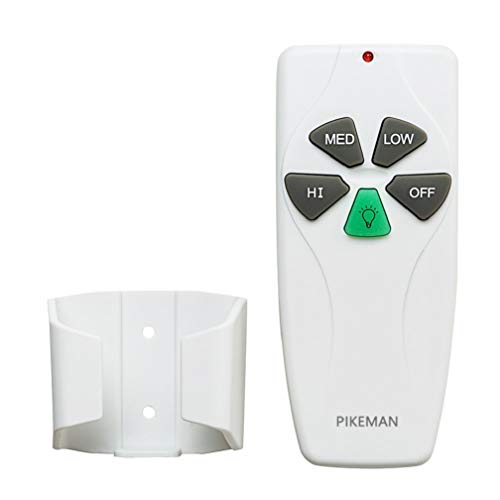
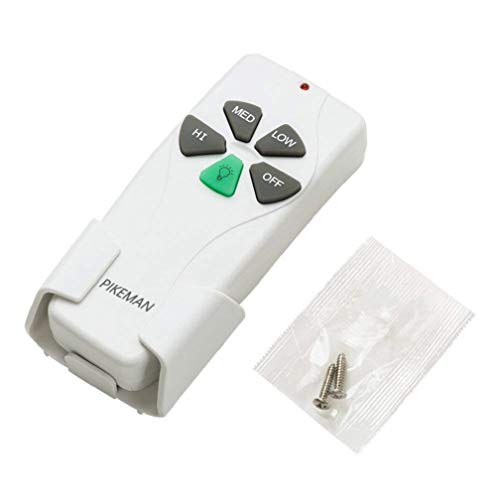

- It is only a transmitter. This Package does not include a receiver. If your original transmitter looks different from this product, Please purchase a complete kit with a receiver in the store. Note: seasonal changes of forward and reverse cannot be changed with remote
- This transmitter is to be purchased only to replace the remote your Fan was originally installed with. You cannot simply add this unit to any Fan that does not already have a receiver pre-installed
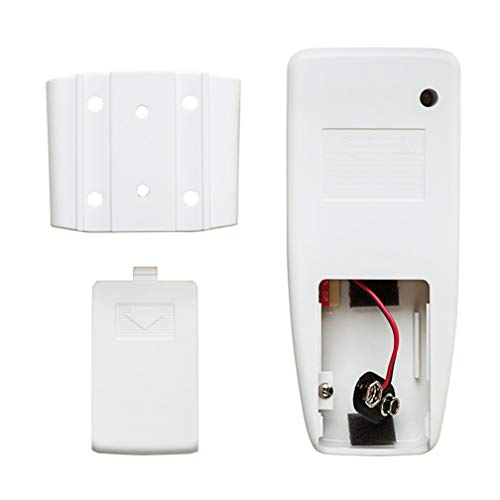
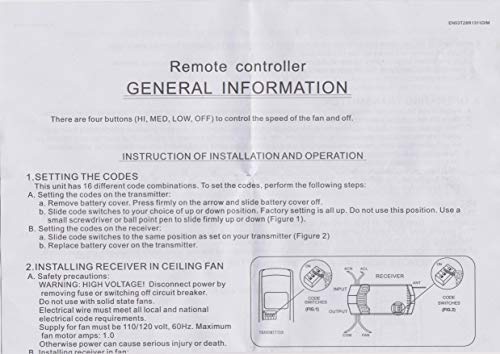
- Look inside the old remote with the battery cover off. There is a series of "dip" switches (4). with a pen, slide the switches in the new remote to match the same pattern as the old remote. Replace the battery in the new remote and things should work
- This is the remote control for the Ceiling Fan. As long as the Fan has the receiver in it this remote will work with your Harbor breeze Ceiling fans, just remember to set the 4 dip switches inside the battery compartment(they are kinda hidden behind the slot for the battery itself)
- Make sure the original remote control model is KUJCE9103、FAN-11T or FAN-53T, or make sure your original remote control model is FAN-HD5 or FAN-35T, otherwise the remote control may not match your receiver.
-
Information
-
Twitter
-
Pinterest
-
Youtube
-
Facebook
Ana Kolevska
Five Stars
Works with the Merwry ceiling fan from Home Depot. Reset the code to match the controller.
Virginia LaFrieda Osonitsch
DO NOT DISCARD THE OLD ONE UNTIL YOU GET THE NEW ONE!
Super easy, works great! However, be sure to keep the old one so you know how to set the pins. I was afraid I wouldn't be able to find a replacement because my fan is nearly 20 yrs old but this one works very well. Simply set the internal pins in the same configuration as the old one was set and you are good to go!
Malinda Zaldivar
Works for older Emerson Fans!
All of the fans in our house were replaced in the first few years with Emerson units back in 02 and 03. Two have remotes and one remote had pretty much stopped working. Emerson doesn't sell the older model remotes like ours anymore and what they offered online were considerably more expensive than this Pikeman. The Pikeman remote looked identical to my old Emerson and used a four gang DIP switch to change frequency so I figured I would try it to see if was compatible. When it arrived I installed the 9 volt battery and aligned the DIP switchs to match my old unit and it works like a champ! Quality low cost replacement for older Emerson units!
Hilario Castrejon
Why did I wait 13 years?!
I love my ceiling fan and it’s been out of commission for over 13 years! Had some folks (including electricians) tell me I had to replace it cuz no one repairs ceiling fans. Searched for years to find one I like even close to how much I love this one! Young man came out recently to fix a few things and he said perhaps the remote receiver is bad. Spend $40 bucks for something that was irreplaceable! You can’t find any like this anywhere! Have been looking for a decade! Super happy!! Now my fan not only cools, but it is cool!!
Yasmine Soojhai
Does the Job
Have had a ceiling fan for a few years. The last couple of years, it always seemed like the remote needed batteries as it was slow to respond or hard to get it to respond. I probably put 4 or 5 new batteries in the thing and assumed I had bad batteries. Tried this replacement and it's like night and day. This one looks like my old one (except for the reverse button which I don't use anyway). Made sure it had the 4 switches inside, set it the way the old one was and it's been working great.
Angelica Nordgaard
Handy for ceiling fans without switches in the wall
My Dad installed these in our two bedrooms because the rooms never had original lighting overhead. First he installed two ceiling fans that had lights on them. Instead of running the wire through the walls and making a mess, he ran the wires to the smoke alarms via the attic. He's been an electrician for thirty years he knows what he's doing. Anyhow, the fans and the lights on the fans would only work if you walked up to the fan and pulled the strings. By purchasing these, you simply hook up the main piece to the inside of the fan, then find a spot on the wall to screw the little basket that holds the remote. The remote has a button to turn the fan on all three modes (slow, medium, fast) and has an off button and a light button. You simply click what you want and the remote does the work. It's better than flicking a switch! If you know what you're doing I'd highly recommend these.
Axad AR
Remote works well with similar remote receiver as long as the dip switches are matched!
Kids dropped this remote and it stopped controlling my outdoor Harbor Breeze fan. The part number for this remote is FAN35T. It was working partially (controlling lights intermittently but not the fan speed). I spent significant amount of time troubleshooting issue, initially thinking that the fan receiver (Part number FAN30R) is bad and I even thought of replacing the $200 worth of fan as it would cost the same if an electrician comes. I gave a shot to replace the remote, matched the dip switches to the old remote and this is working like a charm! I received this remote within a day on Amazon Prime. I saw that there were no instructions sent with the remote. That may be an issue if a non-technical person orders the fan remote only and does not know how to set the dip switches or how to use the "Learn" button to sync with the Fan receiver FAN30R.
Ben Myers
Works with Our Oldish Hunter Fan. Yay!
Worked with our 15+ year old Hunter fan. (Don't know the model #.) Looks exactly like the OEM remote, except for the name on the front of the remote. Don't throw away your defunct remote before receiving this one, because you will need to know the configuration of the DIP switches (inside the defunct remote) in order to configure your new remote control's DIP switches to work with your fan.
John Priest
Works great even when adding to a fan that didn't originally come with a remote
I read a lot of reviews and the capability of working for a "new Install" was not clear to me. I also saw the vendors' caution in their product description. So I checked with them directly. For Pete's sake - all this is is a switch that operates from a remote. Why wouldnt it work? Well, they responded back that it would and that their statement about New Installs is a bit cautious in order to avoid product returns. All that said, if the canopy cup where your fan hits the ceiling can accommodate the receiver, then the install is simple and it works. The black and white wires get connected to the receiver black and white wires. The three wires coming out of the receiver connect to the black, white and blue wires to the fan. The black and white are for the fan motor and the blue is for the light. (Sometimes black is red for some installs). And the bare wire from your ceiling gets connected to the green wire that is grounded on the canopy metal. (The green wire is not connected to the receiver in any way.) Just make sure that you do not leave the dip switches all up (like most people do...) and make sure that the dip switch pattern in the receiver matches the remote. I just flipped dip switch 3 down on both the remote and the receiver. You will need a 9V battery for the remote. Once all this is connected, the thing just works. AND the fan has three speeds AND if you hold down the "light" button (it's green), the light will dim and brighten. So there you have it: remote control of your fan with dimming light. I am not clear why this would not be compatible with any fan, as it is really just a switch that sits between the power source and the fan/light. But I am not an expert on all fans in the world so there may be some reason of which I am not aware. But I'd say for your run-of-the-mill standard ceiling fan, this should just work. I purchased the 53T-28R. Hope this helps.
Asifa Syeda
Replaced Old Generic Remote without having to replace the receiver in fan! Works and looks great.
This works great! I purchased it to replace an old remote that I had installed in my fan years ago, it was just a remote add on purchased from Lowes or HomeDepot. The old remotes buttons were failing. This new remote is great I just replaced matched the dip switches in this remote to what was set in the old one and wala... it worked fine with the old receiver in the fan. All the functionality: 3 fan speeds, fan off, light (hold light button down to dim) worked great. Added bonus is that this remote looks so much better hanging on the wall! It is a little smaller, more sleek looking, and there is a little cap that slides over the screw heads so they don't show after you screw it into the wall and remove the remote from the holder. The black oval at the bottom (mine did not come with the brand name stamped here, which is good) of the remote is has a blue rim light that illuminates when a button is pressed. in the picture attached you will see my old remote alongside this new remote.