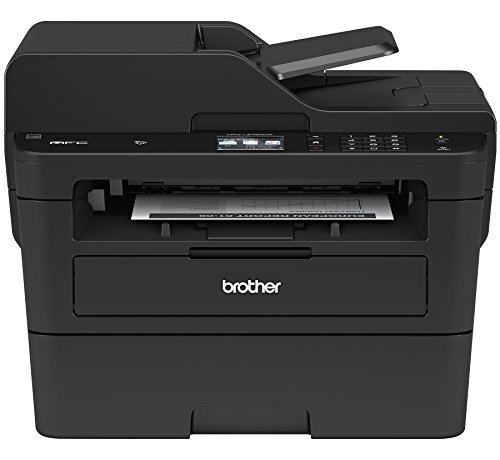


- PERFECT ALL-IN-ONE – The MFC-L2750DW developed for the busy home or small office, Brother’s latest compact laser all-in-one printer features advanced printing at 36 pages per minute(1) as well as faxing, copying, and scanning capabilities
- ENGINEERED FOR PRODUCTIVITY – This replacement for the MFCL2740DW helps save time with single-pass duplex (2-sided) copying and scanning via an up to 50-sheet automatic document feeder along with multi-page copying, scanning, and faxing functions
- PRINTING ON THE GO – Send print jobs wirelessly from your desktop, laptop, smartphone, and tablet(2). The "Touch to Connect" printing with NFC gives added convenience(3)
- CLOUD-BASED PRINT & SCAN – Print from and scan to popular Cloud services directly from the 2.7" color touchscreen, including Dropbox, Google Drive, Evernote, OneNote, and more(4)
- WIRELESS PRINTING & EXCEPTIONAL SUPPORT – Easily connect via wireless connections from your laptop, smartphone, desktop, and tablets. We provide free online, call, or live chat support for the life of your printer.Copy Resolution:600 x 600 max. dpi. Power source-AC 120V 50/60Hz
- Scan driver compatibility: TWAIN, WIA, SANE and scan file formats: JPEG (JPG), MAX, PDF single-page/multi-page (PDF/A, high compression PDF, TIFF single-page/multi-page (TIF).AMAZON DASH REPLENISHMENT ENABLED: Upon activation, Amazon Dash Replenishment measures the toner level and orders more from Amazon when it’s low
-
Information
-
Twitter
-
Pinterest
-
Youtube
-
Facebook
Tina Blanton
Great printer for all your home printing needs
Jerrid D Lindsay
Fabulous printer!
I did quite a bit of research on printers and finally chose the Brother MFC-L2740DW. I absolutely love this printer. To begin with, let me give you some of the requirements I had: (1) Home/Personal use - I think this might still be great in a small office though. (2) Wireless - I didn't want to bother trying to connect via a cable to the printer (3) BW vs Color - I decided that if I really wanted to print in color, I could take it to a real printer shop! (4) Double-sided - To save paper and to save time, I decided that double-sided printing and scanning were key features. (5) I didn't research fax capabilities because this was not important for me. What I have noticed after owning this for a few months. (1) Printing pictures isn't ideal, but it still looks pretty darn good. (2) Scanning works easily - I did make the mistake of choosing a high resolution which made it take much longer than I expected. (3) Printing is great. It is much faster than I would have expected. (4) I love the wireless capability. Can't say that enough. (5) Easy to set up and easy to use.
Avis Evans
Quite a bit faster than my old version of the same model.
Apart from replacing and disposing of the ink cartridges, which applies to any printer, I had pretty good luck with the previous version until it finally weakened. Rather than try to repair, it seemed cheaper to just get a new one, because these are fairly inexpensive. The new one is quite a bit faster and holds more paper, both very worthwhile changes. There are a bunch of other small improvements that really ARE improvements, also. For the money, which is not much, this machine is great. By the way, unless you really, truly need a color printer, it makes so much sense to go black-and-white. B&W is cheaper and faster but the main benefit is not having to maintain 5 kinds of ink supply. The last color printer I had would refuse to print unless ALL the inks were in good supply, and the replacement inks are expensive.
Chantelle Reid
Airprint-Win10-Chromebook-Android&IOS mobiles-ALL/EZ use/multi print&scan/cheap cartridge replace!
Purchased July 18, 2015. Not a single issue. Home use. Used as B/W printer and scanner. Prints reliably, outstanding scan options. Scans directly to PC, Google Drive or Dropbox and Evernote accounts Standalone! Great for scanning docs and receipts to pdf/jpeg or whatever format without ever opening a computer! Google Cloud print works flawlessly, a pain to set up but that is on Googles part not Brother. Iphone and Android phone print to it with no issues. Setup very easy. Both Apple, Win 10 PC and Chromebooks find it easily on the network with no problem. (AirPrint, Google Cloud Print, Brother iPrint & Scan, Cortado Workplace) Went an entire year before changing the first cartridge, it was $38.99 (TN630/1200 pg low yield ) on Amazon,Hi yield TN660/2600 pg is $53.99). Goodbye to dried out, costly and clogged inkjet cartridges. Wanted to get a color laser but while prices were comparable, color laser cartridge prices were prohibitive for us, some color cartridge sets cost more than the printer! Also, don't trust cheaper 3rd party replacement cartridges as they can be hit or miss for yield and reliability. I stick to manufacturer cartridges and these are very reasonable. Also, Option to print use less ink for savings is available on this model. Luckily, we only occasionally print color. This printer has a scan to color option. Also prints and scans dual sided without manual manipulation, big plus. We send color scans as pdf to PC, Chromebook or IOS device and copy to USB flash drive, Kinko's or the local drug store does the rest and we get our color prints without the cost of maintaining a color printer setup. I have recommended this printer to 2 friends both non-techie who swear by the convenience and low maintenance. It is a little big for home but boy does it makes up for it. Have used the fax function once. Not necessary because now scanning docs to pdf or other formats and emailing them is much better for sender and recipient. Originally put off by the negative reviews but after owning, I honestly don't know how so many have had problems setting up and using this printer. Now, another older friend wants a referral to replace his old inkjet and I will recommend this printer. I see there is a newer model available (Brother MFCL2750DW) for only $189.00 on Amazon but can find no reviews for it. The reviews are the same reviews as for this MFCL2740DW model. Also noticed that the print cartridges are more expensive for this newerc cheaper model. Sometimes newer isn't always better... I will likely recommend this MFCL2740DW to him because I know once it is set up, he won't have to bother with it again. I can't tell you how much money we've saved but in the past several injet cartridges have dried up and clogged when only used 20% because of non use! Lasers don't have this problem. Highly recommend this printer. Ymmv. Good luck.
Donald Daniel Smith
Amazon customers are right: This is a 5-star All-in-one!
QUICK SUMMARY: No more ink cartridges! And a printer that always stays online! Hallelejah! BACKGROUND: I've used many makes and models of ink jet printers over many years. The latest was an Epson, before that, HP and Canon. In all, they were all disappointing for two reasons. One, the just didn't last very long before they stopped printing correctly -- the ink jet printer head would gum up and couldn't be cleaned using the expensive-to-use "clean printhead" option; two, the cost of ink jet cartridges was just crazy -- so, so expensive. Our last Epson frustrated us with automatic software downloads onto our computers, popping up all the time saying the printer was out of ink, and going offline constantly. That was the straw that broke the camel's back. I researched Amazon extensively and selected this Brother replacement laser all-in-one. What a blessing it has become! After using it for several months, it finally just now ran out of the laser toner, which was just a sample cartridge. I've installed the high capacity toner cartridge and I think that'll be it for the rest of this year! The Brother was *immediately* recognized by Windows 10 -- I didn't even have to search for a new printer, it was already there, waiting for me to select it. And now that it's my default, it's always ready, everytime. The black-and-white print is perfect, what you'd expect from a laser printer. No, I don't have color prints anymore, but there's an Office Depot a mile away if I really need a color print-out. I'm done with ink jet printers and the high cost of inkjet replacement cartridges. Thank you, Brother, and thank you, Amazon customers, for up-voting this make and model! You were right!!!
James Rippingale
Best multifunction laser I've ever used
I could nit pick some things, but for $200, it can't be beat. It's a powerhouse with great time-saving features, a lot of configurability, and fits right into a cloud-based, wireless way of working. The best part of this printer, much to my surprise, is the Internet connectivity. I can scan directly to Evernote, Google Drive, DropBox... darn near every major online service. I've created four shortcuts, so each member of my family can put a document on the scanner and with one button leave it in their preferred location - OneDrive for my wife, Evernote for me, Google Drive for my kids' Chromebooks. Setup of this is a little involved, but the assistant makes it pretty straightforward, if a little time consuming. Scanning is very solid - color is reproduced accurately, and duplex scanning from the document feeder is spectacular, especially when paired with dropping documents directly into Evernote. An awesome "paperless office" accessory (and cheaper than a lot of dedicated document scanners). Printing is good quality and has sharp text, but it certainly won't fool you into thinking it's a photo printer. Both printing and scanning could be faster, but they're entirely acceptable for a SOHO level device, and faster than most inkjets. All in all, after fifteen minutes to set it up and get it on the network, I put in about another half hour getting all the online services I wanted set up, getting the faxing configured so it wouldn't mess with my home phone line, setting up Google Cloud Print for my tablet, and installing drivers on my many computers. My whole family is now printing and my kids are having a ball scanning all their old artwork and making Google Slides out of them.
Dawn Phillips
Great Printer, package with extra toner is cheaper than buying later
Needed a new printer, was going back to school and expected to be printing a lot of text, so opted for a B&W laser instead of typical color inkjet. I bought the package deal that comes with 2x toner cartridges (2500pp and 4500pp). Just finished the 2500pp cartridge so figured I'd take a second to review. So far, zero jams or other issues. You can compare the pages per minute to other laser printers, I don't know how this thing stacks up in that comparison, but from my perspective after going from an inkjet, this thing feels lightning fast. It's also very convenient to have a printer that does 2-sided without having to manually flip the pages, and holds a ton of paper. Although I occasionally miss the ability to print color, this thing is ideal for the current application. If I find my self in a situation needing the occasional color print, I'll likely buy a cheapo color augment this one. So far I've only scanned about 50pp, which worked great with no problems (2 sided autofeed color scanner is mighty convenient compared to having to lift a tray or flip pages for 2 sided documents). For printing, I started with the 2500pp cartridge, which is rated based on 5% page coverage (I think that's an industry standard). I got 2160pp, but my pages averaged over 6% coverage (easy to check in the web interface if you network the printer), so pretty close to what I'd expect. The drum unit lasts longer than the toner (I think they are rated at like 12,000pp or something, the % left on the drum unit seems to correlate pretty closely with the amount of pages I've printed, so I don't forsee any issues with early replacement there. Overall, would highly recommend, especially if you need to print a lot of pages of text.
Ayesha Ashraf
Easy setup and printing from mobile devices.
Day 1, Hour 1: was able to print from both Android and iPhones without installing any software or apps, right out of the box. Just added power, paper, and the starter toner. The image quality did not wow me but I was printing a mobile-formatted image. When I print word documents or text, I can tell the quality is there since the letters are crisp and precise. The unit does draw a lot of power hence the lights in my home office flickered after turning it on or initiating a print; so I will probably be upping the breaker for that room. If or when I have problems I will update here but I don't expect to after my first impressions. Primary use: infrequent document printing for work-from-home, printing concert or travel tickets, wife prints recipes and makes copies. Perfect for what we use it for. 1 week update: lots of cool features built in that I didn't expect. Includesto several web/cloud connected apps like Dropbox. When scanning documents, I can have then sent directly to email or phone. When scanning documents, they have built in OCR, aka they are scanned as a words instead of just a document. There is ID copying feature for including a scan of both idea on a single page. Automatic Amazon dash toner replacement required additional setup initiated by googling brother dash replacement and following the instructions on the brother website (a 10 min process completed successfully on first attempt). All of this is being done after a week and I still haven't hooked it up to my office computer; thus I can comfortably recommend this printer as a standalone multifunction workstation with mobile connectivity.
Chompink Sunshine
The perfect home office system
Recently my Canon mx892 just died, and I decided to finally get away from ink and go laser for the improved costs and reliability. Ink costs about 20 cents per page and ink expires about 9 months once opened, but monochrome laser is 7 cents/page and the toner doesn't really expire. Back to the printer, let me cover the basics: Pros: * It's super fast printing, with duplex multi-sided * The ADF scanner is also lightning fast, scanning both sides at once (single-pass) * Scan to "Searchable PDF" which also allows you to copy-paste fields from out of the PDF. (great OCR abilities) * Scan to Google-Drive and Evernote makes life so much easier! * The touchscreen makes user interaction easier * Didn't need to install any special software for Windows 10 to be able to print/scan over WIFI * Has far more on-board memory than the MFCL2740DW, which should fix some of the previous complaints about slowing down when scanning a huge multi-page job. Cons: * It's not any larger than the Canon mx-892 except that it's much taller by 5-6 inches * The touchscreen UI is a little disorganized: lots of scrolling/paging to get to the right options * The envelope printing is a bit of a pain: single feed only and requires opening the special back panel behind the printer. Overall, this is a perfect home office productivity machine and worth the investment to me. Special note: the person that left a one-star because it's not color confuses me... how did he do all the research to find this gem of a printer and not read the title?
Elena Hepworth
Works like a charm
I recently purchased this printer and so far it has worked like a charm. This is a replacement for my Epson inkjet printer. Was tired of changing cartridges which can be pretty expensive. Setup - Setup was fairly simple and straight forward. I didn't go for the wireless setup because I've experience some issues with my previous printer. I believe the issue is that these printers can only use 2.5GHZ frequency of the router with "n" network and due to that you usually have to keep the printer close to the router. My router is in the basement and my office is on the first floor. I have ethernet wiring throughout my home so I've connected it via ethernet. It now is available on all my Apple devices/PC/Macs. I've tried printing via all my devices and it works beautifully. Scanning - I've scanned almost 400 pages so far using the "feeder" and "flatbed". When choosing 300 dpi option to scan either in single page mode or duplex, it scans pretty fast. No issues. Saving documents, importing scanned b/w pages via Acrobat worked fine. I had some issues with scanning colored pages using Acrobat. It kept giving me errors. I need to research that a bit more. One more thing that I wish Brother would look into is that the pages don't come straight if you use the feeder to scan. Not a deal breaker but wish it wasn't like that. Printing - I've printed close to 100 pages so far and again no issues. Print quality is pretty good. One issue that I found on my PC was that for some reason the option to print double sided wasn't available. I had to go to device settings and dig deeper to "Install" that option. It seemed strange as this option was readily available on Macs. Fax - I haven't used this yet. Will provide an update in the coming days. So far, I'm pretty pleased with this printer though I feel that Brother could have used better material for its paper tray and the buttons. It feels cheap. The screen is also pretty small. Hopefully, it'll last me for a couple of years. Highly recommend it.