


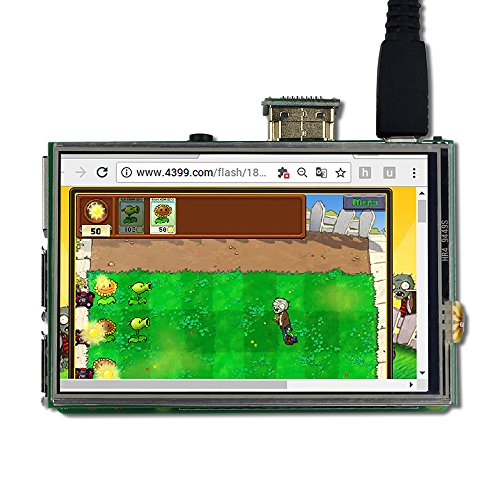

- Support Raspberry Pi 3 Mode B+, 3 Mode B,Pi 2 Model B, Pi B+. This kit includes a 3.5 inch touch screen, a touch pen and 3 heat sinks. (Raspberry Pi main board shown in the picture is not included)
- Display resolution is 480*320. HDMI input resolution supports 480*320 to 1920*1280 any resolution
- HDMI Interface for display. Supports HDMI audio split. Refreshes up to 60 frames per second
- Support plug and play without reboot the Pi. With 3.5mm stereo audio output. It doesn't require any external power source
- Software package contains everything you need to start, including calibration software and virtual keyboard. NOTE: you need to download and install our Raspbian system with LCD driver on your own SD Card
-
Information
-
Twitter
-
Pinterest
-
Youtube
-
Facebook
Katie Elizabeth
HDMI PLUS at a great price.
This is a 3.5" HDMI monitor. ADD to that it plugs DIRECTLY into a raspberry pi (full size). I'm using it with a zero, so I just wanted to see what I was doing in the field. PERFECT. Comes with the little adapter, too, so you can just mount the zero in back of it - no HDMI cable. Works PERFECT out the box, crisp and clear, I have NO complaints. NB: I have NOT used the 40 pin connection OR the touch screen yet, so if that experience sucks, I'll adjust this rating, but as a tiny plug-n-play HDMI monitor, I couldn't be happier.
John Priest
Fanatstic little screen for 3B+
Great quality and value HDMI screen for 3B+. Instructions are clear if not a little long. I copy & pasted from their .pdf version and it worked! Also is plug and play if touchscreen is not required.
Marianne Paul
more useful than intended
I dont usually write reviews for products, but this thing was wonderful out of the box. to start, why i needed it: i wanted to build a super small, self contained, computer thats all. I had a Pi, a portable charger that could power it, a case, and a few other tools that worked, but i still needed a screen. For $25 you get a touchscreen the exact size of a Pi, a few heat sinks, a stylus, and a cardboard box with some foam. for my computer i dont have need of a touchscreen, but should i do anything else, its really handy the micro USB works to dance with the Pi's power, so now the portable battery i use has no issue powering the unit. the button flips the scree, or tuns it off, which is super nice i had no need of the heatsinks, i already had plenty, but its a wonderful touch and it all fits well in the box it was delivered in, in fact, it works better than the case i had for my Pi an absolute steal for $25
Heather West
Very nice HDMI monitor for Raspberry Pi
Works right out of the box for HDMI video, though you can optimize the image by setting the resolution to be closer to the 480x320. Seems to handle many different resolutions, no problem. But for touch screen, you have to add some software. I did find that I did not have to replace the kernel like in their software. Instead, I used Waveshare's version (google for "waveshare 3.5inch HDMI LCD wiki") and used their LCD-show-180817.tar.gz Seems to be fine for me. I liked how it only blocks the pins you need and not the entire GPIO bus. So makes it easier to access the rest of the GPIO pins. For audio, you do need to plug in a external powered speaker, same as normal, and it includes a jack on the video card so you don't have to fiddle with audio settings. The package even includes heat sinks to add to your Pi. (since the screen blocks normal heat transfer a bit, the heatsinks help solve this.)
Mil Lhet
Good value for the money. Does the job.
It was really nice that they included an SD card with a full running OS and drivers installed. I had begun by using my existing SD and installing their drivers from their web site. The screen does what I want. I needed it for a terminal emulator in character mode. In the X Windows GUI, it's too small to really be used as a desktop in that it only shows a fraction of the desktop. The preference pane is too big and you can't see the OK button. (Hint: hit Alt-O to click OK.) . It is what it is and you have to know that when you choose any 3.5" screen. My only gripe is that it needs an HDMI-to-HDMI connector (that is included) in order to send the output of the Pi to the screen hat. See the blue arrow in the photo. The problem with that is it requires the Pi case to be modified by cutting an opening using a Dremel tool. I guess can live with that, but it was the only reason I gave it 4/5 stars for 'easy to assemble'.
Robert Niles
Worked fine
Used to monitor small projects on Raspberry Pi projects. With it you can tell if the Pi is loading before using VNC. Also can run off battery power so for small projects great.
Gęmmå Śmîth
Even work with PC
I bought this screen as a backup screen for my custom loop PC. I have to assemble my PC in another room where there is no monitor available. I can buy a cheap monitor second hand but it take too much place. Then I found this small screen with reasonable price and still work with PC. It is indeed too small for a PC, but what I need it boot and check some stats. It work perfectly for my need.
Martie June
LOVE IT! Quality not seen before in 3.5 inches
FINALLY! Opened the box. Plugged the HDMI adapter in and.... POOF! LIKE MAGIC IT WORKED! I have had 3 screens so far and this one is quality. Plus, unlike my last HDMI screen, I only have to plug the RPi in and not both the Pi and Screen. Love it!
Eric Jay Sanders
Great
This was exactly what I was looking for. I had originally purchased a screen that just connected through the gpio pins, but it was a huge hassle to get it running, and after a few hours of messing with it, I bought this one. Switching from hdmi to the gpio pins disabled my camera and that just wasn’t going to work for my Octoprint setup. If you’re considering which type to buy and are looking for the simplest option, hdmi connection is the right choice. The only thing you’ll have to figure out on your own is your display and resolution settings to work with the tiny screen. But, for the money, I don’t have any complaints. Just to be clear, I bypassed installing the drivers. I’m just using it to be able to access command line, instead of ssh-ing into it, and as a monitor for Octoprint. So I currently do not have a use for the touch screen. My review is based only on this use case. If I end up using the touch screen in the future, I’ll edit my review to reflect that experience.
Caroline Frederick
It works!
#1 It works! #2 It has a very clear and bright screen. #3 All in all I think it is a good buy and good price. #4 If I knew what I was doing It wouldn't have taken any time to put everything together, but this is my first build so it has taken a few hours to figure it out (Rpi3 - bluetooth keyboard - LCD display). #5 The resolution is so small I can't use the LCD. I'm trying to figure out how to increase the resolution. To get the RPi3 up and running I plugged it into a 21 inch LCD TV using the HDMI cable. Wow! Amazing. #6 The RPi-3B+ I bought came with a case. However, you can't use the case if you use the U-shaped HDMI interface. I used the little cardboard box that came with the screen to hold everything. I cut holes for the cables. #7 I have not tried the touch screen yet, so I don't know if it works. I am using a mouse and I just can't see the pointer without a magnifying glass. Resolution problem again. #8 Hope this helps. Sorry I am so new to this. I've got to find a user group. I am using this RPi to help my grandsons learn programming and computer skills.