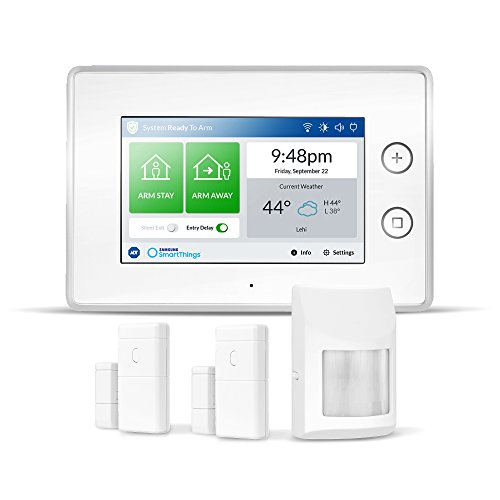




- DIY home security system: Easy-To-Install panel with wireless sensors that can be integrated in minutes with automated Fast-Response alarms to instantly notify authorities
- On-the-go mobile control: receive instant updates with text and email alerts and access to advanced system control from your smartphone or computer
- 24/7 peace of mind: optional, no-contract ADT professional monitoring services with Police dispatch provides unbeatable protection for your family
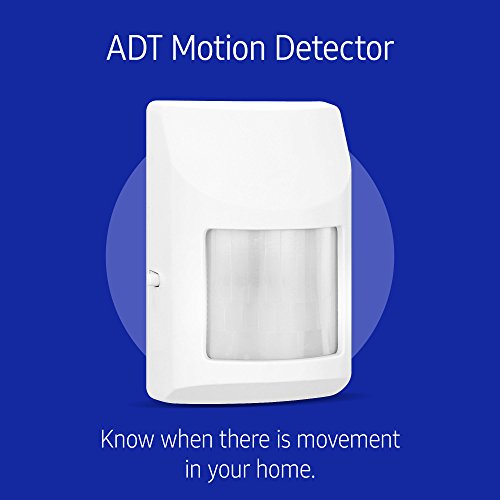
- 4-Piece Bundle: 7-Inch touchscreen ADT security hub, two ADT door and window detectors, and ADT motion detector for complete security solution
- Automate your home: works with zigbee, Z-Wave, and IP network protocols and a wide range of smart devices including cameras, lights, door locks, thermostats (Alexa & Google home compatible)
- NOTE : KINDLY REFER THE USER GUIDE AVAILABLE BELOW & VIDEO AVAILABLE BELOW THE IMAGES FOR ANY ASSISTANCE
-
Information
-
Twitter
-
Pinterest
-
Youtube
-
Facebook
Christopher M Mccard
It's been great so far.
I think that maybe some of the issue was the time setting on the panel. The fix? Well, I ended up getting the SmartThings original app. You need to go to the map you set your location with. Move the pin to a different time zone. Save it. Then go back and put it to your time zone. I did this and it corrected the issue. Simple set-up and does exactly what I need it to do. I have 1 door sensor set up for my shop. Works fine. Follow the instructions for setting up sensors. Easy. I have not set up the motion defector ( both sensors and motion detector come with the starter kit), but I'm not expecting any issues as the first one was pretty straight forward. There's a bit of a learning curve with this system, but it working out well.
Caleb Rawlins
GREAT BUY!! Samsung+ADT= HOMERUN!
I’ve been looking to replace my entry-level DIY alarm system for quite some time, and have read all 70 of the reviews of this system. Given Samsung being a leader in electronics, and ADT a heavyweight in alarm companies, this was a no-brainer with the current price. Installation was involved but easy using the supplied manuals and online tools. The SmartThings apps are a MUST to facilitate painless programming. All sensors programmed and tested correctly, and the panel set-up was easy, after a simple connection to our WiFi. I will be adding more sensors to expand my systems capabilities. It readily found my iPhone and smart thermostat. Glad I bought this system! UPDATE 2/9/2019: I have since added 4 MORE window sensors, all of which paired and are operating perfectly!! Each added sensor has a customizable chime setting which I have to set to voice only. That way I know exactly which zone is triggered. Will be adding last door sensor today, so check back for another update!!! :) UPDATE 2/17/2019: ALL added sensors function perfectly. I just added a Ring Doorbell Pro to the house, and it integrated into the alarm system flawlessly. You can access the camera from either app that SmartThings offer, along with the Ring app. The doorbell shows up in the system monitor as well.
Prabhu Kumar
This is a great DIY security system and worth the price.
I've been using this system with 10 sensors connected to it for about 3 months now. I can only think of a few reasons people aren't satisfied with it: 1.) They got a lemon 2.) They didn't read the description that states it only works with ADT branded smart devices 3.) They have limited technical skills. Some of my sensors are clear across the house from my hub and they never misfire detecting open or close. It's very easy to arm/disarm from your phone, the keychain faub or the hub itself. I would recommend this to anyone wondering if they should buy it or not. I now have a secure house with less than $200 invested. I got the hub when it dropped to $99.
Laurie Patino
Works well if you have the time to set it up
Update 2-23-2019: My system continues to work without a problem. Changed my router and it was super easy to update the WiFi connection without needing to reprogram the sensors. The alarm panel does keep a log of events including notifications of when the WiFi goes offline and online. What’s also nice is the SmartThings app notifies you of that as well. All of this again without having to pay for monitoring service. Best deal ever!! Original review 1-8-2019: This alarm system is great and such a good deal even at $200. Each sensor you add on comes at a reasonable cost too and you don't have to pay (optional) for the monthly ADT monitoring. The only thing you need to worry about is figuring out how to use your phone to set this thing up without ripping your hairs out. Note its still worth 5-stars but with a few tips it will save you from the extra work I had to do. 1 - for Apple users there will be two Smartthings app.. use the older version (Smartthings classic) 2 - scan the item QC code to add the device then remove the plastic tab from the sensor 3 - your time will be wrong on the touchscreen - to change it select a location in a different timezone then save it. then change it again to the right location then it will update. Then you will get the weather for the right location too. 4 - if you have malfunctioning sensors (Out of the box I had a defective motion sensor unable to sense motion) you will get a notice on the alarm panel that the sensor is defective. You can remove the defective sensor from the app or bypass it until you have the time to take out the defective sensor. They are inexpensive to replace so I personally didn't expect everything to be perfect out of the box. 5 - don't set the system volume levels for the sounds at max... the system won't even chime right and will skip/fragment/stutter the tones. Bonus tip: use the app for your family members on each phone so they can be updated if the alarm goes off and to use the app to arm and disarm the system. I will update as time goes on and if I find out new tips/quirks about the system.
RnzNa Bhattarai
Works Perfectly contrary to reviews
I bought this system on sale recently and I’ve had zero issues setting it up. Yes it requires a little more effort that other security systems that are smart home enabled but for the price it’s a great investment. Agreed there are limited ADT devices that work with the hubs arming capabilities but here’s why. For anyone to be selling you secuirty related sensors there are standards that have to be followed and this is why ADT Hub will only follow rules and detection from its approved sensors. The directions in their manual are quite clear. But here’s my process anyway. 1. Install the hub and pair it to WiFi first. It will 100% update once or twice and this takes 20-30 mins 2. Install the smart things classic app and paid your hub by entering the code on the screen of your hub. 3. Now pair your sensors one by one by scanning the barcode first and then removing the battery tabs. 4. Test your sensors by viewing the status in the app by opening and closing doors/windows. 5. Set your home automation through your smart things app. For example I have my garage spotlights which are hue enabled to turn on when the door opens. There are several combinations you can program easily with your smart things app. Finally for all security related features like sirens, notifications you need to use a ADT approved sensor or else it won’t arm your system with the third party sensors that end up showing on your smart things app. Also for those complaining on setting time on their hub correctly. Please use your smart things app, it’s in the account management section where it says pin your location. When you pin your location the time will set automatically on your hub and remain in sync. This hub has limitless capabilities if set up properly not just for home security but also for home automation. It requires some reading of the manuals included and learning to use the smart things app.
Rose Rodriguez
Best Wireless DIY Security System
I upgraded my DIY home security system from the Smartthings V2 hub to this ADT Smartthings and I am very happy with this upgrade! It still works and monitors my door and motion sensors even in the middle of an internet outage + I love the backup battery in case of a power outage! (I would strongly recommend the ADT Keyfob if you always get internet/power outage on your area) You can also put a sim card in for alternative internet connection. And since this is also a Smartthings hub, I can setup automations for my home + it works great with Cortana and Alexa!
Raluca Teodorescu
Bought this to replace Iris shutting down. Did my research before buying and very pleased
I came over over to SmartThings after i got the notification that my Iris System by Lowes will be shutting down. I researched and was posting questions on Smartthings Community Forums about a week before deciding to order. I went with this because it seemed similar to Iris and i like how you do not have to pay for monitoring like Iris. I had all version 1 Iris sensors that are not compatible with any other system except for my Iris Smartplug, Halo+ Smoke/CO Detector, Garage Door Controller, Utilitech Siren and Utilitech Water Detector(Called Everspring Water/Flood Detector in SmartThings) which all pared easily with my ADT SmartThings Hub once i removed them from Iris. With this Alarm system only the official ADT/SmartThings sensors will trigger the alarm which sounds a built in loud siren and also sends text messages and push notifications. You can setup your non ADT/ST sensors from Iris version 2 and up to send you text messages, push notifications, automatons and routines. You also can have these sensors sound external sirens and even have them go off when the ADT/ST Hub is going off. Currently there are two SmartThings Apps for setting up your devices,rules,automations etc... One is the Classic (Before Samsung bought them recently) and the regular app. Both work and offer different functions. They are suppose to be merging them into one soon but until then i use both. As i mentioned above i knew nothing about SmartThings before recently coming over a few weeks ago. This system works better than Iris once you learn how to use it and research everything. I knew nothing about about it previously. A must have app is ADT Tools 2 through SmartThings which lets you do a lot more with the ADT Alarm such as auto arming and disarming based on your cellphone/s location if you are home or not, triggering a external siren/s, light/s etc.. when the ADT Alarm goes off and other functions. This system will work perfectly right out of the box without any complications using the ADT/SmartThings sensors. Once you start wanting to do a lot of automatons and rules with different sensors it can seem complicated but gets easier as you do it. Again if you are thinking of getting this i highly recommend heading over to SmartThings Community Forums first and do your research. They are very helpful over there and you can find out everything you need to know about this system by searching or posting a question.
Booter Collins
Take you time settings it up and don’t get frustrated.
Great product to replace Lowe’s Iris system that’s been discontinued. Pricing was good and after much research, this is the best replacement that has ADT security with home automation. You’ll be able to use existing Zeebee products. It took a little time to set it up as the instructions for the newer SmartThing App are lacking, but I figured it out and it does everything my Iris system did.
Mil Lhet
Easy installation, I am self monitoring and have NOT subscribed to any ADT alarm service
I bought this to replace my Lowes Iris System since they closed down the service and as an alarm it's great. Took just minutes to install each sensor and the siren is really loud when I tested it. There is not a lot of detailed information for this system and the app does not tell you to remove the battery tab when pairing the door sensors although it does tell you in the blue booklet. If I had not read the booklet, I would not have known so this might be why people have had problems with pairing. There is no info on how to program the Smart Things app, it's trial and error and a little confusing in the beginning but once you figure it out it's pretty smooth after that. The first few days I had programmed the app to send me messages every time I opened or closed a door and I was getting the messages from both the ADT alarm side and also the Smart Things app for the ADT sensors, it was a total nightmare about 50-60 texts a day minimum. Once I was comfortable that my sensors were working as they should, I deleted all the notifications and programmed just a chime when any exterior door opens. If an alarm is actually triggered when I'm gone, I will still get text notifications for that. You also have an option for phone calls, I have not done that yet. I've not installed the motion sensor because I have a large dog and a couple of cats and gave up on the Iris motion sensor years ago due to false alarms. I still can't decide the best place to put it to avoid any problems with the pets, probably upstairs where they don't go much. I did leave an Iris sensor on one door and the moment I removed it from the Iris platform, it automatically paired with the Smart Things app, beeped to let me know and then prompted me to set up text messages for door open/close etc, note no history will show on the control panel for non ADT sensors however it will in the Smart Things app. The control panel was easy to set up, there is nothing to it, you can add multiple user codes, check history of the ADT sensors, change sounds and arm/disarm all of which can also be done with the app. It also has a panic button which triggers the siren and scared the heck out of my both me and the pets when I tried it. I added a WEMO mini smart plug to control a lamp in my living room once the alarm was set up. It cost me $10 on Amazon. I installed with the WEMO app then added it to the Smart Things app even though it's not an approved product. It turns the light on and off instantly in the app, I'm very pleased. This particular lamp shocked me with static electricity every time I turned it off before going to bed so that issue should now be resolved forever. Tried turning it on and off with Alexa but she's not recognizing it , probably my fault using the wrong name or something. I can arm/disarm the alarm on the control panel and I can also do it be telling Alexa to tell Smart Things to do it for me. I've also set up my phone as a presence sensor, the theory being that I can come and go without the hassle of actually having to arm/disarm the alarm. For the last 10 years I never had to with my Iris alarm, my Key fob was a presence sensor and automatically did it for me so I find I'm forgetting to arm this system sometimes although I can do it remotely in the app once I remember about it. The programming Scene is set up in Smart Things and I get a message that the phone has left but it's still not arming the alarm so it's still a work in progress for now. I know it can be done, others have done it but I need to figure out the part I'm missing and I'm just to busy to deal with it right now. I am using the Smart Things classic app, which everyone seems to recommend for easy initial setup. There is a new app that Samsung wants new users to use but it is not available for my particular Android phone, Samsung is looking into the issue. Overall I'm extremely happy with the product and excited about all the Home Automation Products that I can't wait to try. For the initial price I paid for the Alarm starter kit, it's well worth it. There is a lot of negative reviews for this product, I do think it's down to poorly written instructions, no support videos and users not understanding that you are buying an ADT alarm system that you can monitor yourself without purchasing monitoring services AND the control panel also works as a hub(Brain) for Home automation products and non ADT sensors which you will control via the Smart Things app, NOT the alarm control panel.
Avis Evans
Great Product
I am a home automation enthusiast and a DIY guy. When I started out with home automation, I was using the open source OpenHAB for my hub. This was nice for having everything localized, but too get anything to work was a chore and I spent most of my time messing with the system rather than enjoying it. I was looking for a mature system that would give me a lot of the benefits that OpenHAB gave me without all of the time spent on configuring it. I was also looking for a decent home security system to incorporate into the home automation system. That's when I found this product, ADT is the name I trust when it comes to home security and the SmartThings Hub was always ranked #1 in all of the reviews I read. Since buying this hub I am pretty happy with it. Still getting everything setup just the way I like it, but a lot less of a headache. I am having an issue with the battery being no good, but I opened a ticket for it and I am sure it's as easy as sending a new one out to replace it. It is a bit price, but I had ADT come out to give me a quote and just for the bear minimum it was about $1200. So, $400 is not too bad from that point of view and also no long-term contract. I can start and stop my monitoring at any time. I also got all of my sensors and motion detectors at 50% off during a sale so that was pretty good too. I know this is a new system and it needs time to mature, but there are some things I would like to see with the system. 1. ADT makes these great glass breaking detectors, I would like to see them release one for this system. 2. I have hardwired and interconnected smoke/CO detectors throughout the house. It would be nice if they make a hardwired smoke/CO detector that could connect into this system instead of just the battery stand alone option currently available. 3. I understand the security reasoning about not wanting to disarm the system via routines, but you should be able to arm it via one. Case scenario I have an Inovelli scene enabled light switch by the back door. Right now, I have it programmed when we are leaving the house two presses of the switch off activates my goodbye routine which turns off all the lights, TVs, sets the thermostat to away and sets a timer for the door locks for 30 seconds. It would be nice to be able to arm the alarm to stay or away from this routine, instead of having to get the app out to arm it. 4. My front door sits in a good bit from the frame and even the spacers, I am unable to use door sensor. I nice recessed model would be a good fit. These would be my top three improvements. Other then that I couldn’t be happier with my purchase.