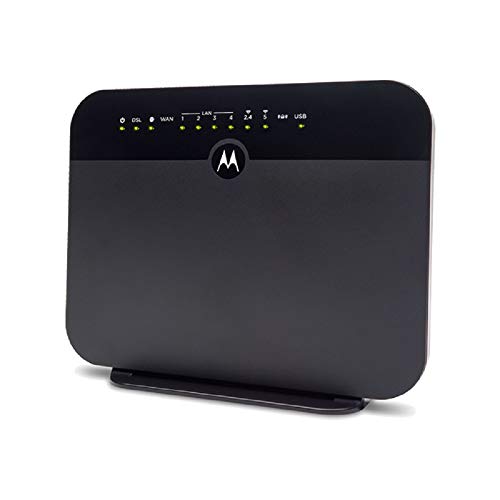

- IMPORTANT: MODEL MD1600 DOES NOT WORK WITH BONDED VDSL, BONDED ADSL, OR VDSL VECTORING. PLEASE READ THE CHECKLIST in the product images on this page before purchasing this product. If you’re still not sure whether you have the right type of DSL service, BE SURE TO ASK YOUR SERVICE PROVIDER BEFORE purchasing this product. MODEL MD1600 IS NEVER COMPATIBLE WITH VERIZON OR AT&T SERVICES. The MD1600 IS NEVER compatible with Comcast, Charter Spectrum, Cox, or other cable services
- The MD1600 is a great choice for most ADSL and VDSL services from CenturyLink, Frontier, Windstream, TDS Telecom, and Fairpoint. .It combines a VDSL2/ADSL2+ modem with a full-featured AC1600 WiFi Gigabit router to provide fast Internet to all your WiFi and Ethernet devices. DSL services use the telephone wiring in your home. Supplying your own modem typically saves $9.99 in modem rental fees for CenturyLink, and savings vary for other service providers.
- Built-in router includes four Gigabit Ethernet ports, AC1600 wireless, a firewall, WPA/WPA2 wireless security, IPv4 and IPv6 support, and Virtual Private Network (VPN) capability. You can plug a USB storage device into the MD1600’s USB 2.0 host port for Network Attached Storage (NAS) which supports DLNA Media Sharing.
- Clean and easy. This DSL modem/router combo saves space, reduces wires and power cubes, and includes a setup wizard for fast, easy installation. Delivers Internet speeds up to 100 Mbps, and speeds also depend on the speed of your VDSL or ADSL Internet service. Using the built-in router, the MD1600 provides a high-speed Internet link for all your wireless and Ethernet devices including smartphones, HDTVs, computers, tablets, game stations, and more.
- The MD1600 is supported from the USA by expert, friendly customer support specialists with a 2-year warranty from a company you trust
-
Information
-
Twitter
-
Pinterest
-
Youtube
-
Facebook
Becca Sisson
It needed a firmware update for centurylink.
I spent 4 hours the first day trying to make this work. Then I read in one of the reviews that you needed a firmware update. I emailed Motorola tech support (you can find the email in the guide) on how to get the firmware update. They responded first thing in the morning the following day. Everything worked (with a few resets and deletes of old saved setups) in just 10 minutes. For centurylink customers using IPoE protocol (not PPPoE protocol): 1. Before buying this, contact CL (centurylink) to ask the following: - if you have VDSL or ADSL. I have VDSL2. - Also ask if you have a bonded VDSL (if you do, this is not the modem for you). - Also ask what protocol you are using. Mine is IPoE. - If your protocol PPPoE, ask for your PPP username and password. 2. At this point you can try setting your new MD1600 yourself. It should automatically detect your Internet setting (the screen will tell you to wait for about 2 minutes). If it works for you, good. If not... 3. Get the firmware update from motorola. They gave me a link to their website. If you search for MD1600, you can find software update link there too. Be sure to read the accompanying 'how to' pdf file. 4. Bad setup cleanup: I followed the direction on how to install the new software. However, did not work for me the first time. I have to delete all the previous saved WAN and LAN, VDSL interface , ADSL interface settings first. These settings are saved automatically once you start trying to setup the new modem. Click on Advanced button, go to Advanced Setup. Then click on Layer2 interface... remove all entries there. Do the same for VDSL interface , ADSL interface, WAN service, and LAN. 5. Reset your modem (or unplug from outlet). Go to setupmyrouter.net again, etc... this time the modem should try to detect your internet setting with a clean setup with the new firmware update. (the screen should tell you it will take about 2 minutes...) Viola! Note, I did not need the PPP username and password since CL in my area is IPoE and not PPPoE. My modem out of the box, did not try to detect my Internet setting. I think this maybe a returned item??? I have no idea but the modem itself looks new. I wish motorola just inserted a note or sticker in the box to say... hey you need a firmware update. Or just add a note here in amazon product description or in their website. Lots of frustration could have been avoided. Actiontec was a breeze to setup. Netgear was more painful. As for the internet and wifi performance... better than my jurassic actiontec C1000A. No more dropped wifi connection. If you have kids, you know how important that is to keep peace in the house. Hope this helps.
Leni Baliza
Absolute fastest & easiest set up ever using CenturyLink's VDSL ...
Absolute fastest & easiest set up ever using CenturyLink's VDSL service. I followed the included Quick Setup Guide instructions and in less than 4 minutes (YES less than 4 minutes) I had internet service and WiFi setup. All I had to do was change the default WiFi password. The Motorola Setup Wizard did everything else! WiFi signal is very strong throughout our 2,000 sq ft, 2 storey house.
Evelyn Sapio Peras
Works great with CentuyLink 40 Mbps
Replaced a failing Xyzel C1000Z...was extremely easy to set up, despite not being officially supported by CenturyLink (automatic set up had CenturyLink option, which worked flawlessly). Wireless signal is strong. My only (very minor) complaint is that it seems to be missing one feature from the Xyzel: the option to automatically remember the IP address initially assigned to a device, and always use that same address whenever that device is connected (but you can set up static DHCP manually, at least, so I still gave it 5 stars).
Adam Escorial
Works for Frontier with one fix
FRONTIER USERS: Yes, it works. See Eugene's review (July 2018) for specifics, but basically you download a firmware/software update from Motorola to accommodate the overly long Frontier DSL username, and then the set-up is totally easy, and the router works better than what we were renting from Frontier (Netgear 7550).Just installed this router today after running the router update. I will try to remember to update my review after 3-4 months with some notes about usage and connectivity.
Gladys Faye Odom
Easy to set-up; Actually WORKS!
Had an older Action-Tek modem that had to be re-set every day and would continually drop connection. I'm on frontier DSL, and local best buy no longer carries dsl modems. Basically plug this in, hook your laptop up with ethernet cable, follow the instructions on their webpage, and it automatically configures everything based on your provider. I was expecting the blinking light of doom, as frontier seems to have issues with modems other than the one they send out - but this thing worked flawless. From the time I unboxed it took about 10 mins to have wifi up and going in the house. 3 days in with no connection issues or problems. Couldn't have asked for anything else; will update if it fails.
Anita Samui
This WILL work with Dish Wifi!
I bought this on the strength of other reviews saying it worked with CenturyLink Wifi. I have the Dish Network but they use CL's Wifi. I couldn't get it set up on my own. At first, I called Motorola to get their help and got a recording that my wait would be 47 minutes!! C'mon Motorola, hire more people! So, I then called Dish and found out that was the only call I needed to make to get this set up, thank God. Dish walked me through the whole set up, it took awhile but worth it. I didn't need to call Motorola and in fact, Dish had specific code #s I needed to set it up. I had gone from slow internet speed to a higher speed and my old Dish modem couldn't get the signal. So I researched because it's murder to fine a compatible modem that is VDSL and works with CL. I had called Actiontec, the modem supplier for CL, and they said none of their new modems work with VDSL. This Motorola product works great. PS-Best Buy told me they do not have any modems that work with CL. I said on the website they show 4. The tech at BB said they are all being returned because they aren't compatible with CL.
Derek Hall
Easy to connect - Century Link doesn't care what modem you use.
I had enough of the ZyXEL modem/routers from Century Link. The modem was my biggest concern and being an ASDL connection there are not a lot of choices. Plus, it was iffy how much help I would get from Centurylink. I was a little worried – but don’t be, Century Link really doesn’t care what kind of modem you have. I went ahead a purchased the Motorola AC1600 model # is the MD1600 and frankly, glad I did. Prior to receiving the modem/router/wi-fi unit, I went to the Motorola support pages for the MD1600, downloaded the most recent firmware, manuals and QuickStart guide. I then email support to see if there was anything I would need form Century Link and they quickly emailed back no. If I had any issues to contact them. I also wrote down as much info as I could from my old XyXEL modem/router. I saw that I had ASDL, PoE, VPI, VCI and LLC 8/35. Frankly, I didn’t know what some of these were but wrote em down anyway. I got the MD1600, hooked up my PC to a LAN port, logged into the modem/router using the defaults and simply followed the easy instructions on upgrading software (firmware). Once completed (it took about 3-4 minutes), I plugged it into the DSL line, restarted the modem, logged back into the modem/router using my PC and it had a connection screen up asking if Century Link was my Internet provider. I marked yes, and it stared retrieving the info it needed. After about 5 minutes it still wasn’t connected. I called Motorola and they said everything seemed ok to them, perhaps Century Link required a user name in my area and to call them. I called Century Link and before they could answer, the modem had connected. I spoke with Century Link anyway, they didn’t seem to care what modem I had. They asked a few questions, verified a few settings that the modem retrieved and send me a help guide in case there were issues down the line. Bottom line – don’t get too impatient when connecting to your ISP (internet provider) the first time, its retrieving info from Century Link and my download speed is a whopping 3Mb (yes its true) – give it 15 minutes or so and I would have been connected without any calls. Motorola help was excellent. Phone was answered quickly, they are based in the USA, spoke clearly and were very professional. Their hours were 7 am to 10 pm too. The modem is excellent – I am getting the fastest download speed I’ve ever been able to get from Century Link. The router has a nice feature set with a lot of automatic settings. The Wi-Fi has both the 2.4G and 5G radios that work independently of each other. I can turn either or both on and off with different SSID’s and passwords. A full feature set is in the Wi-Fi section too. The 2.4G seems to have very good distance for it can reach our barn and inside the chicken coop, both have wi-fi devices in them. The modem is loaded with features – I’m very happy with it. When Century Links service guy was out Saturday, he told me they are upgrading the area. I am so glad the modem and router will work with Century Links upgraded service.
Christine Turney
A great ADSL device with extraordinary customer service.
I'm very happy with this modem/router combo. The device itself performs well, actually increasing the throughput on my terrible DSL connection beyond what the ISP-supplied device allowed. The firmware configuration options are extensive, and about all that could be hoped for with a DSL modem/router. Perhaps the best part of all is the extraordinary customer service/technical support. I had some questions about firmware updates and for help with some of the more arcane firmware options (of which there are several), and I promptly received thorough replies that demonstrated the representative read and understood my inquiry and that were written in actual English that made sense. Usually, when I contact support for any company these days, I receive a canned answer in pseudo-English that just tells me, "I didn't read your inquiry and I don't care; here's a general response to shut you up." Not with Motorola! I highly recommend this device if you are stuck with ADSL service like me (I live in a rural area), although it works with VDSL as well if you are lucky enough to have that option. Just a note, in case anyone else is wondering, since I was curious and asked about it. The excellent support representative explained that firmware updates will appear on the product page at Motorola's site when they are available. They are not available yet (as of this writing) because the device itself is so new that they only have the one firmware version (that comes with the device). I was confused about whether I needed to get updates from my ISP or from Motorola, but the latter will supply them in the future. My only complaint is that it is a bit of a pain to turn on/off the 2.4 or 5 GHz WiFi radios from the firmware, as you have to dig through the firmware pages to get to the ones that respectively control each band. The buttons you see on the side of the device should have been on/off switches for the radios, in my opinion. Since nobody -should- be using WPS, that is a button that has been wasted. Other than that, this is a terrific device, and I highly recommend it if you have DSL Internet connectivity. Update -- I was reading through some of the one-star reviews and have to say that most of them are based on ignorance of the device and its capabilities or misunderstanding of the line that divides a modem/router's responsibilities from those of the ISP. It's important to thoroughly study the capabilities/specs of one of these devices and compare it to your requirements before purchasing something like this. I spent a great deal of time reading up on my options before settling on this. Again, one of the best features about this product is the extraordinary customer service that accompanies it. The representatives are clearly native English speakers/writers, and they do not suffer from the usual flaws of support personnel, such as not reading customers' inquiries in full and then firing off canned responses in broken English that have nothing or little to do with the customers' questions. Highly recommended! If I could get better Internet service, such as fiber, I would, but since I can't do this I believe I have the best device for the job.
Beatriz Madero
All wireless devices connected easily and has not lost connection
First, Thank you Motorola for making this modem, getting really hard to find quality ADSL replacements. Thank you Amazon, for selling it and shipping it lighting fast. On arrival, opened box plugged everything in it found DSL signal but no internet had to log into settings and change two settings to 8 and 35 instantly the internet light lit and has not dropped since. All wireless devices connected easily and has not lost connection, range is good for my place have wireless outside in front yard and back yard and all rooms . Easy to set up guest WiFi so you don't have to give out your WiFi password and still have security settings for it . This will easily pay for itself the first year would recommend this to anyone with ADSL and are tired of paying a fee for subpar gear . This replaced a Netgear N600 that got took out by lightening. When logging into modem the quick start guide tells you to use SetupMyRouter .net when using that on a computer linked with ethernet kept going to some messed up site that wasn't what I needed so do yourself a favor and use the numbers on bottom 192.168.x.x. that should do the trick,but the SetupMyRouter .net works everytime with wireless devices go figure that may help someone else I hope.
Leo Bellamy
Centuylink replacement for C1100Z flaky modem, Moto MD1600 wins!
Backstory - Centurylink ZyXEL C1100Z *bay find when upgrading 7Mbps (ADSL2) to 20Mbps (VDSL2) started doing resync fits, so a replacement was in order. Luckily it stayed working long enough to order the Motorola replacement. Installation adventure begins. The trick is to know your correct PPPoE login name and password *before* doing the auto setup w/ the MD1600! I thought it was the same name/PW as what I used for the original DSL service w/ a Netgear ADSL2 modem, but unknown to me, the service upgrade changed the password. Since Centurylink supported modems autoconfigure the PPPoE name/PW, you won't know the new parameter change without calling Centurylink support. So, plugged in modem, do the ethernet brower login, enter the username/password (wrong) in a popup dialog, and no joy. Dismissed the pop-up and answered the country/service boxes, and still no joy. Call Centurylink, dig out of them the new PW, and now the DSL light goes solid, but not the Internet light. No amount of fiddling, putting in the VLAN port number, etc. will make it work. Call Motorola support- Tech asks a few questions, says, Oh, I think I know your problem- Hold the reset button until the power light goes amber (Restore factory settings), and start over. *Wait* until the DSL light goes solid! Now do the modem web page configuration thing in the manual. when you login, dismiss any popup dialog, answer the country/service selections on the normal web configuration page, which then goes to username/PW, give the *correct* username/PW, and you will be in autoconfigure paradise. There's something about the auto configure process that needs to get all the way to the DSL light solid, then you use the modem's maintenance page to complete configuration and enter the proper PPPoE name/PW and it will complete DSL/Internet configuration all by itself. If something goes wrong, reset to factory defaults, try again. MD1600 *does* work w/ CL VDSL2 (unbonded) service. :) BTW, better SNR/Power/Atten readings too!