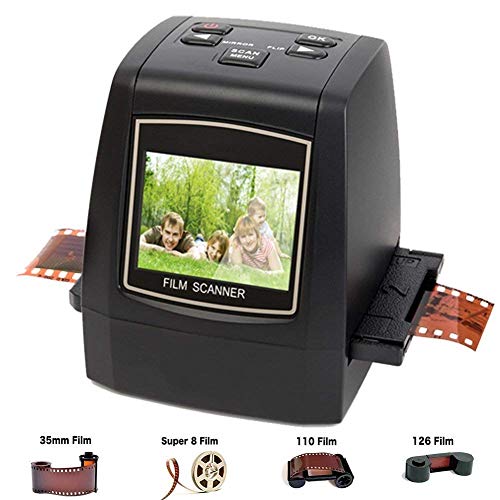


- Convert and digitize 35mm,110 Slides & Negatives, 126KPK and Super 8 films, into digital JPEG format in Seconds with 22 MP(Interpolated)
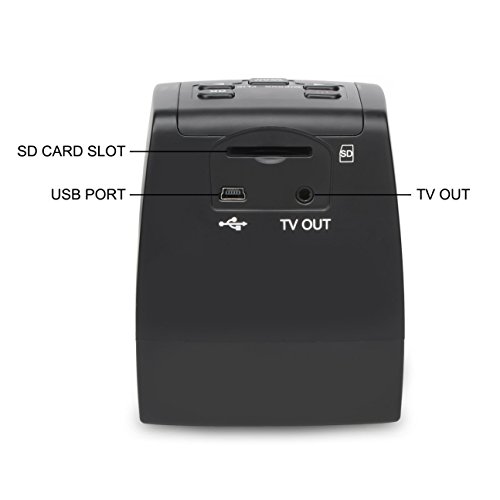
- Support SD card up to 32GB(SD card not included). Brightness and color auto & manual adjustable. Saves images into internal memory or optional SD/MMC cards
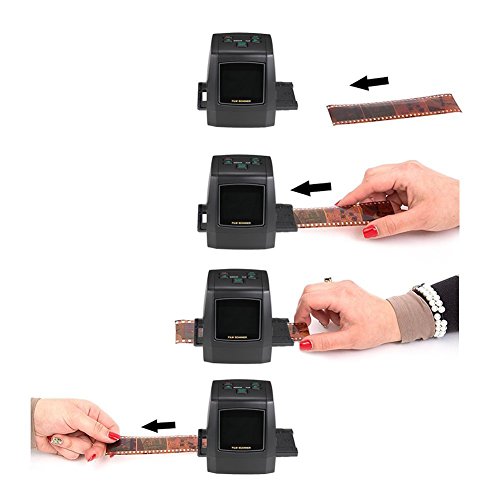
- Unique Speed-Load adapters included for fast loading slides & Negatives
- Stand-Alone-no computer required, Mac & PC Compatible. Video Out for TV Connection (Cable Included)
- Built-In Software Interpolation Can Improve Quality to 22 Megapixels. Support language: English, French, German, Italian, Spanish, Chinese, Japanese. All accessories included
-
Information
-
Twitter
-
Pinterest
-
Youtube
-
Facebook
Yvonne Hines
Quick scans and hand held operation
It is exactly as described. Light weight and small. Fits neatly in one hand. Works great as I sat watching TV while scanning 35mm negatives. The limited instructions are a little confusing at first. With only 5 buttons it doesn't take long to figure things out. Start with the power. After turning it on, you can change the scan from 14mp to 22 mp. You have options to watch play back. Select the Camera icon by pressing the "OK" button. This enters the Capture mode. Once there you load the film into the proper plastic protector. After several attempts fighting with the cover door to the negative adapter, I decided to forgo taking it in and out of the scanner. Instead I pushed each film strip in from the left and moved through the negatives with ease. From the 32 GB memory card, the color view panel shows that I have room for 10,000 pics. The negative was bigger than the scan view but not by much. If printing out 4 x 6 in photos, you may lose 1/4 in on the left or right side depending on how you slide the negative to scan. Once you have it lined up, press the SCAN button. From there you can enter the edit mode to fix colors or contrast. I chose to leave this to photo editing software instead. If you're happy with the scan, press OK, as the highlighted icon on the screen is asking to SAVE the image. Saving takes approximately 4 seconds while a little yellow hour glass appears over the image. The top right corner counter marks the number of saved scans and the remaining quantity. Everything is on the SD card and you can leave it there or move it to a computer. Simple. I have intentions of scanning hundreds of thousands of negatives. I have no idea how long this lightweight plastic will hold out. I also plan to give the little lamp a break to cool down as well.
Janet Castillo
Great product!!
I purchased this and a Christmas gift and my brother was ecstatic! It was amazing to see how clear and concise the photos looked though they were taken nearly 10 years ago when technology was not anywhere near as advanced. Would definitely recommend purchasing this!
كوني توريس جاليا
lA FACILIDAD DE USO
ME AGRADO LA FACILIDAD. NO ME AGRADA EL BALANCE DE COLOR NI LA CALIDAD DE IMAGEN
Jeannette Chambers
Worked As Epected
ALL Good A++++++++++++
Sminer Codef
Five Stars
Excellent product, great trader
Ana Ruiz
DigitNow 22mp Film Scanner
Item is a little smaller than I expected. However, it is easy to use and works great. For the money, it was a good purchase and shipping was very fast.
Channea Rebecca
Excellent product for the money.
This product was easy to set-up and use. It's a good thing because the manual was not very detailed. It took a little trial and error to figure out the most efficient way to copy my 35mm slides. Once I did that, I copied about 400 slides in a short period of time. There are better products on the market but they.are much more expensive. For the money, this one can't be beat.
April LG Cabarubias
Five Stars
Great product. Fast, good quality scans straight from negatives. Feeder is a bit clumsy but workable. Definitely recommended.
Ester Jamisola
Awesome
Amazing some pictures didn't come as expected but I assume is because I have some very old films
Hector Raul Parson Jr.
Yayy
Easy to use and quick set up. I love this thing. It was like magic.