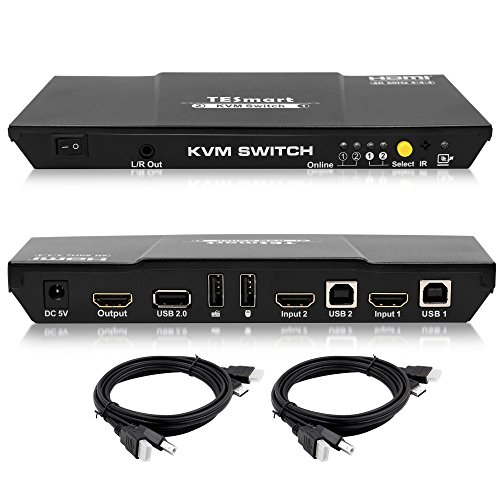
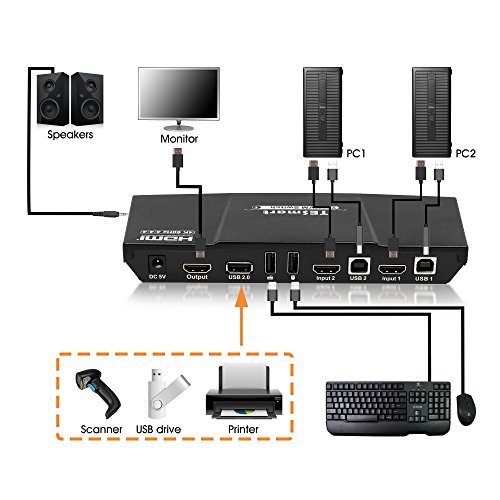
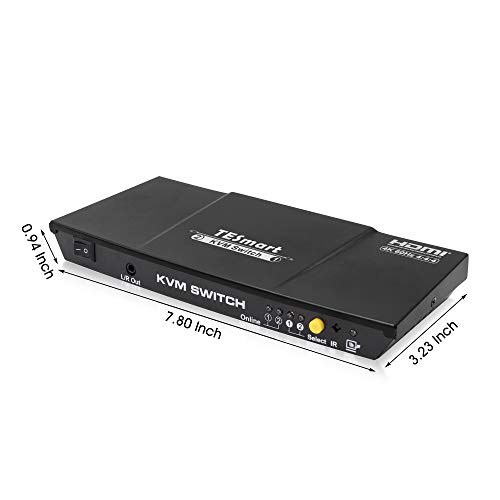
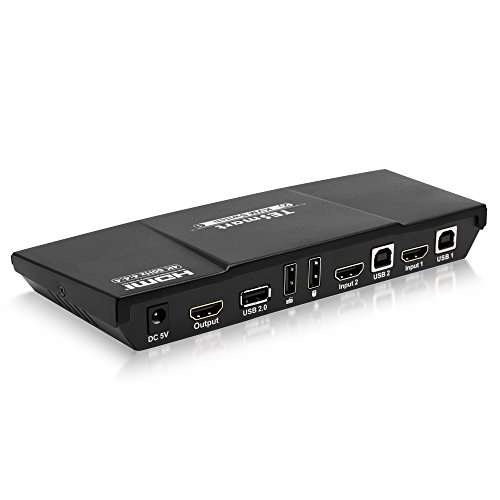
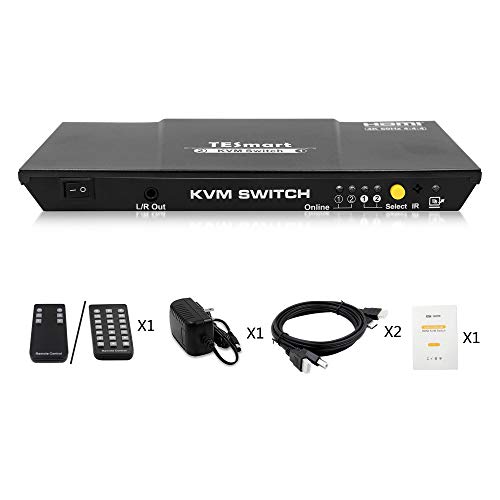

- [Two PC shared with one set Keyboard and Mouse] Save your Room and Office Space, makes your mordern life much smart,simple
- [4K HDMI KVM Switch with USB2.0 port] Supports Connecting your usb 2.0 port device such as Scanner/USB driver/3D Printer/Monitor Camera
- [4K HDMI KVM Switch output stable picture]SUPERIOR VIDEO QUALITY. 3840x2160 @ 60hz with 4K source and capable monitor. EDID emulation to maintain resolutions and icons when switching
- [4K HDMI KVM Switch with remote control] Save your time and switch different PCs easily
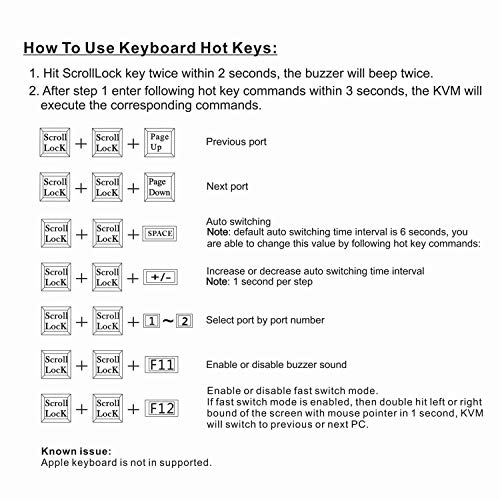
- [4K HDMI KVM Switch is easy to operate and install]EASILY SWITCH INPUTS. Keyboard hotkeys, mouse gestures, push button, or remote control (CR2025 battery not included)
-
Information
-
Twitter
-
Pinterest
-
Youtube
-
Facebook
Lori Dunn
Works Perfectly to switch between Computer and TV - Even EDID which is critical to computer use
The big win is that EDID works perfectly (this is the thing that tricks your computer into thinking that the display is still connected when you switch to another computer, etc., thus NOT forcing windows to rearrange your layout on a multi-monitor system). I can switch the display between the two output sources (a Computer and an AT&T U-Verse HDTV box), and Windows doesn't even know it happened, and doesn't mess up my multi-monitor layout. NOTE: Have NOT used it for 4K video; only HD. BONUS: I was pleasantly surprised to find that the unit has an 1/8" stereo out jack, to which the HDMI audio audio for the switched-in input channel is routed. This was perfect for my application, which was to allow switching of 1 of my 5 computer monitors to display TV on occasion. When the TV (AT&T U-Verse box) is switched in, the 1/8" jack produces the TV audio, which I connected to a cheap set of Logitech speakers. This means that I can leave my regular computer speakers hooked to the computer at all times, so that I get notification dings, etc., yet can still have quality TV audio playing when that one monitor is in TV mode. Perfect! It all works quite nicely.
Marchell Magarro Aquino
Awesome Bang for your buck when it comes to 4K HDMI KVM
I've owned a handful of different KVM switches from io-gear, Belkin, and others over the years. And, aside from the obvious fact that this unit handles 4K video (all of my others topped out at 1080), there are two things that put this unit a head above it's predecessors! I have used a wireless keyboard and mouse for a number of years, and they have never played well with my previous KVMs. First, the wireless nature of the keyboard neuters the "Scroll Lock" key, meaning you can't use it as the toggle switch between PCs as instructed by most KVMs (and many of today's wired keyboards no longer have Scroll Lock keys). As a result, I have been stuck using the wired toggle switch which has always been just a little short for my setup. Second, it typically took 5 or so seconds for the PC to recognize the presence of the USB (wireless) inputs once toggled to. This TESmart KVM eliminates both of these issues. In addition to a wireless remote, it also offers a unique toggle option that uses the mouse. You can switch PCs by "tapping" the cursor rapidly against the edge of the screen. It may sound strange, but it's surprisingly effective! And, it's USB hub keeps the mouse and keyboard "hot" for the non-active PC so that the devices are ready immediately when you switch; no waiting several seconds for that boo-deep sound to tell you that your mouse and keyboard are ready for use.
Nancy J Munoz
it worked like a charm and has continued to work so far
I searched everywhere for a KVM switch that would handle a monitor with resolution higher than 1080 and also would allow us to share a mouse and keyboard that uses a single Bluetooth dongle; and this device was the only one that I could find that fit that need. It took a while to get here, and we had some issues initially because we didn't know we had to also have extra cables for the USB ports, but once we had it all hooked up, it worked like a charm and has continued to work so far. If anything stops working, I will report back.
Glenn Manning
Perfect for an Ultrawide/4k Monitor, and it has a remote!
Upgraded to an ultrawide monitor, and I had a heck of a time finding a KVM that could support resolutions closer to 4k, _and_ had a remote, as I wanted to use my Razer products for gaming without any incompatibilities. I found a few other options, but none of them had both EDID support and USB 2.0 (I never found a USB 3 option, seems these are still very new in the market). This KVM works great!
You Seong Lew
TESmart 2-Port HDMI KVM Switch
Excellent hardware that works perfectly. Do read the manual especially if you plan on using any keyboard gestures. If you want to turn off the beep sound that occurs when you switch, make sure that your keyboard is connected to the switch in the Keyboard Port (very important) and follow the instructions. Likewise for keyboard gestures (that work fabulously). Support - 100% OUTSTANDING! I had one hardware issue with the PSU, and TESmart had a replacement on my doorstep in 24 hours. Seamless.
Tami Chalakee
Setup in under 5 minutes, plug and play
While I chose this because it was one of the few KVMs that would support my 4K monitor within my budget - I am happy to recommend this on many fronts. First, I continue to be amazed by how these electronics are packaged. You open the box and every piece of packaging feels expensive, custom and high-end. I don't know if that is important, but I immediately feel they go the extra mile to make a good product and present it well. So next thing that delights me is that, while I haven't used a KVM in years, setup was intuitive and took less than 5 minutes. I used it simply for my PC, laptop, 32" monitor, mouse and keyboard. It takes up less room on my desk than a tablet, but while small, it isn't light or cheap. I can now see the difference these HDMI cables make with my high res monitor! It comes with a small remote control and easy, non-verbose directions booklet. Or you can simply use the button on the front. The only two minor issues I should mention are: 1. The first mouse I tried (a TeckNet USB wireless) did not work. I used another USB wireless mouse I had instead and that worked fine. 2. The power supply cord, at about 3ft, is rather short, so I am limited on where to put it. I am really excited that it turned out to be a great and easy product to set up and use. Very happy with this product and company.
Irene Maciulis
Easily handles my 32" Samsung monitor, no mic input, semi-functional with Goldtouch
I'm using this KVM to swap between a workstation and my work-issued laptop. The laptop is generally the underpowered machine, and occasionally I get a brief flicker on it, but nothing like what I was getting previously with the IOGear I had (IOGEAR 2-Port HDMI Cable KVM Switch, GCS62HU) which is a blessing. My one brief "argh!" moment was discovering my Goldtouch keyboard would *not* disable the piercing BEEP the KVM emits when swapping machines, although it can be disabled by keyboard commands, thank you TESmart! A cheap Dell keyboard I had lying around worked fine for that purpose, however. I've plugged my mouse into a 10 port USB powered switch, and then plugged the switch into the mouse port on the KVM to enable me to hook a bunch of peripherals up to both machines; the KVM is coping just fine with them. I like that there's a power switch on the front, as well, so that if I shut everything down I don't have to waste energy with the blue LED on the front. I'm very pleased that sound-output is going over the HDMI too, and that there's only *one* USB cable to the machines, so I don't have to futz around with inputs for the mouse and the speakers and the keyboard and the screen. All around, exactly what I was after, and I'm grateful to have found it.
Sheryl Lynn Mumm
Works as advertised - Quality product
I needed a KVM to connect my Debian Linux home machine and my Windows 10 laptop which I use for business purposes. The devices are connected to a Samsung 32" monitor and use a Logitech wireless keyboard and mouse set. The Windows machine goes through a USB 3 docking station and then to the KVM - the Debian is a direct connect. It was a very simple hookup - just connected the cables and everything worked perfectly. The only thing to mention is the remote that came with it (actually I did not know that it came with a remote). Instructions were minimal. I googled to find out the battery and basic operations. I do use the remote to switch between machines. It works great also. The switch between machines is really fast and the KVM keeps the connected devices (monitor, keyboard, mouse) up on the disconnected machine so that when you switch back it is really fast. It also passed the monitor information cleanly to each device and both easily recognized it. So in summary, no issues, smooth switching operations, decent remote, and solid performance. Also there are a number of ways to tile/rearrange the windows on both machines. Personally I use the windows key and left or right arrow to move a window to the left or right hand side of the screen. Both systems work essentially the same with this key combination. On the Windows machine, if you have more than 2 windows open it will display each of the other open windows and prompt you to select the 2nd window to arrange to the other side of the one you initially selected. I would highly recommend this product to others. Update: 2018-10-04 I noted something related to keyboards in the unit's operations that may be helpful to others. In my particular case, I noted that the hotkey operations (switch screens, beep control, etc) only appear to operate when the unit it attached to the keyboard usb connection. When attached to the generic usb connection, it does not recognize the hotkey operations. Connected to the generic usb does allow the advanced keyboard functions to work (music controls, launch calculator, mail, etc.) while connected to the keyboard usb disables the advanced functions. My preferred solution is to use the unit's remote to switch screens and connect the keyboard to the generic usb port to get the advanced keyboard functions. Still love the unit - very solid operations.
John Cullen
Works flawlessly sharing Keyboard+Mouse
I was looking for a way to share my keyboard and mouse between two PCs. In my case, each has its own monitor which I didn't need to share. I've used the IOGEAR 2-Port USB VGA Cable KVM Switch with Cables and Remote, GCS22U product, but it required pushing a button to turn control over to the other PC. I was going to purchase the StarTech KVM device when I saw this one, in particular it had the capability to switch PCs via mouse movement off the screen and it would take over the other monitor -- in the same way a single PC would share two monitors. I've had software KVM products do that like Multiplicity -- but they really had very poor performance over time. This exceeded my expectations as a Keyboard+Mouse sharing device. You simply move the mouse off the monitor in the direction of the other monitor and it switches control with minimal latency. It's not 100% perfect but I've tried a few of these and this is about as good as it gets. Can't comment on the video switching capabilities since I'm not using that feature, nor the remote control.
Kyle Harris
it works at 4k60hz
This thing works as advertised. I have a desktop and a laptop connected through it to a 4k60hz display. I have a small un-powered usb hub connected to the usb port and am using this to connect a usb microphone, web cam, and wireless mouse/keyboard dongle. Everything works, and switching is near-instantaneous. The only drawback was a ridiculously loud beep when switching, and no obvious way to mute or lower the volume. I found a solution which I'll share: plug a wired keyboard into the keyboard port on the switch. double tap the scroll-lock key (holding it down on the second tap), then tap the F11 key. Done, muted.