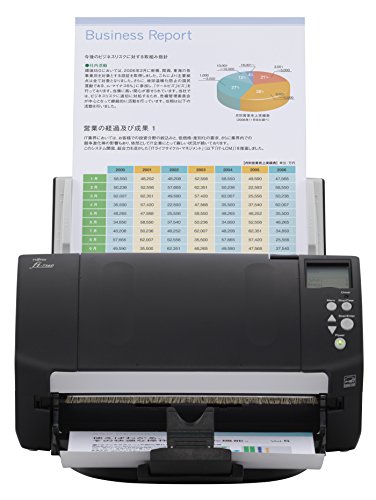
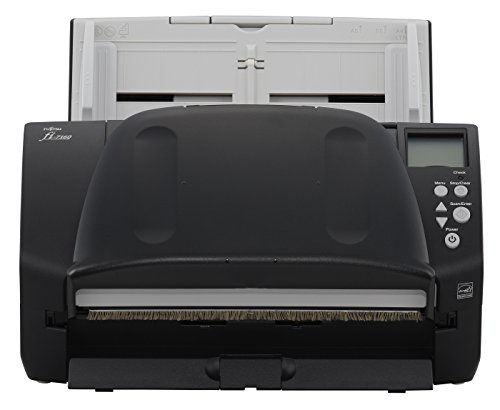


- Designed to make end-to-end scanning processes faster and more reliable for your workgroup
- Duplex scanning speeds of 120 images per minute at 300 dpi in color, grayscale, and monochrome. 80-Sheets automatic document feeder (ADF)
- Capable of handling sticky notes, receipts, labels, and hard and embossed credit and ID cards up to 1.4mm thick.Maximum Document Size: 8.5 x 220 (inches0. Minimum Document Size: 2.0 x 2.1 (inches)
- Advanced paper handling technology for the ultimate in-feeding ; Temperature: 5 to 35°C (42 to 95°F)
- LED light source and ISOP (Intelligent Sonic paper protection)
-
Information
-
Twitter
-
Pinterest
-
Youtube
-
Facebook
Karl Wilbanks
Best scanner money can buy
I install these absolutely anywhere I'm able to get clients to spend the money. They're fast, they produce very high quality scans, and the software and drivers that come with them are very nice. You can use the paperstream drivers to create multiple scan profiles and set users up to be able to take a single document and scan in multiple pages of all different sizes and the software will skip blank pages and automatically detect the correct size of each sheet of paper in a single scan. I usually get users setup to do all this with just the touch of their scan button on the front of the scanner. I've been told a thousand times by office users how much easier this makes their lives compared to the various solutions they were using before.
Shaun Jackson
Probably the best scanner you can buy but they are kind of ...
Probably the best scanner you can buy but they are kind of pricy. The options offered by the software are really the time saver. I have people call me when they have a lot of documents they want to scan and send to someone. It only takes a few minutes and puts them all on one pdf file that is very small. Great product.
Artika Lata
Simple to use
If you want to save time scanning your files, this is the only machine you'll need. I was using a Cannon but stopped because of constant misfeeds. This scanner is extremely quick. It doesn't get misfeeds and is so simple to use after 30 minutes I was up and running. I scan about 60, 200 page files a month - then shred the files and it's all stored neatly electronically.
Renee Hodge
This is a great product
This scanner is fabulous. Works like a charm. Gobbles up the pages at about 1 per second and scans both sides and no matter how many pages you load, a few seconds after it scans the last page, a thumbnail view shows up on your screen of all pages. You can have it then do character recognition or not. I have scanned a couple of thousand pages by now and I had 4 misfeeds. Three were because I overlooked stapled pages. The sound sensor detects the crumbling of paper during a misfeed and quickly turns off the feed motor so your page is not shredded. Very small footprint, very intelligent design. The scanner manual is probably in the top 2% of well written manuals that I have ever seen. Clear, logical, photos, arrows detail, hyperlinked. My only gripe is that there is no documentation for the software and although it is easy to load and works flawlessly, it took quite some time to figure out exactly how to use it. You have to first create "Driver Profiles" that contain the options that you want. Then you create scanner profiles and select other options that you want and select a driver profile to go along with it. The combinations are endless. Color only. B&W only. Auto color recognize. Various resolutions. OCR or not? Pdf or jpeg? Their PaperStream software is brand new and there is already a newer version on their website to download. There are options in the software for things I have never heard of, and evidently would only be useful in an enterprise environment. I contacted Fujitsu twice and got English speaking people answering the phone who were knowledgeable and polite. I must be dreaming. I highly recommend this product. Very satisfied, but ouch it is costly. 1/21/2014 Update: Just finished scanning 5000 pages since I bought it. I believe there were only 2 misfeeds that were my fault (forgetting to remove a staple). It has now told me that it is now scheduled for its 5000 page cleaning so I called Fujitsu to ask a question about that, a very nice ENGLISH speaking person answered and told me that I really do not need to pay for the cleaner and pads specified in the manual, just use isopropyl alcohol greater than 90%. I did, worked fine, saved money. ANOTHER positive interaction w Fujitsu. Then I went into the software to reset the counter for cleaning to "0" so that it will let me know in another 5000 pages. There are other page counters that will let you know when it may be time for replacement of different feed rollers, and then there is a global page counter that cannot be reset. I am very impressed. What is interesting is that I originally performed my research and settled on the HP Scanjet Flo 7000 which is also a new model and has very similar features. I ordered it directly from HP and the shipping date kept getting pushed back, and back. I kept calling and emailing Hp to ask for a realistic shipping date. They kept giving me different excuses such as, "I tried contacting the warehouse and I can't get through", then "I sent an email to the warehouse to ask and they have not responded", then it was "there was a large rain storm that knocked out the electricity and the servers are down and it won't be until tomorrow when they come up." Delays, lies at Hp caused me to cancel the order and go with the Fujitsu Fi-7160. I could not be happier with how things worked out. Interestingly, in the last month I noticed Fujitsu scanners at hospitals and other large corporations that I have been in, not HP. 5/18/2017 Update Still amazed how wonderful the scanner is. Flawless. Never jams, unless I forgot to remove a staple. I decided to upgrade to the newest version of Paperstream software since I was still using version 1.0 from 3 years ago. Easily went to the Fujitsu website, easy download, easy install. Unfortunately, all the scan profiles I had created with Version 1.0 were not carried over, so I had to recreate them... I half expected that to happen. Glad to see that the usability of the software is greatly improved from the 1st version. The right click Adhoc feature lets you change any part of a profile for just one scan, very cool. So a couple days after I created my 8 scan profiles, I opened up the program and they were all GONE! Not happy. I remembered my great experience the last time I called customer support, so I decided to try that again, although I was truly expecting that they went the way of everyone else and now contract their customer service out to a company in Siberia. Amazing, went through one phone menu, was on hold for 20 seconds, and my call was answered by a real, live, native English speaking ADULT. And he was fully competent and was able to solve my issue immediately. Another great experience. Thank you Fujitsu. 3/5/2018 Update This baby is still cranking. FLAWLESS. I hope Fujitsu will consider making cars. :-)
Thomas Kitchens
All around great
Great shipping and great little scanner. It wasnt too many years ago that we purchased a scanner similar to this for $3,000. This scanner is every bit as good as the more expensive one. Maybe a little less sturdy in construction but just as fast and clear. Time will tell if it is just as reliable. Very happy with the item and the seller.
Rachel McGlenister
Fast scanner
I have a earlier model of this size and style scanner. I thought it was fast but first time I ran this scanner it practically blew me away. I know expensive scanners are fast but for around $800.00+ it is really quick. I use it mainly for PDFs and have not tried it on JPGs. Even though I have had it only a short time I feel comfortable about its quality as I have had it's older sibling for many years and have scanned many books, photos, and set-up info sheets and it has ran well. I would expect the same for a more expensive upgrade. The soft ware is a little weak but is not bad for PDFs. Reading The book indicates JPGs may be a little tougher. I have not tried yet. I defiantly would and have recommended the scanner.
Amílcar Teixeira
... that we have used for a few years with great success. Since we use Lacerte Software
We are a small Accounting firm and have one of the previous Fujitsu scanners that we have used for a few years with great success. Since we use Lacerte Software, specifically Lacerte DMS, one of the scanner requirements was to have "Twain". I was researching many scanners that were lower priced, but none have the features and high reviews the Fi-160 shines with. I love the single pass/2-sided scanning with such accuracy and very little jamming. The scanner only jams when documents have clear issues, and the jams are easy to remedy with a simple lift up of the top. I also like the scanner software which eliminates blank pages on duplex scanning. The source documents we obtain from clients have a variety of one-sided and two-sided pages, to be able to scan then all at once (this scanner is very, very fast) is a HUGE time saver for us. I now scan everything in duplex mode. We got 5 of these scanners for the office and they will save us much time and frustration.
Misty Rene Freudenberg
Works well with Mac.
This is a solid scanner for volume single-desk use. I recommend it for legal use with a Mac. You do have to eat the cost of driver software. A high-volume court in my locality that is paperless filing-only (Fulton County Superior Court) uses this very scanner, the f1-7160, for lawyers and lay persons coming into the court clerk's office and needing to file documents in person. All federal and bankruptcy courts are e-filing-only, and most state courts here in Georgia have moved to e-filing, most of them exclusively. The days of running to court to beat the statute (or the filing deadline, and the parking and mileage...) are over. I am a tech idiot (or not far off), but I had enough sense to photograph the court's scanner and buy one for my own office. I am running macOS High Sierra 10.13.2 but followed good advice to download ExactScan Pro for $79.99 from the App Store. Amazon does not sell this software. The software found the scanner and within about three minutes I was in business. You can scan by mouse-clicking on the screen or by using the rubber button on the scanner itself. The cost at about $850.00, plus software for a Mac, is no joke. I expect to make it up in productivity.
Alice F. Hyke
Amazing
My last desktop scanner was the ScanSnap S510, which proved to be incredibly dependable, but a bit s l o w for my admittedly low level of patience. After over 300,000 scans on the S510 with no service whatsoever, another Fujitsu purchase was a no-brainer. Although I had high expectations, the Fi-7160 still struck me as an amazing machine at fire up. I didn't know whether to laugh or be concerned that the space-time-continuum may get sucked into the feed. The software is intuitive, easy to navigate, and simply used to set your setting profiles (including "one-touch" scanning). I have boxes of dead files that have been leering at me from the corner, and now, that off-putting, put-off task is actually (almost) fun. Thanks, Fujitsu, for making another amazing product. I recommend this product, even at the price (which only hurts until you use the scanner).
Dana Vironet
Our Last Scanner Lasted Us 2008-2016! This Is Such An Upgrade!
I am a manager for a pediatric practice, and I have been with my office for nine years. Back in 2008 was when our office converted from paper charts to an EMR (electronic medical records) system. During this time, we ordered a Fujitsu scanner (it was the Fi-5120c). We had to scan thousands of paper charts to convert them into our EMR system. On top of that, we were constantly scanning new patient charts, updated patient documents, photo ID’s, etc. on a daily basis. We had used that scanner every single day, all day, since 2008. It was only up until two weeks ago that the scanner stopped grabbing documents as tightly, so they were no longer scanning properly. I knew that I wanted the most comparable scanner that I could find, and I came across this. I have an I.T. company that I work with, and they offered to sell me this very scanner for $300 more!!! Thank you my trusty Amazon! I am so happy that I not only found this scanner here on Amazon (so that I could use my Prime and get it shipped to the office quicker), but I am also glad that it was so much more affordable. We have used our scanner for a week now, and boy is it an upgrade from the Fi-5120c. This little baby SCANS VERY FAST compared to the older version. Installation took me only moments, and I had no trouble with linking this scanner to our EMR system. The time that we save on scanning is amazing. In addition, this holds far more sheets of paper than the older one did, thus saving us even more time. The quality of color on the photo ID’s is also enhanced. There is nothing about this scanner that I can complain about. I understand that to some, spending this much on a scanner may seem like too much; however, I can tell you from experience in our practice that it is much more sensible to put up the money now so that you will save later on. Fujitsu is hands down the best brand for scanners, in my opinion.