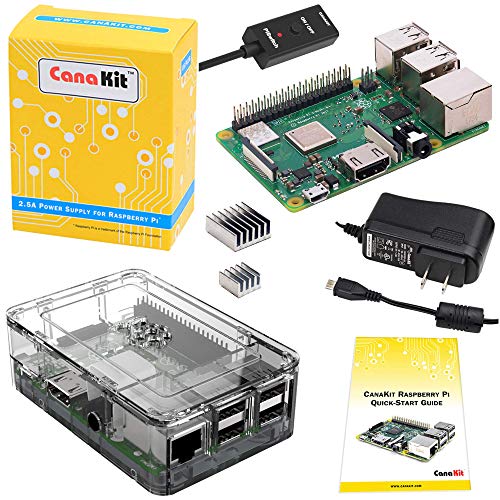


- Includes Raspberry Pi 3 B+ (B plus) with 1.4 GHz 64-bit Quad-Core Processor and 1 GB RAM
- CanaKit 2.5A USB Power Supply with Micro USB Cable and Noise Filter - Specially designed for the Raspberry Pi 3 B+ (UL Listed)
- Dual band 2.4GHz and 5GHz IEEE 802.11.b/g/n/ac wireless LAN, Enhanced Ethernet Capability
- Premium Clear Case, Set of 2 Aluminum Heat Sinks
- CanaKit Quick-Start Guide
-
Information
-
Twitter
-
Pinterest
-
Youtube
-
Facebook
Jamie Tracy
Well designed product
This is a review for CanaKit's Raspberry Pi 3 B+ with Premium Clear Case and 2.5A Power Supply. The case is very well designed for both ventilation and protection against dust. It features a 3 piece design which does not require any tools for assembly. Cutouts were available for installation of heatsinks. The top cover can be easily removed to access headers and camera connectors. The Raspberry Pi 3+ and the latest Raspbian (2018-11-13-raspbian-stretch.img) are very well developed. The development team for Raspbian did a superb job in ensuring that all the Linux interfaces to the hardware works and optimized. Testing the latest Raspbian on my older Raspberry Pi 2 also showed significant improvements where the noticeable lag when using the GUI is now gone. Using the VNC feature also does not show noticeable lag. Due to the 1G RAM size, opening multiple browser tabs would still show some lag but this is expected. I've used the Raspberry Pi with Repetier Server for 3D printer monitoring, NFS and TFTP. Configuration was a breeze and did not run in to problems encountered with some of the other embedded Linux distros provided by some low cost Pi-like single board computers.
Sabre Abuhania
One board was defective but Raspberry Pi 3B+ with latest Raspbian Stretch is better than ever
Although I did receive one defective mother board, the Raspberry Pi 3B+ with the latest Raspbian Stretch with desktop and recommended software (November, 2018) is better than ever. For the defective mother board, the power light wouldn't even go on (tried with several 5 V 2.5 A power supplies that worked for other Raspberry Pi 3B+ mother boards) and the monitor always displayed "No Signal", but Amazon provided me with a return shipping label and the replacement that I ordered worked fine. I enjoy learning Mathematica that comes with it. Octave, a powerful numerical mathematics package similar to MATLAB, can also be installed. The LibreOffice 5 that also comes with it is mostly compatible with Microsoft Office except for equations. LibreOffice 6 does a much better job handling equations, but is not yet available for Raspbian. Installing hplip and cups lets me print wirelessly to my HP Officejet 8600 Plus printer. Installing cups-pdf lets one print to a pdf file. A Columbus V800+ USB GPS receiver displays the position using gpsmon (see my review on this USB GPS receiver). I was able to use Win32DiskImager to write 2018-11-13-raspbian-stretch-full.img to a 256 GB micro SD card to obtain 238 GB of storage. The boot root partition is automatically re-sized after the first boot. Installing dosfstools, ntfs-3g, and exfat-fuse lets one read and write to a USB flash drive with all the common formats. Installing firefox-esr gives one an alternative browser, installing matchbox-keyboard gives one a screen keyboard in case one doesn't want to use a usb keyboard, and installing scrot lets one take screen snapshots.
Bianca van Boven
Easiest Way to be Up and Running with Raspberry Pi
There are many ways and lots of places to buy what's needed to get a Raspberry Pi operational but this kit has to be one of the easiest. All necessary instructions and parts are included - just add your own keyboard, mouse and HDMI monitor. Good value too - one might be able to purchase the parts separately for less and if you want a hundred that would make sense but just to start with a Pi this is a great place to begin. There's no point in my reviewing the Pi itself - thousands of others have done that already.
Mckenzie Glass
Extra features makes this one standout.
In case you hadn't noticed, ALL Raspberry Pi processor boards cost the same. Why? Because the price is fixed and controlled by the Raspberry Pi organization. I'm not complaining about this, but it does beg the question as to why you would pick one supplier over another. The key differentiators are: 1. Power Supply - is there one and how good is it? The official power supply is designed to plug into virtually any outlet on the planet. Consequently it's huge. The one included in this kit will allow you to plug other things into a duplex or quadruple outlet (like I have in my shop). 2. Enclosure - is there one and how good is it? I like the 'official' enclosure slightly better than this one for one reason - it is a bit more modular, but this one is decent quality and may provide better ventilation than the original. Originally I thought that I couldn't install a GPIO cable and put the cover on this one, but happily discovered that there is a gap, large enough for the cable, between the top and the side of this enclosure. A RaspberryPi 'Hat' should fit ok, but I personally haven't tried that. 3. Price - as I mentioned, the Processor price is fixed, but the add-ons aren't. This kit is about the lowest price I've seen for what it includes. 4. Extras - this is where this kit really shines. It includes a short cable that you insert between the power supply and the Pi. The cable has a switch that toggles the power on and off and an LED to show you that the power is on - useful when starting up and you don't want to plug in a powered cable to your Pi. I haven't seen this in any other kit, certainly not at this price. If you've used other kits, powering off your Pi requires physically disconnecting the microUSB connector or unplugging the wall wart - either way, not as convenient as simply pressing the switch. Updated: to fix comment about ribbon cable.
Joel Niedo
Great Purchase provides almost everything needed to get a pi working
This is a great entry level purchase. I needed another pi to run "pihole" on my network to remove ads for everyone using it. Included everthing you may need minus an SD card. The Power supply is perfect and provides ample proper clean amperage and voltage to the pi and the on off switch is a plus, and way easier in an emergency than using SSH to halt the pi. I only have one gripe, the case provided doesn't have the best ventilation. It does include heat sinks which helps but ideally it would be great if they had included a case with active cooling like a smarza case. Running pi hole all day and night it idles at a temp of around 50-55c. After running sysbench it would take quite a few minutes to recover to normal temps. Just a warning to those that are first time pi-ers planning to run something cpu, gpu or ethernet intensive. Not the worst temps at idle but you have to remember the B+ has the advantage of better cpu cooling and what not already
Aakanksha Roychowdhury
The Ultimate Retro Console!!!
What i can to say: It's perfect ^_^. I'm gamer, a retro gamer in majority, after thinking and thinking about a classic console, i choose to do my own console, using a raspberry. As advanced computer user, it's not so hard to understand the world of raspberry. Well, ok, now about the product: This kit is all u need if u begin into raspberry world, why? have all accessories may you need after, case, heatsinks, adapters & in-line switch, u’ll need a microsd as hdd to the raspberry, nothing serious. After doing some...modifications ( i know i know, that fan wasn't there XD), and installing it behind a 16" hdtv, the result is a powerful retro console w/display, & maybe a desktop computer to little projects, Why not Zoidberg? If you want a little computer to enjoy other world far from windows and MAC, and a retro console at the same time, where you can play nes, snes, n64, ect ect ect....go ahead and order this kit! Enjoy guaranteed. CanaKit, thanks so much O_^ from Costa Rica.
Haley Engelskind
Replace your old Pi with this
I use these to teach programming classes to inspire the next generation of programmers. What can I say - these CanaKits have it all (except a memory card). 4 cores of processing power is crazy in such a low-cost board. My original Raspberry Pi has shown its age. These B+ 3rd gen units boot in ~20 seconds vs the 4 minutes from the original Pi. The unit stood up to regular abuse: 30 Chromium tabs, 4 terminals, and compiling java code. Handles these tasks wonderfully which makes teaching programming that much easier. I even picked up a second for myself as run RasPlex on it. Huzzah - DIY computing as its finest;
Jacquelyn Blankenship
You decide
The Raspberry Pi can be used for many different types of projects and these kits from CanaKit give you everything you need to get started with just one stop. When I received the kit I ran into some issues that appeared to originate from the factory; therefore, it does not reflect on CanaKit. In fact CanaKit customer support went above and beyond in solving my issue. If you are looking for everything you need to get started in the world of the Pi then it is a no-brainer to get your kit right here! Taking the time looking around to find each of these pieces might save you a buck or two, but why bother? Isn’t your time worth anything? I have bought allot of these boards from different venders and the customer support you get from this company is well worth the couple of dollars you pay for their service. I am a contractor who is hired to build/design electronic devices to fit specific needs, and like everyone else I found myself with not enough hours in the day to do everything I needed too. This caused me to buy my first kit through this company because of the time it saved me in looking for each part individually. Not only will I be buying from this company again, but I am going to look further into the different kits they offer. I don’t know about any of you out there, but great customer service means more to me than running into an issue once in a while. Just to be clear: I do not work for this company and have no affiliation with them other than being a customer. When I write my reviews I base them totally on my personal experiences with the product and/or dealing with the company. I get nothing out of writing this review other than helping others decide whether or not to purchase this product from this company.
Kent Hickson
Great Combo!
This is a great way to get the Pi 3B+ with the power supply and case that you will also need. The case is well made and the Pi fits perfectly.
Lori Dunn
Really good kit for a hobbyist.
I have been using a Pi -B and Zero until now. Didn't realize just how much more powerful the 3+ is. Almost could be used as a person's daily desktop if it had a bit more onboard ram. But, it is a great little device for programmers and experimenters. Wifi just pops up ready to use without having to hack through the old method of driver finding and loading. (Although if your network is secured, which it should be, there is a little work to get the password into wpa_supplicant, but vastly easier than the old method of using wrappers.). If you are used to standard Debian, there are some gotchas in the Raspian desktop that will cause puzzlement for a bit, but you won't get stuck. The Raspian desktop is too Windowish - tries to tell you what you ought to do. Apt-get XFCE if you want a familiar Debian GUI. But for a command line junky, it is great. Hack all day and if you bomb it, just flash the microsd again and boot up. With the Etcher flash utility, it takes about two minutes to get your little machine back online. This high quality CanaKit gives you all you need to get started, except for the SSD. Be sure and purchase a wear-leveling chip, as a Pi with this power will probably burn out an older microsd card in less than a year. Sandisk Extreme is one brand. Recommended.