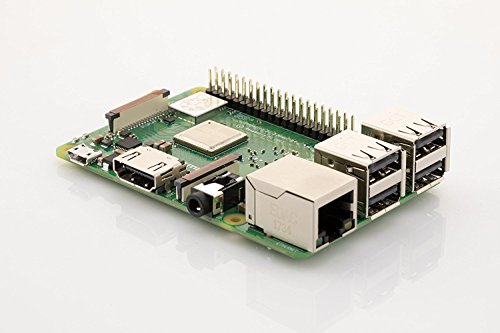
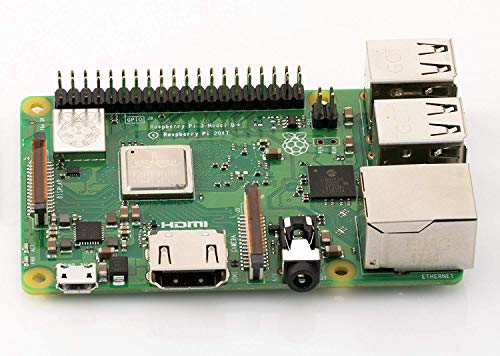
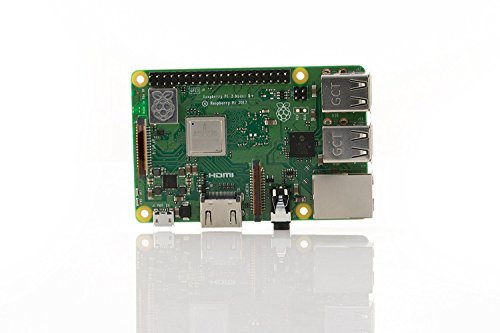
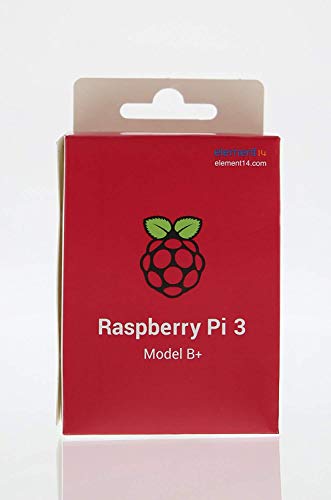

- 1.4GHz 64-bit quad-core ARMv8 CPU, 1 GB RAM
- 802.11n Wireless LAN, 10/100Mbps Lan Speed
- Bluetooth 4.2, Bluetooth Low Energy
- 4 USB ports, 40 GPIO pins, Full HDMI port, Combined 3.5mm audio jack and composite video
- Camera interface (CSI),Display interface (DSI), Micro SD card slot (now push-pull rather than push-push), VideoCore IV 3D graphics core
-
Information
-
Twitter
-
Pinterest
-
Youtube
-
Facebook
Maj Jackson
Computing as it was meant to be.
I love my Raspberry Pi! It's a full blown computer the size of a deck of playing cards. It runs silently, and uses a fraction of the electricity of a larger computer. It can be configured to do nearly anything. People have configured them to work as personal computers, retro gaming consoles, media players, art installations and much more. They will run a variety of operating systems; a version of Linux was created specifically for the hardware. Linux has come a LONG way since I tried to install it on an old PC decades ago, unsuccessfully; everything works the way you'd expect it to on a modern computer. I was able to install the operating system and connect to the internet within about 5 minutes. The operating system is stored on an SD card, if you mess anything up, you can reinstall a new operating system and be back up and running within minutes. The system boots up lightning fast, and most of the preinstalled programs load in seconds. The Linux command line, while daunting at first, is easy to learn and powerful; I find myself using it as often as the Linux desktop. A wealth of open source programs are available and can easily be downloaded and installed via the command line. The device has 40 general purpose input/output pins that can be used for prototyping. One caveat: be careful with the GPIO pins, you can ruin the board if you connect a live current to a pin when the Raspberry Pi isn't expecting any input. I accidentally touched a pin with a live wire connected to an Arduino board, and it killed my Raspberry Pi immediately. I bought a replacement, and since the operating system is on an SD card, I was able to plug the dead system's card into the new system, and it booted right up with the operating system and files intact. For the price, you really can't go wrong buying one of these. If mine broke, I'd buy another immediately. They're great for learning computer programming (the Raspbian operating system comes with multiple programming environments preinstalled) and were designed to teach children programming. Don't expect to do any graphically intensive gaming or rendering with these devices; for everything else though, they're great. I recommend looking up how to secure the Raspbian operating system before going online with one. They are set up with minimal security out of the gate but can be made to be highly secure with a few commands. I highly recommend this device to anyone who is interested in computer programming.
Saima Shahbaz
Works great - BUT you need to download newest Raspbian Stretch!
Raspberry Pi 3 B+ works great - BUT you need to download newest Raspbian Stretch. First I wanted to start this new Raspberry with microSD card with preloaded Raspbian "2017-11-29-raspbian-stretch.zip" - that did not work at all. The Raspberry would not start. I downloaded newest Raspbian "2018-03-13-raspbian-stretch.zip" from the official Raspberry site. After flashing microCD card with that Raspbian the Raspberry started immediately. Seems to be really fast. 64-bit quad-core ARMv8 CPU. 2.4 & 5GHz 802.11b/g/n/ac Wireless LAN. Bluetooth 4.2 & BLE You get just the Raspberry Pi 3 B+ board in the box with instruction manual. MicroSD card is not included. No cables or power adapter included. Just stating the facts - not complaining about that.
Marianne Paul
Beware buyers, before you Google it. (Saving you ...
Beware buyers, before you Google it. (Saving you the trouble) If you want to Retropie on this, and you power it on, seeing a yellow lightning bolt to the top right of your screen, there is nothing wrong with your Raspberry Pi 3 B+. You need Retropie 4.4 or a Retropie Image with 4.4 and above embedded to make it boot. Retropie 4.3 or under is not supported with the 3 B+ model. I did research to find out.
LeeAnn Shane Clutter
RPi 3 + as Steam Link
I was unable to get the Steam Link device before it was discontinued. Now people selling them for hefty price for it. So Steam Valve announced that there is a free software to stream pc gaming for RPi 3 B or B+ only. I went and purchase RPi no question asked and got them set up. Bluetooth and WIFI added to this board is truly a blessing. I had the first generation RPi that required a lot of add ons back in the day. If you plan on using this for Steam Link, please be sure to do your research before starting. You will have to configure bluetooth using Terminal. This is only if you're trying to get Xbox One S or X controller to pair. I put the game into a test for 4 hours and it went smoothly so far. I am truly happy of what this little thing can do. Now I can sit back in my cozy couch and relax!
Mirella Rahme
Perfect for Aspiring Engineers + Checklist
Amazing capabilities when using Raspian. Be prepared to spend $20-$150 in order to use this. If you don’t already know, you’ll need: - a monitor with HDMI input - mouse and keyboard (wired preferred) - Micro SD card - 2.5A Powersupply to MicroUSB If you’re looking into using this with solderless Breadbaords - m/f jumpers
Beverly Jane Chua Malamog
Awesome purchase
**UPDATE: 10/1/2018 Works great but it comes with ARMv7 not 8. Beware - false advertising** Firstly, make sure you have a micro as card with the OS of your choice installed. I have one sd card with the NOOBS installer for the Raspbian OS (Raspberry’s de facto operating system). All I had to do was download NOOBS files, format the sd card to FAT32, and copy the files onto the card, and plus it into Raspberry Pi motherboard. When I turned it on, the motherboard picked up on the system files and walks you through the install, and there’s various OS’s you can pick from. I also have another sd with RetroPie (video game emulation OS). RetroPie needs to be imaged onto the sd card before being plugged into the Raspberry Pi. I bought a housing unit with a fan for this thing that also comes with heat sinks (a must-buy if you ask me). If you are new to Unix-like OS’s, learn a few Terminal commands to learn how to do just a few things on here like running things as an administrator, navigating files, creating folders, etc. This product is a great buy. If anyone has any questions about this, feel free to comment.
Amy Thurman
Differences with 3B. Won’t fit old case...
This is an amazing ARM based computer. Given that I have a few 3B models, just want to focus on some obvious differences with this 3B plus model. The first is that it doesn’t quite fit in the 3B case. It has 4 extra power over Ethernet pins. You could make a hole If needed. The two holes in case for the optional heat sinks do not exactly match the chip positions. This doesn’t seem to be as big an issue as the heat now radiates all over the board and out the metal Ethernet / USB connectors. Haven’t needed heatsinks yet. The other gotcha is that you will need the latest NOOB software on the memory card, if you want to boot up. Not an issue but worth noting. Overall it runs well and uses the same software as previous versions. Doesn’t get hung up or overloaded as easily when you push it hard. It also has 5G in addition to the 2G WiFi. A very good choice if you are still wondering. Using it on SunFounder robotic car, I upgraded car software to Python 3 myself and implemented openCV AI vision to recognize and follow us around. It is not maxing out the new 3B plus CPU cycles as it was the 3B. However, I am planning to impliment multi threading and multi processing to use more cores to process the real-time video a little faster. I haven’t intentionally ‘real world’ tested how power hungry it is when I unleash projects for an extended time on lithium batteries. It doesn’t appear over hungry for power. We could probably look that up in the specs. So far I haven’t noticed any difference with normal usage. This is a noticeable improvement over the 3B model ;-)
Shauna P Green
Best Little Computer On Earth
OK, I'll admit to being a Raspberry Pi fanatic. I own 2 of the very first batches to be manufactured, and they still work perfectly - one of them is still silently running a file and web server for our household. Nowadays, the non-profit Raspberry Pi Foundation and the community around it have grown into a global influence on the greater computer market, and their uniquely noble effort to make computing and coding accessible and affordable to literally everyone. This one I got to be used as a desktop workstation doing basic email, web browsing and office stuff - it is more than powerful enough, and does the job perfectly. The standard install of Raspbian, the Linux distribution made especially for the Pi and supported by the foundation, comes with everything a typical user needs, and adding other software (like Firefox and Thunderbird; Mozilla for the WIN!) is a snap with just a few mouse clicks - no need for command-line shenanigans. This latest model (3b+) is jam packed with critical features built right in, like WiFi and Bluetooth, and it can boot up directly from a USB mass storage device (hard drive or thumb drive/stick), whereas the previous models need a little help from an SD card to get booted. At the price below $40 (US), you simply cannot beat the value, and it makes the Pi great for experiments, projects, or just a cheap and cheerful workstation. As you can tell, I can't say enough about Raspberry Pi, the pastry and the computer. And no, I'm not being compensated for this review in any way.
Harsha Mehrotra
The best and fastest Pi yet.
This is such a nice little SBC with so much support online to get you going. Has onboard WiFi and Bluetooth as well as an internet jack to hardwire if you want. Also has 4 USB ports (USB 2 speed). Makes a great retro gaming machine. Download RetroPie with Emulation station and load your games up. Use the 40 pin I/O header and build and control that robot you always wanted to. There are faster (and more expensive) SBC's like the Asus Tinkerboard and the Odroid XU4 but their level of online support can't match the latest Raspberry Pie 3b+. This a great way to get into computing and programming and is a great choice for someone on a budget. You will also need a power supply and a case and an HDMI cable, a keyboard and a mouse (USB) which you probably already have those last two. Oh, also a class 10 micro sd card (Samsung Evo is a good choice). I recommend at least a 16 gig card but it can take up to 128 gig card. I am getting along fine with a 32 gig Evo. I also recommend a couple of heat sinks which just stick on. Samsung 32GB 95MB/s (U1) MicroSD EVO Select Memory Card with Adapter (MB-ME32GA/AM) LoveRPi Performance Heatsink Set for Raspberry Pi 3 Model B (2 Heatsinks) And this power supply/ NorthPada Raspberry Pi 3 Model B B+ Plus Power Supply Charger AC Adapter 5V 3A PSU Micro USB 5 Feet with Power On/Off Switch (1 X Power Supply) You can buy a CanaKit with most of similar components but these I have recommended are better and a little more expensive. But worth it. If you can afford it I highly recommend this case to install it in. The perseids NES Case, NES & VCR Retro Synth Mini Computer Case with Cooling Fan for Raspberry Pi 3, 2 and B
Sharath Sukumar
Excellent new RPi!
I’ve had and used these RPi’s going back to the original RPi1, so I’m not going to write another long review. Simply put, these were originally designed and manufactured to help children learn about computing design and coding, but they were instantly adopted by - well, pretty much everyone else. I’ve used and used Raspberry Pi’s for desktops, Kodi, RetroPie, breadboarding, MMDVM’s (amateur radio), APRS (amateur radio), AllStar (amateur radio), automation, weather station, Software Defined Radio, ADS-B (aircraft tracking), coding, prototyping, music, etc, the list goes on and on. The question isn’t what can they do, but what CAN’T they do? I’m up to having thirteen of them now. It’s an illness that I need twelve steps to recover from. The newest addition to the RPi family gives you some more processing power. There are now pins for Power-over-Ethernet (requires a PoE Hat). Also, 5GHz WiFi is finally built-in and onboard. I’m Sure, there are boards out there that boast higher specifications on paper, but they lack the community that the RPi has formulated around it. Just make sure that whatever you want to use it for has an updated kernel for the RPi3B+. Also note that not all cases for the RPi3 can be used with the RPi3B+. Highly recommended ! BTW: Another reviewer wrote about receiving this in a bare box. Strange. Mine came in proper packaging. I’d question the source of the board received and return it.