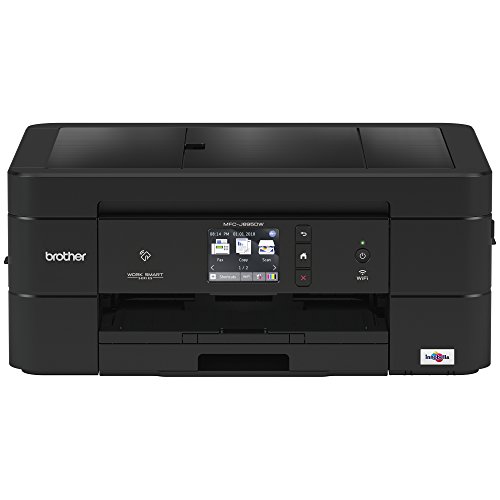


- SIMPLE TO CONNECT: Versatile connection options with built-in wireless, Ethernet, or connect locally to a single computer via USB interface
- MOBILE PRINTING: Print wirelessly from mobile devices(1) using AirPrint, Google Cloud Print, Brother iPrint&Scan, Mopria and Wi-Fi Direct
- CLOUD CONNECTIVITY: Print-from and scan-to popular Cloud services including Google Drive, Dropbox, Box, OneDrive,(2) directly from the MFCJ895DW
- NEAR FIELD COMMUNICATIONS (NFC): No network setup needed for NFC one "touch to connect" mobile device printing and scanning(4)
- FOR USE WITH BROTHER GENUINE INKS: LC3011BK, LC3011C, LC3011M, LC3011Y, LC3013BK, LC3013C, LC3013M, LC3013Y
- AMAZON DASH REPLENISHMENT ENABLED: Upon activation, Amazon Dash Replenishment measures the ink level and orders more from Amazon when it’s low
-
Information
-
Twitter
-
Pinterest
-
Youtube
-
Facebook
Pho Tartee
A few things that may not have been previously mentioned
I haven't read all 451 reviews for this printer, but rather than just heap yet more praise upon it, I'll mention a few things I didn't see in those I did check. It has an internal power supply and a plain old normal AC mains power cord. This means no giant lump that blocks the outlets on either side of the surge protector when it's plugged in. And no giant lump in the middle of the cable from there to the printer. This was the most welcome thing for me. The single sheet feeder, as used when printing labels, is very, very precise. As opposed to my old HP printer, where it was always a crap shoot and I would use about two times as many label sheets. Watching and listening to this printer lining up the label sheet is a joy to behold. Heh. The ethernet and USB jacks are inside the printer. You have to lift up the top to access them, and there's only enough space to run one cable at a time to the outside world. That said, the wifi works very well, and is what I'm using now. It handles LONG pass phrases fine. It is, however, only in the 2.4 GHz band. I bought the MFC-J880DW instead of the MFC-J680DW for the ethernet, but as it turns out I really don't need it. Also beware that on Amazon the MFC-J680DW is listed as having ethernet. It definitely does not. The Brother software installs painlessly on both macOS 10.9.5 and 10.12.6. When doing the initial setup, the yellow in the test pattern is not so easy to see. Selecting the clean the printheads and try again does not make it any darker, but it does use lot of ink. "Lot" here means close to one third of the color cartridges supplied with the printer. Printing actual images with yellow in them looks fine. This is a very well made printer, and the manuals are quite clear and easy to follow. I'm definitely more than happy with it...!
Kypriani Thoma
MFC-J880DW, No fuss install and full driver support for Mac/PC
It's nice having a printer that works the way you want it to. After using a Brother L2340D laser and having no issues we needed to replace our old HP Officejet K8600TN. We have a mixed OS environment and seemed like we were having to often transfer projects to a PC to get it to print correctly on the HP 8600. It's old and a tank but we always had issues that would infuriate the most docile individual. The menus on the Brother are responsive on the touch screen color display. Setup was a breeze on all devices. The built in scan to OCR is nice and fast. The unit wakes instantly, no sluggishness at all. Was impressed they had Win10 64 bit drivers right away. This unit was just released so that makes sense I suppose. I use the Google Cloud print a good bit from my Android phone and its great. The NFC function basically just starts the Brother iPrint app or sends you to a link to download if tapped. I like the WiFi feature better though for mobile devices. Scanning to your phone is really nice for something you need quickly on the go. Also one thing I noticed that I don't see often on Inkjet printers is when canceling a print job the Brother J880DW cancels it immediately without fuss. I'm use to HPs and others grinding for 2 minutes or even having to unplug power to get them reset. The only thing some people may have trouble with is the 4x6 photo paper tray. You have to slide it back when you want to print on this size manually and then back for 8.5x11. It's kinda cool you can keep it loaded with this size paper ready to go though. This printer seems to do photos way better than I thought it would for the price. The 880 and 885 are the same except the 880 has a fax built in. If you do not need a fax then the 885 may be for you. I purchased this unit before it was apparently released or in stock at Amazon because it was a replacement for the renowned 870. Pros: Easy setup, supports everything you would want and for the price does better than expected picture quality. Drivers seem equally featured on all operating systems. Compact. Lots of scan to functions from the touch screen. Cheaper priced ink cartridges than some others. People like my dad would appreciate the full printed manual included with the printer to hold in hand as he watches TV and "studies up". Most are on PDFs on the disk included. Cons: Being very critical, as there is not much not to like about this model. Possible confusion on the 4x6 push back tray for some that don't read instructions. Small paper tray. Print cartridges look small. I just received the 880 and time will tell how long they last and if the cheaper price to yeild ratio compared to larger cartridges of other models.
Suneetha S
Easy to set up and easy to use printer. Works Perfectly. Great value.
I previously had a Canon Pixma which was the printer from hell with all kinds of things I hated so getting a printer that did not make me want to throw it out the window from day 1 was super important. I was looking for something that woke up and started printing immediately, did not disconnect from the network every time it went to sleep, did not gobble ink, did not print only from an app on my computer but also from the device itself, printed quickly, had double sided printing and scanning (and copying), was easy to set up on my network without connecting directly to my computer, had an easy to navigate interface both on the device and on the app, and could print from a variety of devices including laptops, chromebooks, and phones. The MFC J895dw meets all these requirements and comes in a reasonably compact size as well. Print/copy/scan are all speedy, it connects right away to whatever device has sent the print job, setting up the printer wirelessly (without the cable connecting it to my computer) was easy, and I was able to get all the software I needed from the Brother website (I don't have a CD drive) without getting any extra unwanted software, unlike with Canon where I got more junk than you can imagine and none of it useful. For anyone who is concerned about the comments about slow printing, those folks who are having problems need to tweak a setting of some kind or update the firmware or a driver. This printer is so fast that if I forget to set up the little arm that catches the pages, they will literally shoot out a foot away from the printer (no worries - this does not happen as long as the arm is extended). I spent a lot of time reading reviews and going through the options on Consumer Reports, and I am really happy I chose this computer. I was hoping to spend less than $100 but as great as this printer has been so far, I don't even feel bad about going over budget for my purchase.
Nicole D Friedley
Best by far of the lower cost all in ones
I had the earlier version of this printer which was 15 years old. The print head died so it was time for a new printer. Foolishly I tried, and returned two printers of different brands. They were both low cost, and performed accordingly. One of the ones I returned had generic cartridges that cost half the printer price. The OEM cartridges cast 50% more than the printer. This printer has reasonably priced OEM and generic priced cartridges. Set up, connectivity, and operation are all a snap. I don't know what I was thinking by trying other brands.
Jamie Elkins Taylor
Simple set up and works great
This is the way I wish most printers would be. The set up is simple to complete and you are printing in no time. Wireless printing a snap. Once you use a computer to set it up, you only need to turn on the printer to used it with other PC's which you have loaded up the software. Print cartridges are simple to install and no doubt replace. I like Brother because they work and are reasonable to maintain, unlike HP which I will never buy again due to what I perceived as ink carts that are proprietary and dry out fast by design. Fast buck became more important than customer loyalty. Not the case with Brother printers. Ink is set for economy printing, but you can choose to increase the ink use for higher quality images to great effect. Another plus is the capabilities of this printer without an overly large foot print needed.
Summer Dawn
affordable color printer
This is my first Brother inkjet after a lifetime of only buying Canon inkjets. So far I've been very satisfied with the printer. I had the whole printer set up and printing in under 15 minutes. The installation process on my Mac was pretty easy, although I had to download an update first and download the iPrint app from the App Store. The printer has already updated itself with new firmware too -- I really like that it can update itself. I am connecting via WiFi. It's pretty fast at printing. It's somewhat noisy when printing, but that's not really a problem for me because my printer is hidden in a closet. I can't speak yet to ink life, but it's easy to monitor this in the iPrint app as well as on the printer. And I like that you can set up the printer to automatically order new ink via Amazon Dash. Color quality is good but the colors aren't quite as vivid as they are on my Canon which this replaced. However the color tone was very close, and I have printed some photos which look good, so I would say the colors are indeed accurate. Coated paper would probably make these colors pop more, but I haven't tried this yet. I have used the scanner a lot and really like the document feeder. This was one of the main selling points for me. It works well except for color accuracy. When I scan documents with blue text, like a signature, it comes out teal. And dark blue on a W2, for example, also comes out teal. This may be related to saving scans as PDF with OCR, since this can sometimes change the document, but I haven't tested to confirm this and I have not tried scanning a photo. There are no color adjustments for the scanning in the iPrint software. Overall I would recommend this printer. It works well. It has a lot of features, and good Mac support.
Thet Myat Noe
A winner
I previously had a HP 6700 all-in-one printer. Very large and noisy. Then it crashed and could not be recovered.. I switched to the Brother all-in-one. Smaller. MUCH quieter. More functionality to manage print results. LOVE the multiple scan options. MUCH easier to address envelopes than with the HP 6700. Wireless, wireless, wireless. My first impressions are very positive. I'll update my review if anything changes. The more I use it and the associated computer print options screens - the more I like it.
Elena Hepworth
My 2nd brother printer
My first brother printer lasted for 8 years and died. The price was a bargain (about $40) so I didn't expect it would last 8 long years :) The software quality on Brother is way better than HP printer I had. I don't recall a time that the printer required a reset to work. Third party ink could be purchased at lower price. My new printer has been running more than 2 month now, print quality is good and has no issue so far. Once connected to the network, it notifies you about the new software is available. Happy with the purchase.
Kalpana Srivastava
(found it a bit tedious that each web app needed to have a temporary ...
Just brought one of these home. I have always used an HP printer until frustration drove me to the store. The brother setup was not the most user friendly, (found it a bit tedious that each web app needed to have a temporary pin generated by a computer), however within an hour I had everything setup and all apps installed that I wanted to use. I am tech savy so a less tech savy user would probably need assistance to set these things up. However they are fairly easy to use once set up. My favorite part of the printer is the automatic document feeder (ADF) scanning option. When you buy these cheap all-in-one printers the ADF is something that usually doesn't work, and if it does it works poorly the ADF on this printer works well. It feeds pages to be scanned in straight, not at an angle, it hasn't jammed on me yet (scanned probably about 200 pages through the ADF so far), and gives me the option to save it as a file or email to myself. It is not a fast ADF by any means, but this is not important to me. Will never buy an HP printer again
Dean Stone
Great for GENERAL HOME USE.
Bought this to replace a much larger HP I had bought from Costco that lasted a few years before dying. Spent a small fortune on ink for the HP so wanted to go to a more ink friendly company. This had all the features I needed for home - not a home office. If you need a machine for a anything more than occasional scanning DO NOT BUY THIS. This is a great machine for what it does but would not support a even a small home office in my opinion. Go for a larger more business oriented machine. This is a very small footprint which us great and has Automatic Document Feeder. I use the scan to email or scan to Dropbox functions which work great. This really shines though in the ease of connectivity to all my wireless device in the house to allow for wireless printing. I have an Macbook Pro, Surface Pro 2, iPads, iPhone 5c, iPhone 6 Plus and all connect perfectly and print perfectly. Very easy. Print quality is perhaps slightly below the HP I had but I can live with it (for general home purposes). I can't comment on the ink yet because I havent had to buy replacement but I intend to buy some off-brand anyways. So far very happy with this for what I need it for - GENERAL HOME USE.