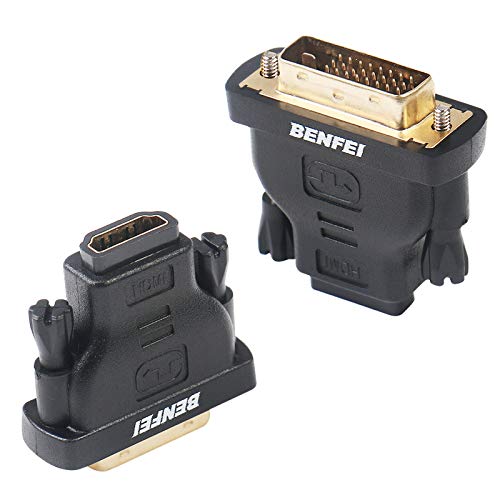


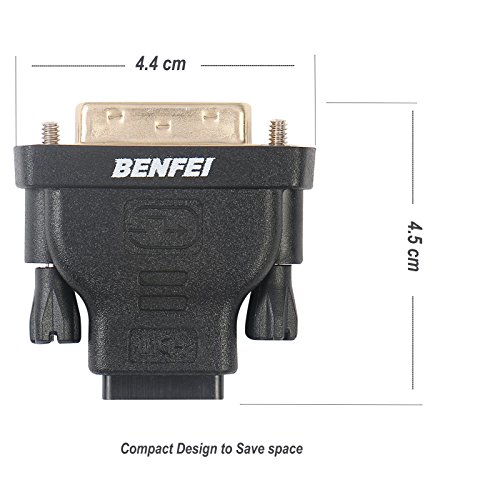

- The bi-directional HDMI-DVI adapter is a great solution for connecting from a computer with DVI port to a monitor, HDTV, or projector with HDMI port, or from a computer, Blu-ray player, TV box, or game console with HDMI port to a monitor with DVI port. An HDMI cable (sold separately) is required
- Convenient 2-pack DVI to HDMI adapters for use at home and carry on the road for office monitor or projector connections
- The DVI to HDMI adapter supports video resolutions up to 1920x1200 and 1080p (Full HD). Audio must be transmitted separately
- Sturdy DVI-D to HDMI adapter with gold-plated connectors resists corrosion and increases durability
- DVI-D to HDMI adapter with grip treads helps plugging and unplugging ; hand-tightened screws provide a secure connection
-
Information
-
Twitter
-
Pinterest
-
Youtube
-
Facebook
Robbie Dyches
Converts a DVI graphics card plug to HDMI 60Hz-75Hz Monitor.
I was using one video card with two monitors. The video card I was using has one DVI-I port and one HDMI. So one monitor hooked up to HDMI and one to DVI. But I had a major power surge in the building and it killed one of the two monitors. So I had to buy a new monitor. But I couldn't find very many choices of monitors that still used DVI. I frankly like DVI much more than HDMI but since HDMI has pretty much replaced them in the TV and monitor business, I decided to just get a monitor that had only HDMI plugs. But since my video card had only one HDMI, I had to convert the existing DVI port on the card to another HDMI one. One of these two adapters I will keep as a spare. The other adapter did convert DVI to HDMI really easily and worked up to the max timing my monitor can do (75Hz). The images look just as sharp and good on HDMI as they did on DVI. But there's a catch. No audio is passed through this adapter. But since I have my audio pass through the other monitor on the actual HDMI, I still have my sound on that monitor. So I didn't need to hook up separate sound systems. But if you are going to use these adapters, just know you will have to hook up a pair of speakers to whatever motherboard or sound card you have installed. I'm quite happy with these adapters. They allow my combo DVI-I and HDMI video cards to work like they are all HDMI ports (except for the missing sound pass-through). I highly recommend these for converting a video card DVI to a connector that any HDMI cable can attach to. I did not test to see if it would convert HDMI to DVI as I no longer have a DVI monitor to test this on. So I can't attest to this adapter being able to convert in both directions.
Mish Khan
Low cost alternative to DVI
Since today's TV don't have a DVI interface I needed an alternative to purchasing a new video card. I made sure to pick a DVI to HDMI converter. This unit was high on the list so I purchased them. Arrived promptly and works like a charm, plus the female HDMI connector makes using my existing cables a cinch.
Ishaz Fwie
perfect for connecting my HDMI cable from my CPU DVI output to my TV HDMI input
This adapter was perfect for my needs, is well made and I can happily recommend it. I'm connecting via cable the output from a spare DVI monitor port on my computer CPU to the HDMI input on my TV. I selected this item and it's done the job exactly as desired. Pros: 1. Well made materials. 2. Solid connections (screws, DVI, HDMI slot). 3. Inexpensive (even though I only needed ONE not two, thank you, but this was still the best bargain). 4. Signal remained strong. Overall, the correct choice for me.
Robert Ferguson
WORKS GREAT.
DOES EXACTLY WHAT IT SHOULD. GOOD PRICE FOR TWO. I ONLY NEEDED ONE BUT AM GLAD TO HAVE THE SPARE. COMPACT AND NOT BULKY. THE DVI OUTLET ON MY LAPTOP DOCKING STATION IS CRAZY CLOSE TO THE DISPLAY PORT, HAD TO SHAVE A LITTLE PLASTIC TO GET THINGS TO FIT. ITS NOT DUE TO THIS ADAPTER, IT IS VERY COMPACT. ITS MY DOCKING STATION THAT HAS PORTS SO CLOSE ITS CRAZY. USED IT TO CONVERT DVI TO HDMI TO CONNECT TO A HDMI KVM STITCH. WORKS PERFECT AND ALLOWS HIGH RESOLUTION VIDEO TO PASS THROUGH FLAWLESSLY.
Jacinda Lynn Walker
These are built well, and they work!
I needed several of these for the re=wiring of my computer-video array in my office, as I am trying to shift everything from VGA to digital, and I have a lot of equipment that only has DVI interfaces, either on the computer end or the monitor end. The only issue *I* had was on some of my older video cards that had adjacent DVI jacks, and I had to cut a sliver of the rubber off of the adaptor in order to get both adaptors to seat completely and screw them down.
Monalisa Basu
Worked great to convert an old dvi/vga monitor to hdmi
I used this to connect an old dvi/vga monitor to a wired HDMI output. I essentially used this to connect the hdmi output of a game console to use it with an old gateway monitor with no HDMI connection. Worked fine.
Erin Smith
Solid Product
You get a Solid Product that is not overpriced and does exactly what it is intended to do. If you need a DVI to HDMI adapter you can't go wrong with this one. Having 2 monitors on same PC is new to me and it's pretty cool. So if you need one or just to try it out, the price is very good, considering you get 2 of them for the low price.
Rick Omeasoo
Works Perfectly - Bi-directional
I used this adapter for two separate applications replacing VGA cables, one from an older desktop PC with no HDMI (but an DVI plug) to brand new monitor HD, and one from a newer desktop with HDMI but only DVI on the monitor. Works flawlessly. Great value. Thanks
Richie Cameron Gomez
Works
Allowed graphics card dvi-d port to connect to a dvi-i to hdmi converter plug for my hdmi display. Note you can't convert a digital dvi-d signal to analog without an active converter. Just needed my digital dvi-i to hdmi converter cable to plug into my graphics cards dvi-d only plug (missing the 4 analog holes so you cant plug it in)
Jennifer Krupa-Hawk
Perfect sync, easy peasy
Works perfectly for new desktop configuration using Samsung Note9 DeX Pad docking station with HDMI output to 2010 model LG monitor with DVI-D input.