




- ❤ USB PORT EXPANDER & LONG CORD: There are 7 USB Data Transfer Ports, which makes it very easy to connect Multi USB devices to your PC, laptop simultaneously, such as keyboard, mouse, card reader, mobile HDD, webcam, mp3 players, oculus, etc. And this USB hub comes with 100cm Built-in cord, enough length for you to arrange your cables.
- ❤ 5Gbps HIGH SPEED DATA TRANSFER: The USB 3.0 Hub extension provides up to 5 Gbps data transfer speed, which means you can transfer an HD movie in seconds, and it is backwards compatible with USB 2.0/1.1. Every port supports Hot Plug.
- ❤ UP to 4 SMART CHARGING PORTS: This USB expansion hub with 4 fast charging ports allows to charge cellphones, tablets, cameras, speakers and more. The most important thing is that it could automatically detect your device's charging protocols to deliver the optimum charge at speeds up to 2.4 amps per port. CHARGE FASTER.
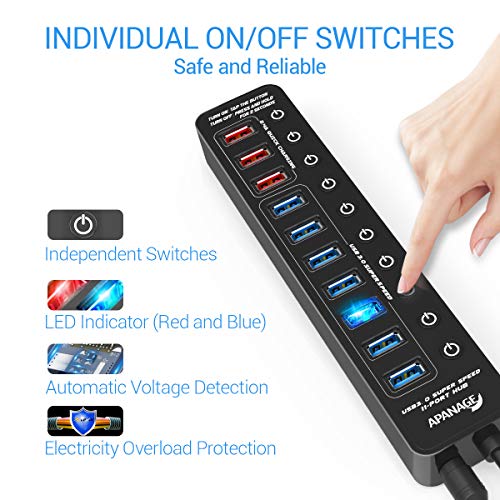
- ❤ INDIVIDUAL ON/OFF SWITCHES: As a powerful USB splitter and gadget manager, this 11-port USB hub has built-in on and off switches with led indicators for each port, being able to turn on or off the separate USB port without unplugging the equipment, blue LED lights let you know the working status easily, each switch remembers the on/off config.
- ❤ WIDE COMPATIBILITY: This powered USB Hub is compatible with the most operating systems: Windows XP/Vista/7/8/10; MacOS-8/9/X, UNIX, Linux and offers fast PLUG-AND-PLAY installation.
-
Information
-
Twitter
-
Pinterest
-
Youtube
-
Facebook
Rochelle Gooneratne
Perfect for me!
With the amazing amount of devices fighting for your USB ports this hub is fantastic! Regarding performance, my iPad Pro has always been very temperamental when it comes to charging. A lot of USB ports, even on my brand new laptop, don't supply enough power to charge that thing. Any port on this hub, not just the charging ports, will charge my iPad! And what's up with all those ON/OFF switches, that may seem like overkill. However, that is a feature I have come to love. Turning off unused ports eliminates the pretty bright LED associated with each of those ports. Better yet, you can leave devices plugged in without worrying about constantly charging them. You can leave the device plugged in, just shut off the port it's plugged into and let the device run on it's battery until it needs recharging. Then simply push the button and it's charging again. This USB hub was the last step in my desktop setup. At home the notebook is shut and placed in a stand way back on the corner of my desk (change "Lid Close" action to "Do Nothing" when plugged in). The only thing that plugs directly into my notebook at home is; 1. the power cable 2. one USB C thunderbolt to my Display Link hub 3. one USB 3 to the 11-port USB hub Pull three connections and my laptop is ready for the road. Whereas at home on the desk, I have two external 21" monitors (three really but I hardly count the little 7" Lilliput I've had for ever), a full size wireless keyboard and mouse, Hard wired Ethernet, external speakers, external Logitech webcam (remember the laptop is shut so the built in webcam is off), my Apple watch stand w/charger, my iPad stand w/charger and of course my iPhone stand w/charger, my weather station, my digital picture frame, and other assorted devices to charge or sync. All of that and I'm only using two ports on the notebook Between the notebook, display link hub and USB hub I know have 20 USB ports, I think I'm covered for awhile.
Toukta Manibod
Need Ports and able to charge that USB device? Read on!
I purchased two of these devices to meet my needs for actively connecting my laptop and PC to many different USB devices and the ability to charge some devices that can be charged by USB. Well I found this to be an excellent addition to the technical collection of items I own. These devices enable me to clear my desk of some clutter and cables, because now I can consolidate my cables at one location and direct them to the device (laptop or desktop that I want information to be directed). That means your external USB drives, Scanners, your cloud device or anything else that you might want to control or access from your PC or laptop. The nifty thing is that you can turn off or on the individual connected ports at this USB 3.0 Hub. Lets say, you think you have an external hard drive that you may have a bug and you want to isolate it until you can find a solution or you are ready to perform a scan, but you do not want to take the device down power wise. Just press the hub button that corresponds to the drive and turn off communication till you are ready for what every you plan to do. The device is now isolated! Overall very pleased with the speed and connectivity and that benefit of extra charging capabilities. 11 Ports USB Hub Splitter (7 High Speed Data Transfer Ports + 4 Smart Charging)
Merlys Francis
Great Hub.
I have it at to attached to my Surface Pro 4 port extender and it works perfectly. All my USB storage device work AND as an added bonus, I plugged in my USB fan into one of the power ports and it blows a quiet steady stream of cool air against the back of my SP-4 machine. The on/off switches are ideal for fan use. All the other switches are left on for everything else (Printers, Scanner, Label Maker, Old Disk Drives, Thumb Drives and an SSD.) It's a teriffc product!
Malcolm Glover
Has the Power to drive it all, individual buttons very useful.
I have previously purchased USB hubs that claimed to have enough power to drive a few external hard drives. This one really DOES. I've hooked up all 6 of the drives I own, and charged batteries and phones off the other ports, and it just works! No sign of power overload. Some of these drives were not USB3.0, and that din't phase the hub at all, nor did it impact the speed of the drives that were USB3.0. Alas, I do not own enough USB3.0 drives to test the combined throughput of the hub, but all the drives performed as fast as they did when plugged directly into a USB3.0 port on the laptop, so I'm happy with the total throughput. As an aside, Windows itself isn't really all that happy about that many drives (2 internals + 6 externals). The external drives go to sleep when not used, and when you click on the recycle bin Windows wakes them ALL up to check for all items in their recycle bin, so it can take a while to get the bin to appear. This is obviously NOT a fault with the hub. In fact the fact that the hub has the individual power switches makes it really easy to just leave all my drives physically plugged in, but powered off so Windows doesn't bother with them. When I want to use one of the drives I just click the button and that one drive is then connected. I just wish I had more drives or another computer or some reason to buy another one.
Jodie Roll
Great Product. I’m ecstatic.
I love the long cord from the usb end attached to the tv, I have a 50 “ smart tv that is approximate two,and a half feet above the bottom of the tv space of the specially built entertainment center, and it lays flat on the bottom and within easy distance for me who has disabilities to comfortably add and remove flash drives. I have five 32gb drives currently attached and they all perform wonderfully. The average size of the movies is about 3-1/2 gb, and the television shows between 1-1/2 and 2gb. I purchased thos hoping for the best when my apple tv began not connecting to my wifi, and would have to wait days for help to unplug it and attach it to my computer to reload the apple tv software. Better than spending $150 or more on a new apple tv.
Ajit Ojha
This is exactly what I was looking for...
I am a writer and use a lot of flash drives. I also have devices that need charging frequently. What I like about it the most is that I can either use it USB when my computer is on or use the electrical plug-in when my computer is off. When I need to use it, where by USB or electrical, every port is "off" until I want to use it to either charge a device or download something to a flash drive. I stabilize it in place with a sticky strip. I also have a cord holder on the end of my desk to hold 6 inch cords. By the way, someone in reviews said you cannot turn it off but you don't tap it to turn on or off, you hold it a second.
Sonia Quintiliani
Does not work with disks
This USB hub works well. Followup -- Although I had some trouble with hub or disk a week ago, after exhaustive tests I find it's working perfectly. Changed the review to 5 stars. Not sure whether the disk or whatever was acting up, but now all works well. Good support.
Angelika Ali
Works great
I have an older Gateway desktop. It is older but I built it to be ahead of its time as far as Ram and CU's and it runs great, the only deal is that it only has two USB ports on the front and I use multiple devices that need ports, including two different mice for different systems, head set with microphone, you get the idea. I needed more ports, in addition I wanted to be able to charge the mice while I was using devices. I have had this Hub for about a month now and it works great, just want I needed. Just make sure you actually turn the "charger" port on (press the button) when charging a device. Compact for the amount of ports. I have no complaints whatsoever, looks very space age with the lights :) Appeals to a techie like me.. Recommend if this is your need. Currently I am using 6 of the available ports. 5 of the blue and one of the red for changing. Really kind of love it...
Patrick J Dougherty
A Lifesaver!
I was just given an HP All-In-One which, for whatever reason, has a paltry 4 USB ports. This is not even enough for my mouse, keyboard, and 2 externals hard drives. As you can see from the picture, I am pushing this thing to the max and it works perfectly! Fantastic product. Highly recommended!
Fi Fi Jamieson
Works great and includes nice features
So getting a hub that included that many ports was a bit overkill for what I needed, but I just wanted to have the extra ports in case. It's slightly more expensive than what I would've wanted to pay but it really works well. Pros: -file transfer speeds have been fine -ports can be individually turned off -lights easily help you differentiate data ports from charging ports Cons: -Plastic material is a fingerprint magnet Found no issues with this hub. It has offered me everything that I needed. Will update this review if issues arise.