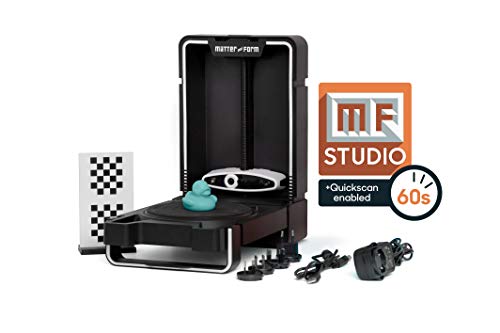
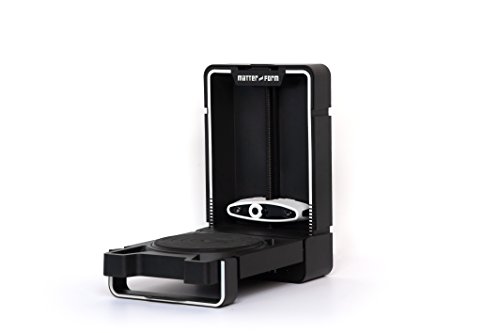
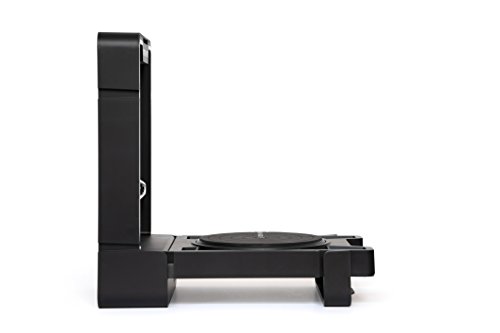


- Designed to transform beginners to professionals. The Matter & Form V2 3D scanner +quickscan is the next evolution of desktop 3D scanning
- Equipped with Matter & Form mfstudio +quickscan software. The V2 allows you to get complete geometry in as little as 65 seconds
- The perfect 3D printing companion. The V2 is designed to integrate seamlessly into your workflow. Simply scan, mesh and Export your creation, to be used with any 3D printer in the world
- Get up to 0.1 mm accuracy with the precision of eye-safe red lasers. Supported on both Windows and Mac, with multiple export capability for 3D printing
- Sleek, foldable design allows you to keep your scanner and workspace neat and clean. An integrated case protects both the turntable and the camera. Simply fold up the base When not in use
-
Information
-
Twitter
-
Pinterest
-
Youtube
-
Facebook
Kaitlyn Shepherd
Great tool for STEAM.
First off, I want to say I love this scanner. As a social studies teacher, I’ve been working to integrate my curriculum with STEAM (as opposed to STEM) concepts, and I wanted a tool that would help students maximize cross-disciplinary learning. For example, if I’m teaching about Roman Empire architecture, instead of having kids throw a poster together, or build an arch bridge out of balsa wood, I can use this scanner to get them involved with a real tech-tool (that’s actually used by Industrial Designers and engineers) which they can use in conjunction with a 3D printer (and/or, as I found out, with Photoshop). That way we can bring history into the science room, and vice-versa. (I can also share this scanner with the art teacher, science teacher, and anyone else who can find an application to maximize cross-departmental collaboration.) Second – I do want to note that it takes a little practice to get down a good method for scanning. Once you get the concepts, tips and tricks down (how to properly set the laser for good geometry capture, how to clean and combine scans, etc), it’s easy to get great results. Even though that stuff is in the manual, Matter & Form offers live tutorials (I’ve never encountered another company that does this) which is perfect for people like me who aren’t big “user manual guys”. Getting personally walked through a couple things was a big help. (I highly encourage M&F to pop up a couple videos on the nuances.) So, all in all, it’s a great piece of equipment, and has really helped bring other disciplines into my classroom. Students LOVE working with it, and I get to bring my pedagogy into the 21st century. Thanks, M&F!
Vicky Henry
Almost Returned it- but now it’s a keeper!
I have a huge amount of experience with 3-D printers and wanted to add a scanner to my arsenal I have used the maker bot digitizer in was familiar with low resolution and performance of it and was looking forward to the matter and form v2. The first two days of using it I was a bit frustrated but after doing a conference call with Trevor from the company in going through some of the intricacies I was able to learn how to use it correctly. I think that without the training I definitely would have returned it because of a disappointment I thought that would’ve been in the resolution however I know this is not the case simply that the scanner needs to be finessed a little bit calibrated correctly and it likes oh Paik subjects to scan if you can work those things out this is a valuable tool in definitely worth it it’s actually a five star product I put it is four stars so you would get this information before purchasing. Having quick scan is absolutely a dealmaker- It is worth it for the time savings alone but it in terms of the actual performance seems to be great. I can see that this will now be a valuable tool in my rapid prototyping business.
Mirza Lipi
Good price for the functionality.
This was my first entry into 3D scanning and I was skeptical. The Matter and Form *seemed* like a good choice, since it has good resolution and the price is better than the other options. I decided to take a chance and if I didn't like it I'd just return it. The software doesn't come in the box, you have to download it from their website. I don't have a CD drive in my computer anyway. I didn't know where the power button was on the scanner. It's the logo. Kind of different but OK... I was able to calibrate and to get a good scan of the toy duck it comes with, but the scan didn't have the top or bottom. So you have to scan your object a few times and combine the scans together. This was fairly easy to do in their software. Each scan only took a minute, cleaning up the little bit of noise in each scan took about a minute, then combining them was almost instant. I did spend about an hour playing with different ways to scan the duck before I really liked the combined results. I was able to mesh and get a nice STL file for my printer. They have a cloud service bevelpix to upload the scans as well. I haven't checked it out yet. I also scanned this sea shell because I wanted to test these 0.1mm claims. I did this one with "quickScan". My time scanning the duck paid off for the shell. I got the two scans I needed and this result (see picture) in 8 minutes. My conclusion: 5 stars. I like this machine. It works and it is accurate. I also enjoyed using it. The pictures are my duck scan and print and my sea shell original and scan.
Marissa Simons
Amazing for the price
This little scanner blew me away. I've used professional scanners worth $40k and this one is better for the objects I scan. The software is less complicated than others I've used, but there are enough options and controls so I can tweak each scan to get the best results. Some forgivable bugs, but more enjoyable to use. Just a tip, the right lighting is key. Make sure you scan away from windows and bright lights.
Jennifer Rouse Wilkinson
Unlocking your potential from a beginner to professional in minutes
The Matter & Form V2 3D Scanner + Quickscan will take you from a beginner to professional in minutes The MFStudio software is easy to use and will help you Unlock your potential this truly lets you fly through projects with ease.
Sharath Sukumar
no lo cambio
He usado otros escáners sin embargo este es el mejor por su facilidad de uso, su exelente servicio al cliente y la calidad de sus escaneos. no lo cambio, a menos que sea el V2 de la misma marca.