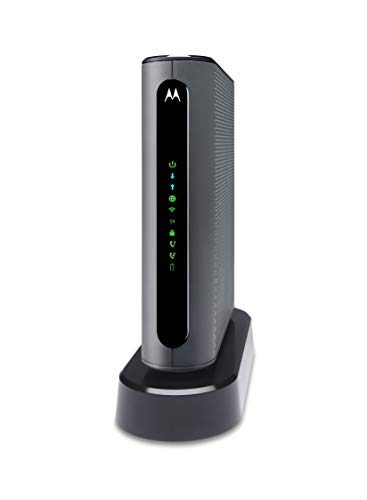


- Three-in-one 24X8 DOCSIS 3.0 cable modem plus a built-in AC1900 Dual Band (2.4GHz and 5GHz) WiFi Gigabit Router with four Gigabit (GigE) Ethernet ports, plus two XFINITY Voice compatible phone ports. This product is approved by Comcast for Xfinity Internet and Voice, and recommended by Comcast for XFINITY internet service speeds up to 400 Mbps. A Broadcom cable modem chipset provides security from Denial of Service attacks.
- REQUIRES COMCAST XFINITY INTERNET SERVICE. Approved by and for use with Comcast Xfinity and Xfinity X1. ELIMINATE CABLE MODEM RENTAL FEES UP TO $156 PER YEAR. THIS PRODUCT WORKS ONLY WITH COMCAST XFINITY.
- Built-in high-speed WiFi router with AC1900 WiFi and Power Boost provides Internet access for WiFi devices including smartphones, notebooks, tablets, game stations, HDTVs, Amazon Echo, Google Home, Chromecast, Roku, Amazon Fire TV, and AppleTV. Four 10/100/1000 Gigabit Ethernet LAN ports provide wired connections to Windows and Mac computers, HDTVs, game stations, streaming TV devices, and other Ethernet-capable devices.
- Wireless Power Boost adds high-performance WiFi power amplifiers to boost the wireless signals to the legal limit, giving a significant boost in speed and range. In addition, AnyBeam beamforming at both 2.4 GHz and 5 GHz frequencies focuses the signal on wireless clients to further enhance performance and range.
- Integrating the cable modem, router and telephone ports creates a more reliable connection that reduces unwieldy wiring and power adapter clutter while conserving desk space. The vertical design further minimizes shelf space, improves cooling, and extends product life while looking great in any home or office. The backup battery option, Model 98250, which allows your phones to make calls for 8 hours on standby after power loss, is not included.
-
Information
-
Twitter
-
Pinterest
-
Youtube
-
Facebook
Fozia Amjad
YOU STILL HAVE TO CALL COMCAST!!
I bought this because Comcast increased their monthly rental fee from $11 to $13 as of 1/1/2019. I always had a gateway unit (modem & router in one unit). I know most techies said to buy a separate modem & router. However, I never had a problem with the gateway unit and I didn’t want to have 2 pieces of equipment in the house(my personal choice). We also don’t do any gaming or things like that. I also have the triple play package with Comcast (internet, cable & phone). I could care less about the landline but it’s cheaper to have the triple play. SET UP - it says it’s an easy set up and takes about 15 minutes. That’s true HOWEVER there is NO way getting around not calling Comcast!!! You can’t just switch the cables and phone line and click a few buttons. You HAVE to call Comcast so they can register the unit and connect everything on their end BOTH internet and phone line. You can NOT do that without calling them no matter what these reviews say. I called early in the morning 7:30am because I didn’t want to be on hold forever like you usually are when calling Comcast. I was fortunate and got two women (one for internet and one for phone) who knew what they were doing and made the process super easy. I was dreading having to call Comcast!! When you call, press the prompt for internet service first. Get that set up. HOWEVER, after that’s done check your landline. You won’t have a dial tone. Tell the Comcast agent you don’t have a dial tone because the internet person does not know this and figures they are done. They need to connect you to another agent who handles the phone connection. CHANGING WiFi name - After you have everything connected and are done with Comcast, it’s super easy to change the names of your networks if you want to do that. I am no techie but I didn’t want the network names to be what comes with the Motorola unit. I was apprehensive at first thinking it would be a process and another hour of my time. On page 6 of the Motorola instruction booklet you will find the instructions. It took all of 2 minutes to change the network names. HOWEVER, when you do this, you will have to log back in to your internet on all your devices AGAIN and provide the password. No big deal but just be aware that changing the network name kicks you off and you need to sign back in Overall, I am really pleased with the unit and getting it connected. I just want people to know YOU HAVE TO CALL COMCAST TO COMPLETE THIS PROCESS, REGISTER THE DEVICE AND GET CONNECTED(internet and phone). Good luck.
Nadine Dauphin-Simmons
This Modem/Router is worth a 10 star rating !
I was blessed to find this Modem/Router combo, it solved my connection problems within 15 minutes, easy to install, and connected without even calling Comcast, or even connecting a USB cable, as soon as I plugged it in and turned on my computer, it automatically directed me to the Comcast website, all I had to do was click on the connect icon, and voila, I was up and running in seconds, same thing with my phone, and still haven't called Comcast. I'm going to hang on to their Gateway Modem for a few days, until I'm positive that this new Motorola Modem is going to work out, before I return their modem. I went through hell for over a month, after 3 service calls, and numerous calls to customer service, and they still couldn't figure out what was causing the connectivity problems, about the only thing I can figure, is that I have too many devices for their Modem to handle.....This Modem is truly a Godsend, Thanks Motorola for building such a fine piece of equipment.
Nancey Ali
If You're a Comcast Customer with Telephone This The Modem/router For You!!!!!
Installed very quickly and activated on the Comcast network in about 10 minutes. Checked my account when the modem was functional and the equipment list showed my new device and the correct serial number. VOIP took about 1/2 hour to become fully functional but that is the nature of VOIP calling because ANI/ALI table updates takes awhile. One minor issue is the technical documentation - should have a list of todo's once the install is complete and a step by step guide on changing default passwords to deflect hackers. It is minor since they strongly encourage it be done in the docs. Just not clear instructions. All in all beginning to end was about 40 minutes and I have a safe and secure gateway running 10% faster than my Comcast device. And BTW the return of the rental unit was painless and quick.
Susan K Linton
Money saving Router to replace xfinity rented unit.
Received the MT7711 cable modem / router in the afternoon. Had time the next day to install and completed the task in less then a 1/2 hour. It took a couple of attempts to log in the Xfinity site. The router works great, had 7 devices connected and no slow down.
Sieku Chiri Sambu
Very Easy Install
I got the Modem on same day I ordered it. Unplugged the old rented one from comcast and input this one. Took about 10 mins and this started to work. Tested phone service and it works, along with fax features too. I bought speeds for 250mbs and finally with this modem, I'm hitting the speed I bought. With this I'm also, saving money on rental. Would recommend to anyone who has comcast and has a phone service, to connect this modem.
Yağmur Ceren
Very happy I got rid of the rental modem/router!
I noticed my speeds were far below my internet plan (Extreme 250) and I did some researching and discovered there is a hidden network that runs along with mine. It's Comcast home security service and although I do not have that I found it annoying the network couldn't be deleted or disabled. I suspected it caused the decrease in internet speed so I bought the Motorola MT7711. It was very easy to set up and the hidden network is gone and my speeds have increased considerably. The only con I found is in the Motorola Modem log in site there is no option to see the list of devices with access to the router. Xfinity's modem site allowed me to manage them (ex. remove).
Kristen Youngblood
perfect replacement for comcast Xfinity modem
Easiest install I have experienced. Merely connected it to the cable line and powered it up. My PC instantly opened the Xfinity website and I merely entered my Comcast username and password. Within a few minutes, I was back on line. DONE! My download speed went from 250 mbs to 295! One thing, it makes it so much easier reconnecting all peripherals (computers, iPad, Nest, etc) if you use the same name and password of your previous Wi-Fi network. Best thing was when I returned my previous modem to Comcast. While waiting in line, I overheard the teller saying to another customer that current modem rentals are $11 and will be going up to $13 on January 1 (Bonus!!! I will more quickly make a return on my new modem). Then, when i got to the front to return my modem, the teller scans it and asks me where is my new modem so they can register it. I told them its already connected and working including the phone line. She starts telling me that without registering it, once they remove my current modem, I will lose all connectivity in the house as the new modem is not yet registered. I assure them its been working fine for the past 5 days yet they continue to ask if i want to proceed with returning their modem, which I do. They give me a receipt and a paper with instructions to call Comcast to register the modem when it stops working. Once i got home, the modem is still working PERFECTLY without need to call and register it. Quite obvious to me that Comcast wants to steal every cent from their customers including from renting equipment, going as far as trying to scare me into keeping their modem and paying them for it.
Gary Jimenez
Noticeable difference in speed
Like others I noticed the rental price increase this year and figured it would pay for itself in about a year and a half. Hopefully it will last longer than that. Anyhow, after I hooked it up and registered it on Comcrap I noticed a significant speed increase while on the internet. I did some speed tests before and after on various websites but won't bore you with the results since I don't know about the accuracy in the first place. I hate buying stuff like this but hate renting even more so it is what it is. I can't compare beeps and squeaks like tech junkies can but it works better and will cost less in the long run. Works for me.
Ingrid Viaene
Easy Installation and Great Performance
I finally decided to bite the bullet and buy a cable modem/gateway to save on monthly modem rental charges from XFinity, and I'm quite happy with the result. I was bracing to suffer through agonizing hours of installation glitches and excruciating calls with customer service (knowing my luck with these kinds of things), but all I had to do was hook up the new MT7711 the same as for the modem/router I was replacing, plug it in, and turn on my PC. The XFinity activation site popped up automatically when I clicked on my browser, and the activation directions were easy to follow. After the activation steps were completed, I needed to reboot the modem once to get full internet access (i.e., unplug the modem, wait 10 seconds, and plug it back in). After that, I was connected in just a few minutes, and everything worked fine. I don't have many wireless-connected devices (additional PCs), so for each of these devices I went ahead and used the new network name and security key/password provided on the modem's label, and everything was connected and operational right away. My wireless signal strength is as good as or better than it was before, on the devices I checked. All of my phone and internet services work great. For me, the total installation time from taking the modem out of the box to full connectivity and operation of all devices was about 30 minutes, which exceeded my wildest hopes. I didn't need to call Comcast/XFinity at all. The modem also comes with a Quick-Install guide that's very helpful, if one needs it.
Sarah Quintana Castro
Comcast Replacement ... 5 Stars
I was a little apprehensive to install this modem gateway. Not too computer savvy. However, did my homework read up on the Motorola MT7711 and waited its arrival. After Comcast raised its rental fee to $13.00 per month ($156 annually), it was time to bail! Installed the gateway per the Motorola quick install instructions and bam, it recognized everything. It was totally operational in maybe 10 minutes. Comcast's online instructions for the install were spot on and very user friendly. I waited a couple of days to make sure all was good and returned the Comcast equipment as required. The MT7711 is a gateway with 2 telephone lines - if you need that, I did. It also includes instructions to set up a "Guest" wireless sign on so you don't have to worry about personal info when guests want to use your internet. I would definitely recommend this modem gateway. Thank you ..... Motorola!