
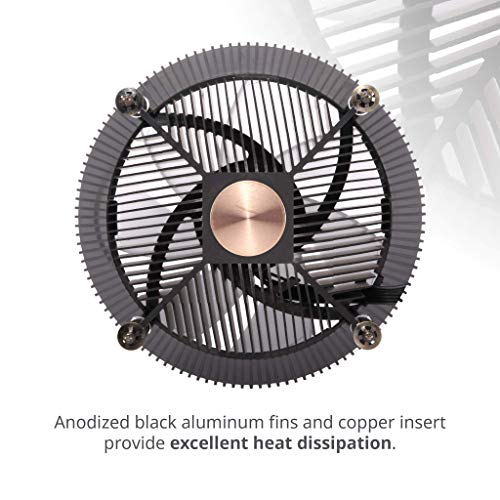



- Compatible with Intel LGA 115x sockets; Air flow 37 CFM; Noise level 25.0 decibels
- 60 millimeter super thin design perfectly fits all-in-one systems or limited form factor cases.
- Anodized black aluminum fins + copper insert provides excellent heat dissipation.
- 120 millimeter diameter RGB fan ready for more than 16.7 million color options
- Compatible with Asus aura sync, Gigabyte RGB fusion, MSI Mystic Light Sync, and as rock RGB LED.
- CPU socket support - LGA1156, LGA1155, LGA1151, LGA1150
-
Information
-
Twitter
-
Pinterest
-
Youtube
-
Facebook
Mehboob Ahmad
Locked i3 or i5 --- JUST BUY THIS!!!
I build budget PC's and use this cooler to keep my costs down, performance up and add a little cool; with some nice RGB! Runs quieter than stock! Runs at a lower temp than stock! The RGB is nice and the controller that comes with the cooler is a nice touch, especially since alot of the cheaper motherboards don't have RGB headers. ...looking at it closely, you can tell its a cheaper cooler, but for <$20, IT IS A CHEAP COOLER! I've used this cooler on an i5-7600, i3-8100, i5-8400 and an i5-9400f. Each time, I set a fan curve to; 20% @ 30*, 40% @ 60, 60% @ 75 and 100% @ 95 and have never had an issue! Fan runs quite and I've never seen any of the CPU's get over 65*!
Gina Ordiway
A really nice cooler for NON K CPUs recomend for 3rd Gen and up though
Installing was simple, but you need to take it slow and watch where the screws are at or it could scratch the PCB. My old cooler is a Noctua nh-l9i so I will compare from it for this review. Cooling in idle is 34c the same as the Noctua in Gaming the temps get no hotter that 65c (non CPU dependent games avg. was 56c) same as Noctua. Torture Testing with Prime95 for 15 minutes did get the temps on some cores to go to 78c which is 5c hotter, but well below the 100c threshold for the I7-8700 used so that is good. Fan noise is actually just a tad noisier when compared the Noctua which surprised me the most in a good way I was expecting a louder fan but pretty quiet for a cheap cooler. RGB lights are bright for a 4 point lighting colors are good, but for RGB Fusion Motherboards you will need either a 2.0 board or a controller hub for effects or you can use the included hub for limited effects. Height issues you have 45.5 mm clearance for RGB RAM, or tall heatsinks anything above 36 mm will require you to remove heatsink fist before installing or removing safely. With the temps I got in a well ventilated case I would only recommend this for CPUs that are not overclocked (non K mostly) so 85W TDP (65W for ITX Builds) CPUs (third gen or above) if you don't want the CPU going over 90c. I bought this for the RGB lighting and the price. This is overall a great product for the price, but as said earlier take it slow with the install and watch the screws while installing so you do not scratch the PCB.
Sharon Tribe
Does the job much better than expected
I needed an Intel cooler that would work with the OEM backplate, as I didn't want to remove the motherboard on a system still under warranty. The OEM cooler would barely run until 90C then ramp up like crazy for a moment, then do it all over again. This is on an i7-8700. I had an aio liquid cooler installed for a while, but also didn't want to run the risk of leak on a warrantied system. I didn't expect much out of this small cooler, but it has gone way above my expectations. It idles around 30C, getting up to 55C under load. Not bad at all for such a small cooler that just works. This is with the paste pre-applied. I can't really comment to how loud it is, as I have 3 fans going so it's hard to tell. This is worth a try for anyone needing a simple cooler, no crazy mounting changes. Lenovo Legion T530.
Holly Beckwick
Great cooler with lots of color for lower powered CPU/ i5 9400F
I ordered this as an inexpensive replacement for my I5-9400f and stock Intel heat sink. It was super easy to install. Self sticking back plate and 4 pre-secured screws later and its on. Comes with paste installed already and cools the cpu to 29c at idle and 55c under full load. Great price to performance ratio and looks great. I did not use the RGP switch that it comes with I simply plugged it into a RGB header on my motherboard. If it lasts a few years then this is amazing!
Carmen Bxc Loyd
The best air cooling is going to get. A+++
I'm not running any kind of overclocked monstrosity. I just have a simple, sleeper build. Basically it's a consumer-grade Acer mini tower with a micro ATX compact form gigabyte motherboard, i7-8700 processor, 64GB of 2666Mhz DDR4, and a 2TB NVMe drive running things. For graphics I'm running a Nvidia 2070 Super card. It's a lot of horsepower in a very tiny case so cooling was very important, and there was just no room for a water or hybrid setup. I ultimately decided on this cooler based on recommendations from other friends of mines with compact builds, and reading some of the reviews on here. I have to say I am impressed with the overall performance, package, and features available for a sub $20 purchase. the design of the fan itself is genius. You're basically running a 120mm fan that shoves air through a cowling into the heatsink which ends in a copper contact surface with your CPU. This is way Superior to aluminum because of the conductivity properties of copper. the design of the cowling allows air to not only be compressed but also flow faster on to the CPU for a larger and faster evacuation of hot air. With the physical benefits of side, this cooler is going to be a huge compliment to even the mildest aesthetic builds. You can practically just run this fan and it adds great lighting to the interior of your case. The included controller is fantastic for choosing multitude of colors, but it also comes with connectors that allow you to connect your own RGB controllers or connect directly to your motherboard. Right now I have my graphics card connected to the motherboard, but I plan on getting a splitter so that the cooler's controller can sync the lighting between the graphics card and the fan. If you're in a situation that you cannot afford water cooling due to costs, or in my case physical space but still need superior cooling, don't hesitate any longer and go pick this up. I've seen it range between $14 and $20 on here. I have already bought two of them and it's going to continue being my premier choice for air cooling whenever I need another one.
Neb Saitiam
Nice cooler for the money
I really like the build quality and price on this cooler (I paid $14.99) Mine came with the lighting controller module. The controller would probably be a little difficult to mount anywhere outside most cases, so it might have to be a "set it and forget it" kind of thing, but it has 3 controller buttons to vary color, frequency of color and strobe effect change. I'm using this in a custom case PC (inside an ammo can), I didn't actually measure the temp change if any compared to the stock cooler, but I'd say it was an improvement vs stock. It has worked well to cool both the i5-4570 used initially, and an i7-4771 swapped in later. The i7 ran a little hotter than the i5, but nothing has gotten the temps beyond the mid 60's with light to moderate gaming. Build is for a light duty portable gaming pc running a low profile MSI 1050 ti. Recommended.
Katie Lopez
Fits great in 2U server case with mATX mobo and GSkill RAM
Based on the listed dimensions of "120 x 120 x 60 mm / 4.7 x 4.7 x 2.36 inch" on Cooler Master's site, I was not confident at all that this would fit in my 2U case. I wasn't concerned about the height as much as I was the width - the available space I had between this motherboard's heatsink alongside the I/O panel, and the RAM slots didn't appear to be enough, but, as you can see from my pics, it fits well with a little room to spare! The main thing to remember is that the width of the top of this cooler is the 4.7 inches they refer to, whereas the section below it (the part that actually sits on your CPU) is about 3.5 inches wide, and gradually becomes wider as it rises up, certainly doable in practically any system setup I think. This is mounted on an mATX MSI z490M Gaming Edge motherboard with GSkill RAM in the 2nd and 4th slots. If I had 4 sticks of RAM, I could still fit them in next to this cooler. So, if your spacing seems tight and you're not sure about this cooler, I'd say go for it as it will mostly likely work. If you're tight on space on the back of the motherboard as well, this also comes with a minimalist backplate to attach this to, and is attached only with the applied adhesive strips so, nothing bulky on the backside either. Overall, compared to the stock intel cooler, this has brought my temps down by 10-15c on the high side when stress testing, and about 5c lower while idle. Cooler Master wins again! Love'em, great product.
Sarah McMurrough
For the price get it and try it. It won't disappoint.
From a stock. My temps are now more stable than before where when I'm playing games it would sometimes reach 100Celsius. overall it kept my temps at a low 39 high 50 and average of 40. Playing FFXIV while playing Remnant and running 2 instance of blue stacks. my highest temp is 69c. For install be warned the the RGB is controlled by a physical controller. There are probably some ways to connect the LED connector to the MB to control the RGB. Everything is possible now a days but my setup is I routed the wire outside the PC and daisy chained it to my desk RGB ^_^ Warning the Fan is huge and its blocking one of my memory stick ^_^
Yuuki Cross
Practically silent
This fan is so much quieter at idle than the stock intel cooler. I installed it on an 10100 Core i3. For less than $20 it's worth it to not hear the fan whine when the CPU has to do a little bit of work. I haven't run the system under continuous load, but this is a basic family PC and not meant for that anyway. It's a 4-pin, large fan, small-ish profile fan for when you want a step up over what came in the box. Also, for those who aren't interested in the color changing stuff, there are two wires so just don't connect the color signal one and you'll have just a basic cooler with a clear fan on it. It's perfect.
Gaurav Aghi
Best CPU cooler under 20$
Got this for my wife's old pre-built with an old Sandy Bridge i7 2600. Due for a repaste and figured I'd replace the stock cooler. Found this for 15$. Installation is like any other CPU cooler, you have to change the backplate to accommodate for the shorter standoffs. Be careful removing your old one as they are held in with 3M tape. Old cooler would get close to 80c during normal use, was definitely due for a repaste. Now after a bit of testing hardly wants to leave the 50s. Great cooler get it if you are restrained on space like my old prebuilt is! Update 100% load this hit 79C! No big deal shouldn't hit 100% load very often but crazy to think what this computer was running before the repaste at the high loads was more than likely throttling and not hitting full load to keep the Temps below 80....