



- The Anker advantage: Join the 30 million+ powered by our leading technology.
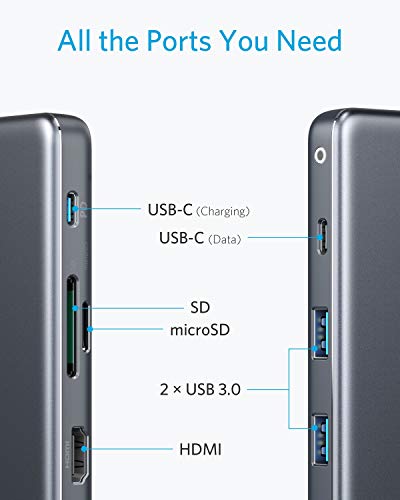
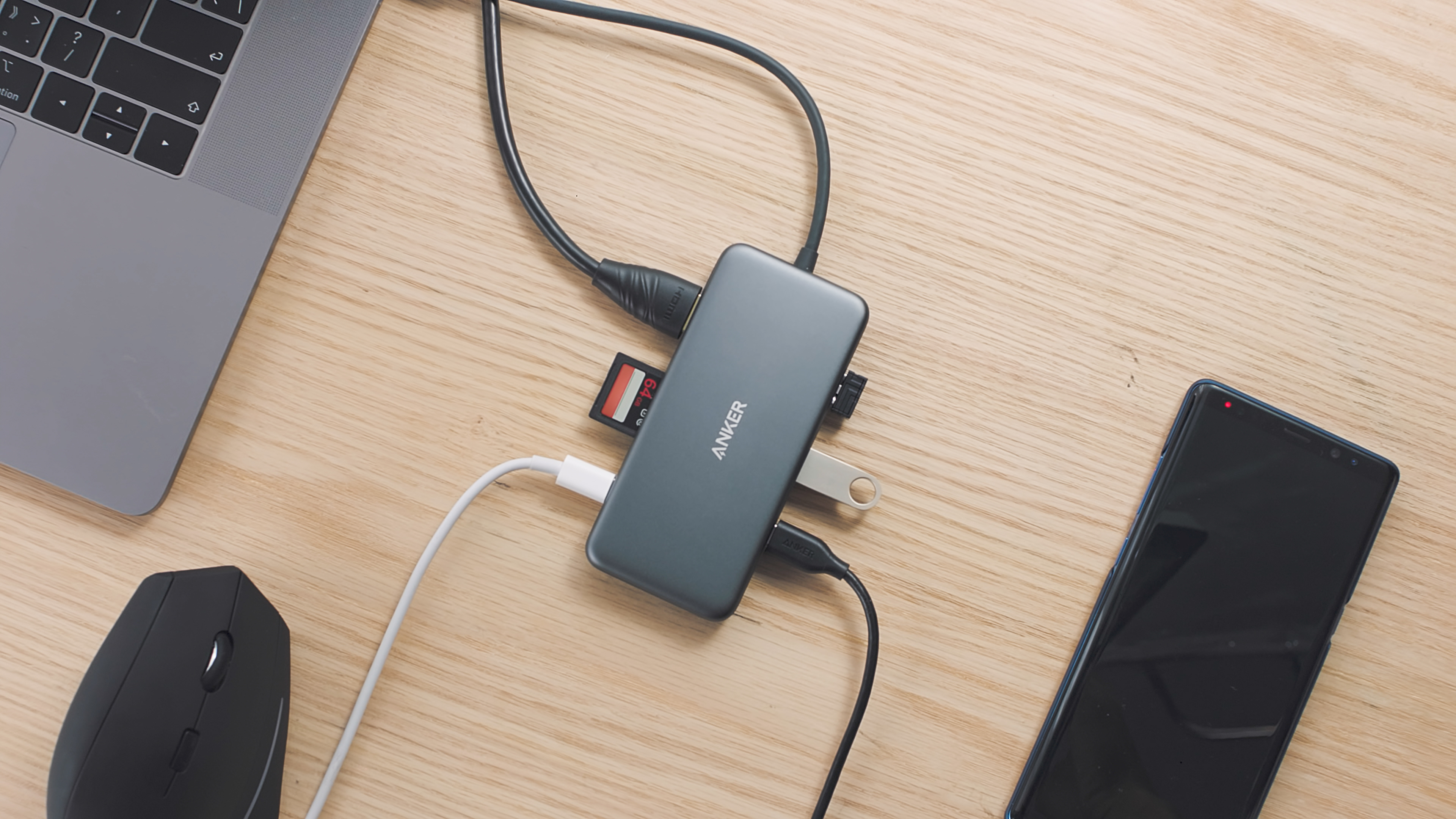
- Massive Expansion: get way more out of your MacBook's USB-C port, with 4K 30Hz HDMI, SD card connectivity, USB-A/ USB-C data ports, as well as high-velocity pass-through charging with power delivery.
- Superspeed transfer: transfer music, movies, and more in seconds with 5 Gbps data speeds.
- Sd ready: swap and sync nearly all SD card formats with the microSD and standard SD card slots.
- What you get: Anker premium 7-in-1 USB-C hub, travel pouch, welcome, guide, worry-free 18-month warranty, and friendly customer service.
-
Information
-
Twitter
-
Pinterest
-
Youtube
-
Facebook
Sarah Guerra
Very Nice USB-C Hub
I really like this USB-C Hub. It works great on my MacBook pro and my IPad Pro 2018. The advantage that this hub has over most is that not only does it have USB-C PD input, it also has a USB-C input for data. This comes in super handy when moving files from a SSD drives from SD Cards. The only thing I wish they would have done is made this out of aluminum.
Jessica Bohannon
Open USB-C Port is Important
This is better than the Adam elements multiport adapter I got previously - solely because it has an open USB-C port. With my Adam, I couldn't charge my iPadPro when I was using the adapter for, say view viewing photos on an SD chip. With this Anker, there's an open USB-C port so you can charge at the same time you are using the other adapter ports. The little carry bag is cool too.
Sheelagh Kathryn Lovaas
Nice hub, but very costly, but works great!
This thing is great! I still think it costs too much but it’s defintiely durable and works well... I also like that it doesn’t get too hot like other similar products. This one stays nice and cool.
Serrina Randolph
Decent USB C Hub at Best (UPDATED: BEST USB-C HUB; I had defective product)
UPDATE: Anker reached out to me after my initial review (2 stars) and sent me a new product. Turns out my first one was just being dumb and defective. Nothing disconnects anymore when I disconnect the PD power, all the USB A and USB C ports work. The HDMI is fine (still 30Hz at 4K, but not a problem as I have a USB-C to HDMI cable that provides 60Hz refresh rate at 4K). You can always count on Anker and its fantastic customer support to make your day. If there is one USB-C hub that you need for your laptop, it should be this one! Original review (2 stars; no longer applies): PROS/CONS LIST FARTHER DOWN! I absolutely loved this hub when I first got it. It worked beautifully. I was able to connect a USB microphone, a phantom powered AMP, an external SSD (via the USB-C data port), an SD card, and if I needed to the HDMI port (which I did not need to). I have two set ups: I use either my 13" Macbook Pro (MBP) or my 15" MBP. I'll be talking about my entire experience during the following PROs/CONs list. PROS: Has many (7) connections: 2 USB-A; 1 USB-C for data; 1 USB-C for Power Delivery (can only supply a maximum of 80W of the 100W mentioned, but I'll explain that shortly); HDMI that supports 4K but only at 30Hz, not 60Hz; SD card slot; microSD card slot. Those are the 7 connections. CONS: 1. USB-C data delivery is slower than if you were to plug your USB-C device directly into your computer's USB-C port. So I use the Samsung T5 SSD and to transfer a 7GB file while DIRECTLY connecting it to my computer, it would take around 10-15 seconds, whereas if I connect this external SSD via this Anker adapter, it takes approximately 3 minutes (this is 12x longer). Now before anyone says 3 minutes is not a long time, I agree. However, take into consideration this is merely 7GB. 30GB takes 1 minute while plugged directly into the computer whereas through the adapter it takes 16 minutes (so 16x longer here). NOW sometimes (rarely) the adapter has no effect on this speed, but I want to say 80% of the time, it does slow down the rate at which data is transferred. Not sure why (and no I do not accidentally put this in the PD port, as my charging cable goes in there to power all my USB devices). 2. USB PD PORT. So say you are video editing. You plug this adapter in, along with the stock charger that came with your laptop (61W for my 13" MBP and 87W for my 15" MBP). Let's consider the scenario with my 13" MBP. If my 61W charger is connected to the laptop, the laptop will only draw 41W which is not enough to charge the laptop UNDER THE HIGH LOAD OF VIDEO EDITING. If you are just browsing the web or checking emails or doing anything that does not require much processing power, this will NOT apply to you. But I'm forced to use my 87W charger when I use my 13" MBP while video editing with this adapter. But what about my 15" MBP? Well, that only gets 67W when the 87W is plugged into the adapter, so that one will also not charge during video editing. I should note, the computer will say that it is charging, but the battery will slowly drain. It is a slower drain compared to if nothing was connected, but if the 61W charger is directly plugged into the 13" MBP (or the 87W is directly connected to the 15" MBP) and I'm video editing, there will be no net negative charge; both laptops will charge up to 100% and stay there. This adapter does not allow that; however I'm in need of powering my USB devices while editing so... *shrugs*. 3. One of the USB-A ports does not work anymore. I've had this product for about 34 days... and the return window for Amazon is only 30 days... so there's that. 4. Disconnecting or connecting the PD input WILL DISCONNECT ANY USB-A, USB-C, OR SD/MICRO SD CARDS/DEVICES CONNECTED. Someone else reported this problem a couple days ago in the reviews (also giving 2 stars). This is unacceptable for this price. You must have everything connected to the adapter before plugging the adapter into your computer. But for whatever. I can let even this slide, even though I just said it is unacceptable (for the price of $80). Unfortunately I'm out of my return window, so I cannot return this product. This product was decent while it lasted and I was fine with it. But with ONE of the TWO USB-A ports not working, I'm hoping to either get a replacement of this product or hopefully a refund. I will say this: from my experience, this Anker USB-C adapter is still one of the best on the market, but unfortunately I did not have a good experience with it.
Natalie Swinson
Purchased for use with a Surface Go
I bought this because I needed a USB-C to USB-A hub for using older peripherals with my Surface Go, but also wanted PD capability so I could charge from battery packs without hogging up the only USB port I have. The HDMI comes in handy when I need to do the occasional presentation. I'd previously been using an older version of this hub that was just USB and HDMI and it performed very well for years, so I suspect this one will as well.
Ayesha Ashraf
Works well with my Spectre x360
I bought another model first, trying to save a little money. That was a mistake. So far, this works with everything I plug in to it, whereas the other one couldn't even handle usb 3 flash drives and didn't work with any TV I could find to try. I haven't tried either memory card slot yet. There's an excellent chance I never will; not only do I not care, but my laptop has a built-in micro-SD slot. Some other reviews have expressed disappointment in the power delivery and consumption of this device. I'm not one of them. I'm using a 60-watt Anker power supply, which is five watts less than the one my laptop came with. I have two active wireless connections downloading large files and streaming the SOTU, and a USB-C phone charging at full speed from the laptop. With all that, my battery is going up a percent every minute or two charging through the Anker hub. I'm sure I could find ways to increase my power consumption if I tried, but it's doing awfully well with a notably smaller power supply than its maximum. So, sure, it tops out at passing 80W to the laptop and 20 to itself and other connected devices, but that seems like more than I'm likely to ever try to pull anyway. There's little reason why it would matter, but it is perhaps worth mentioning that all my testing has been done with Linux, specifically Fedora 29 with kernel 4.20.3. I haven't tried it with Windows and don't particularly plan to.
Hannah Fatunase
Works great and a great value
All the ports work just fine. It's a great add-on for the new Apple notebooks that only have USB-C ports. Instead of packing a bunch of cables and adapters, just take this with you. Card reader slots are a nice bonus. Comes with a little cloth bag to protect it in transit. Anker really stands behind their products. Everything they make is first rate - top quality, great performance, solid build, and backed by perfect customer support. If you're debating between brands, go with Anker and you won't go wrong.
Sam Holder
Great hub for Google Pixelbook
I needed a USB hub with SD card reader for my photo work, and having PD pass-through was a huge bonus. The Pixelbook only has 2 USB-C ports so this is a huge help in expanding things. The hub is very well built and feels completely solid. The cord is a little stiff but not overly so. Anker including a small protective pouch is a nice touch as well.
Hafeez R
Sturdy but power hungry
I started using this only 2 weeks ago, so no reliable information on durability. But some information you might find helpful. This is a solidly built adapter. It works well with my Macbook, and the HDMI output is excellent even at 4k. You need to be aware that this adapter will draw quite a bit of energy for itself - at least 20W from my own testing. Anker states even more than that (23W). This is considerable more than similar adapters, e.g. the Nucleum (which I also have). This is important as you may not get the performance you expected. While the Anker is Power Delivery (PD) compliant, you need to have all other components matching. If you use a standard Apple 29W power supply, only 9 Watts will be left for you Macbook - not enough to charge it (but it will maintain charge). If you have a bigger power supply but use, for example, the Amazon Basics USB C cables (rated at 5V, 3A, or in other words 15 W) you'll be in even more trouble. This adapter has the capability to support fast charging, but you will need a high powered, PD capable charger and a matching USB C cable. Otherwise, you may end up with a device not charging at all. If something changes related to reliability and performance, I will update.
Nicole Zipf
Great, especially for laptops with only USB-C ports.
With us moving more and more towards slimmer computers and universal connectors, hubs like these are becoming the norm. They're now a necessity, and Anker makes one of the best, just like they do with every other product. This offers almost every connector you could need and at a fairly small size. The price is a bit high, but you can find discounts if you look to bring it down a bit. But if you have something like a Macbook that has only USB-C ports, this really is a necessity.