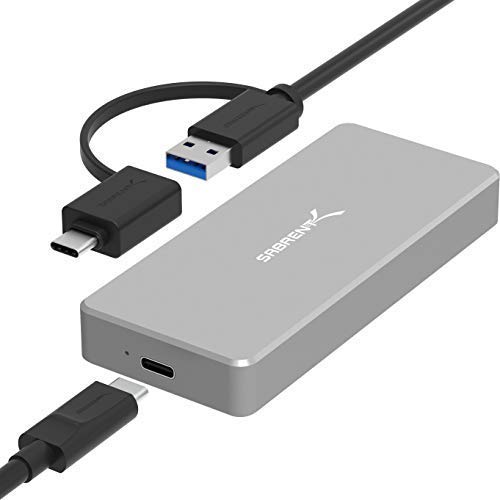


- Speed - USB 3.1 port supports data transmission speeds of up to 10Gbps for steady and efficient data transfer. Backward compatible with USB 3.1 Gen1 and USB 3.0.
- Easy setup - Hot-Swappable, plug and play, no driver required! Enhanced performance can significantly reduce latency. Supports Samsung 950Pro/ 960EVO/ PM951/ PM961/ SM951/ SM961.
- Design - Ultra slim aluminum alloy sandblasted shell. Sleek, durable, and convenient. Portable yet durable, Ideal for traveling.
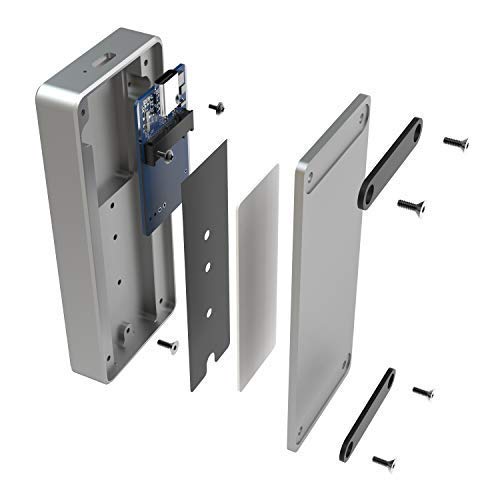
- Heat management - Professional aluminum case. Designed with vents for heat dissipation and reduced power consumption.
- Compatibility - only for NVMe m-key M.2 SSD (Pie-based). does not support M.2 SATA based SSD (NGFF). applicable to sizes 2230/ 2242/ 2260/ 2280.
-
Information
-
Twitter
-
Pinterest
-
Youtube
-
Facebook
Cora Monteflor Pacure
Solid NVMe SSD case - Good construction
The case is almost a solid piece of aluminum that comes with all the screws, plus an extra, to install an NVME. I used it to first clone the drive I was going to swap out. Installation took a few minutes with no snags. I only have a USB 3.0, so I was able to get 400-450 MB/s read and write times, which feels like the limit for the interface, not the device. The device has USB 3.1 Gen 2 with a "C" connection, with a USB cord that has the traditional "A" type of connector and an A to C converter, covering your bases for older and newer devices. The case includes a thermal pad, with a covering to keep the adhesive clean until you install the drive. I am waiting until I install my "final" drive since I was not certain it would work to swap drives with it and my connection is not able to go over 450 MB/s and actually only copied the files over at about 150 MB/S due to the cloning speed. Would definitely recommend and get again.
Maleah LiberatedSoul Franks
It's very nice and solid enclosure : TOO MANY VINE REVIEWS
It's a very nice and solid enclosure. I'm using it with Samsung 970 EVO PLUS... There are way to many VINE reviews for this product. Normally if product is really good it should have tons of USER ( Non Vine ) reviews... Vine users are sponsored to get reviews... Doesn't matter if they're unbias, they're not natural users who come to amazon to buy the specific product in question so their reviews / use are different than a regular user who comes to amazon looking for a specific to use... This summary is primarily for those who will be copying large files ( 60GB to 500GB + ) from the Enclosure ( which are reads ) to any other device. The copies always abort prematurely in the middle of copying when enclosure is connected to USB-C port that supports USB 3.1 Gen 2.. If Enclosure is connected to regular USB-A port that supports USB 3.1 Gen 1, then copies ( read from enclosure ) works 90% of the time, meaning copies do not stop / abort in the middle... I'll update refine and update this review later and make it more succinct later... I spent a lot of money trying to get reads ( copies from the enclosure while it's connected to the USB-C port USB 3.1 Gen 2 ) to work... To eliminate and isolate issues, I purchased and tried following: two Samsung 970 EVO 1TB NVMe PCIe, M.2, one Samsung 970 EVO Plus 1TB NVMe PCIe, M.2, one Dell XPS 15 9570 32GB Mem, 1TB NVMe, PCIe, M.2 SSD )... I've tried three different NVMe, PCIe, M.2 enclosures and they all exhibit the exact same behavior: Write / Copy large file from any source to enclosure with 970 EVO or 970 EVO plus installed while the Enclosure is connected to USB-C port USB 3.1 Gen 2 and writes / copy to enclosure " ALWAYS " works 100% of time no issues whatsoever... However, then try to copy the exact same file that was written to enclosure with 970 EVO or 970 EVO Plus NVMe, PCIe, M.2 to any other drive ( internal or external ) and the copy will start but ALWAYS files to complete... ALWAYS fails to complete no matter device / memory / drive it's being written to... Irony is the Samsung T5 1TB enclosure with 1TB inside it NEVER FAILS when copying from it... Also there are no thermo issues as I have fan blowing directly on enclosures and it's cool to cold during whole duration of copy... More details below. I will update this review later... Anyway, Nothing to complain about except fact that this enclosure as well as the others below " ALWAYS " fail during middle of copying when trying to copy large files from the enclosure ( which are READS from Enclosure ) to any of the following drives when the enclosure is connected to a USB-C port that is Gen 2 10Gbps and also Thunderbolt... Windows 10 Pro, Dell XPS 15 9550 & 9570 both systems: 32GB Mem, 1TB SSD NMVe, PCIe, M.2 Plug Sabrent Enclosure with 970 EVO Plus in Enclosure to USB-C port... WRITES to the Enclosure are very, very fast as expected and never, ever fail or stop prematurely during writes ( copies ) to the enclosure... However, when trying to copy ( for purpose of backing up file ) the exact same file that was just written to the enclosure, copy from enclosure fails in middle of copying from the enclosure to Internal Drive in XPS 15 ( NVMe, PCIe, M.2 SSD 1TB PM951 ) and it also fails in middle of copying from enclosure when copying to any of the following USB devices: USB 3.1 devices: Seagate 5TB Portable, Seagate 8TB HUB, WD 4TB Portable NVMe PCIe M.2 Internal Samsung PM951 1TB I've tried numerous times, trying to copy from enclosure while it was in the USB-C Port I've retrimmed the internal drive in the XPS 15s before copying from enclosure and writing to the internal drives PM951 NVMe PCIe M.2... It ALWAYS FAILS TO COPY same large file that was just written to enclosure. File sizes between 80GB to 450GB... Steadily copies ( 100GB to 500GB+ ) file from enclosure to internal drive in XPS 15 at 750MB/s then abruptly starts slowing down, then stops 30%, 40%, 50%, 60% of way ( completed ), but never successfully completes copying... IT NEVER COMPLETES COPYING FROM USB-C PORT SAME EXACT FILE THAT WAS WRITTEN TO IT TO ANY DEVICE.... HOWEVER, IF ENCLOSURE IS CONNECTED TO USB-A PORT USB 3.1 it will successfully copy from the enclosure the same file 90% of the time to any drive internal or external at approximately 375MB/s... This enclosure isn't the only one affected. I've tried following enclosures and they all exhibit the same behavior so I suspect there's something about the USB-C port that saturates and dies during middle of copying... I saw other reports and reviews on web concerning iMac and MacBook Pro's Copies FROM the enclosures only work when not in a USB-C port USB 3.1 Gen 2 Sabrent Type-C Enclsoure for NMVe PCIe M Key M.2 SSD QNINE NVMe M.2 USB 3.1 Gen2 SHINESTAR NVME NMVe PCIe M Key M.2
Mirza Aman Ullah Baig
I am absolutely delighted with this product
The attention to detail in this product is superb. The machining on the compact little (but very solid) enclosure almost reminds me of a piece of jewelry. Whoever designed and built this product deserves a ton of credit - borderline beautiful. Packing is pleasant to open and well thought out. They even include a small screwdriver for the screws needed to put it together. For the record, I have no connection of any kind with this company, don't know anyone there, etc. This may be the most positive review I have ever written but I am really blown away by the meticulous machining, ease of assembly.. well, just about everything. Reminds me of the ultra-high construction quality of an iPhone. Thanks to Sabrent for a job beautifully done! I'd give it 6 stars if I could.
Sammy Lee Stowers
Heavy compared to a SATA m2 enclosure, but boy is this fast
I had a 256GB Samsung OEM NVME drive that I had upgraded out of a laptop, and wanted to use it in an external enclosure. There are now a lot of external USB3/3.1 to NVME enclosures, but most of them are brands I didn't recognize at all. Sabrent has been around a while, so I figured on trying it. This is a pretty decent sized hunk of aluminum (almost 150g/5.2oz with the drive in, not counting the cable) so it's not a stick it in your pocket all day sort of case that will replace a USB stick. Installation was easy if you've ever done any external hard drive enclosure. There's a thermal pad on the inside cover (make sure to remove the protective paper!) and it seems to keep the drive nice and cool. It has a blue activity LED and a USB-C port, and that's about it. It gets about 380MB/sec read on a USB 3.0 type A port, and about 770MB/sec read on a Thunderbolt 3/USB-C 3.1 gen 2 port. I think those are basically the limits of the interface, once you account for protocol overhead. This was starting to copy a 40GB backup file -- small files will be much slower, as with any external drive. I haven't tested write speed, but that will depend heavily on the drive you put into it and how much data you download at once. While my first thought was that the main use for these would be why I got it -- to make use of a spare drive (or to transfer data from -- I wish these had been affordable 6 months ago when I upgraded the computer this came out of.) That said, given that cost of good NVME drives has come down a lot, this might well make sense just to have a very fast external drive: I'm fairly sure this plus a WD Black or Samsung 970 EVO would be cheaper than any comparable "pre-assembled" external SSD, especially as the sizes go up. The one odd but harmless choice they made is that instead of a USB-C to USB-C cable with a USB-A-male-to-C-female adapter, they have a USB-A to USB-C cable, with a USB-A-female-to-USB-C-male adapter (with a little plastic bit to hold them together.) It works, and seems solid, so zero objection, just kind of odd.
Georgette Eid
Solid external NVME enclosure
I was pleasantly surprised by this enclosure. It was a bit pricier than competing products, but it was better reviewed and it is pretty high quality. It's made of solid aluminum and is easy to install a drive in. I used a 256GB Samsung NVME that came in my laptop but I swapped for a higher capacity drive. This drive isn't the fastest and its SLC cache fills up quickly, but the initial burst of transfer speed is in excess of 700MB/s over a thunderbolt 3 connection proving the enclosure is capable of handling plenty of bandwidth. The drive I used apparently puts out a decent amount of heat, because after transferring over 100GB worth of data the case was fairly warm. The solid aluminum housing helps dissipate heat and it comes with a thermal pad to help transfer heat to the exterior casing. Attached is a photo of how warm it was after a few minutes of solid writing with my example drive. The included USB C cable with USB A 3.0 adapter is a nice touch, and the enclosure feels heavy and quality. I have no worries of carrying it around and tossing it into a backpack. This unit deserves the five stars since it delivers on everything I wanted it to.
Zack Ael
Amazing Quality Enclosure
I purchased a few enclosures and this one was by far the best. I installed a WD Black NVMe drive and it is awesome that I can get crazy awesome speeds on my newer machines via USB C 3.1 at 10Gb and still very fast on my older machines via USB A 3.0 at 5Gb. Formatted ExFAT this works on all my computers where the ThunderBolt 3 enclosure I purchased is twice as fast but it only works on my one TB3 computer.
Michele Daniels
Sabrent has become my #1 choice for enclosures!!!!!
SOLID, QUALITY construction. Heat dissipation is excellent, comes with everything you'd need (besides the m.2 nvme memory module of course). I've purchased 2 different external SATA enclosures, and all of them have been supreme quality. I'm extremely grateful for Sabrent and all the great products they are developing. This is going to assist me in migrating LARGE amounts of data in a very short period of time. Please keep up the good work!!!!!
Sianne Joseph
Glorious chunk of sleek aluminum to keep your expensive NVME SSD safe, also fast
If you're going to buy an NVME SSD and use it externally, this is the answer. I dropped an hp ex920 1TB into mine and it worked great. Speeds were very nice but you do lose somewhat with USB: 1.1GB/s reads and 280 MB/s sustained writes, as tested in my i7-8800 with native USB 3.1 on the motherboard, using gnome-disks partition benchmark. I was hoping for faster writes (the disk itself is rated at 1.8GB/s sustained writes) but 280MB/s is pretty freaking fast for removable media, especially considering there was no noticeable drop-off, even after several GB of writes. This is my new travel companion--durable as hell, fast, and very flexible with the convenient USB 3.0-or-3.1 cable. Love Sabrent.
Simone Gallimore
Fast performance, excellent linux compatibility
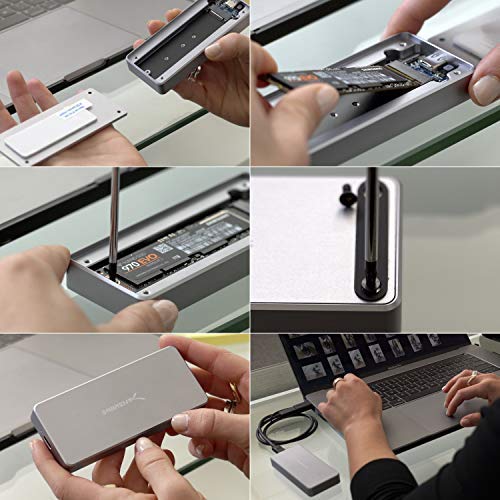
I'm quite impressed with this little drive enclosure. Installing the nvme ssd was easy, consisting of just attaching a pad to the interior, plugging in the drive, screwing in a retaining screw, removing the cover over the thermal pad on the bottom cover, and then attaching the bottom cover four case screws. The case does use Torx T9 screws, which normally I might subtract a point for (since the Torx drivers are less common), but they include both the appropriate Torx driver and an extra screw with the case so it's difficult to complain about this. Once installed, the drive was recognized without problem by my Linux (ubuntu 18.04) boot disk. The drive easily sustained 466 MB/s while cloning a 1 TB drive with dd, which is impressive given the theoretical bandwidth of the USB 3.0 port I had connected it to is 500 MB/s; clearly the USB protocol is the limit here (and not the USB to NVMe board). The case did become quite warm during the transfer (arguably the fault of the NVMe drive), but there were no signs of errors or throttling. The case was also a relatively uniform temperature. I would interpret this as a sign of good thermal coupling between the drive and the case (no errors caused by heat) and within the case itself (uniform temperature), and adequate surface area of the case for radiating heat (no errors caused by heat). The case is a bit larger and heavier than some NVMe cases out there, but this likely contributes to its good thermal performance. Due to the bottleneck of the USB connection, I would not recommend buying an NVMe drive just to use in this case; you can probably get the same performance with an SATA drive at a lower cost. If you have an extra NVMe drive or need a case to clone your existing drive, however, this well-built case provides reliably performance at the limits of what USB 3.0 can support. Note that other reviews have noted errors with what sounds like USB 3.1 gen 2 connections; I have not tested this so I can't comment on whether this case would be a good choice if you intend to use USB 3.1 gen 2.
Rita Grech
High quality, zero issues.
So far so good. Product is top notch quality. Nvme SSD 80mm was very easy to install. The supplied hardware was sufficient to secure the lid to the enclosure. There is a type of sticky thermal paste on the lid. My best guess is that it's purpose is 2 fold, to dampen vibration of impacts and to transfer heat to the aluminum casing. My Xbox recognized the drive immediately and formatted it. Games run much faster and smoother now. Yes a USB 3.0 EXTERNAL SSD is faster than an internal HHD. The casing does get quite warm during game play which surprised me maybe I'll glue heat sink fins on. Love it totally worth the quality.