
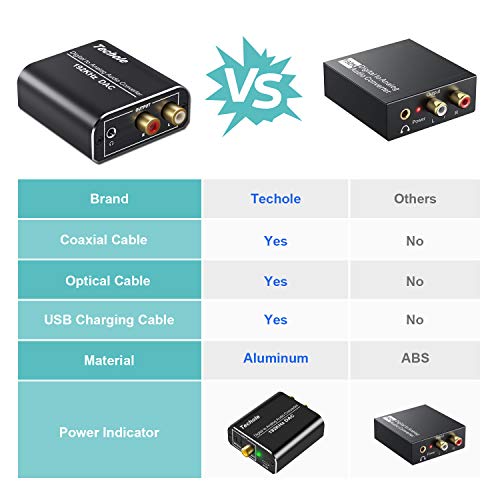

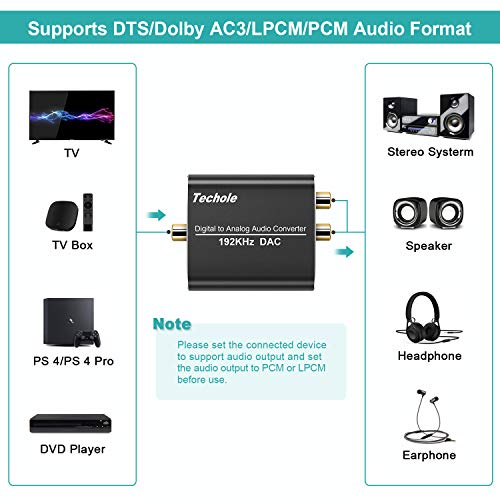


- 【Updated DAC Converter】Ideal DAC converter converts coaxial or slink digital audio signals to analog L/R RCA and 3.5mm Jack audio simultaneously (not capable of being reversed). Can be used with PS3, Xbox, Blu Ray Players, HD DVD, Home Cinema Systems, and more devices which lack RCA L/R or 3.5mm jack outputs.
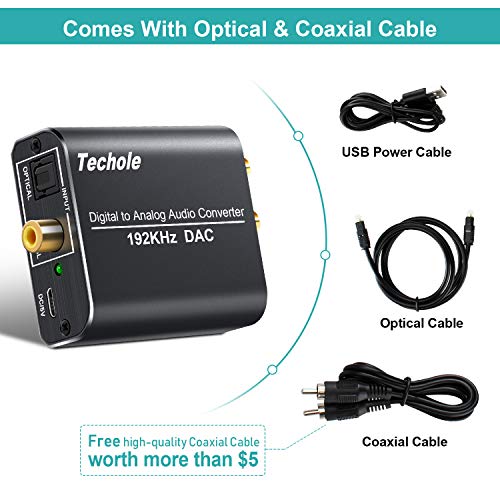
- 【Plug & Play】DAC adapter comes with an optical cable and a coaxial cable to transmit digital or analog signals respectively - so you’re all set and don't need to buy one. Powered by (5V 1A) USB power cable(Does not come with adapter), 0.5W low power consumption. Easy to install, perfect for beginner.
- 【192KHz Sampling Rate Achieved】Techole Digital to Anglog Audio Converter actually supports Sampling Rate at 32, 44.1, 48, 96 and 192 KHz, and 24-bit S/PDIF Incoming Bit Stream on Left and Right Channels. Good Anti-Interference function makes the sound pure and clear.
- 【Multi-Point Connection】Input audio connector with one Toslink and one RCA (Coaxial) cables, DC 5V port, Output audio connector with two RCA(R/L) and one 3.5mm Jack. Supports uncompressed 2.1-channel PCM or LPCM digital audio signal output, will Not supports 5.1 channel Dolby sound.
- 【Aluminum Alloy Design】Aluminum Metal Case, lightweight, durable and heat-resisted. Gold Plated Sockets, enhance HD sound signals over long distance broadcasting smoothly. Note: Please set the connected device to support audio output and set the audio output to PCM or LPCM before use.
-
Information
-
Twitter
-
Pinterest
-
Youtube
-
Facebook
James Yants
Your TV Must Support PCM or LPCM modes
I feel like the people who are reviewing and saying that this product doesn't work for them don't realize why it doesn't work. The product description reads "Supports uncompressed 2.1-channel PCM or LPCM digital audio signal output, will Not supports 5.1 channel Dolby sound". If your TV doesn't have either PCM or LPCM modes, this product probably won't work for you. These modes are the ones that are able to receive the signal sent from this converter. I had to look in the advanced settings in my TV in order to find it. At first I wasn't getting any sound, but once I did some digging through the settings and changed it to PCM mode and the sound comes through just fine.
Mamakanneh Momoh Karsie
Very good Product
I am very happy with this Device, I have surround sound one again
Mattie Mahon
Does the job
I needed this converter because my new sound bar was not compatible with my existing TV. PLEASE BE MINDFUL, it comes with a USB power cord but It does not come with the piece needed to plug into the wall. I had a spare, so it was no big deal BUT this is not mentioned in the details. It's a lot smaller in person which is great. It is easy to conceal on my entertainment center. Like the title, it gets the job done.
Amber Elizabeth Lewis
Nice and solid, no time-lag, and easy to connect
I bought this to connect a pair of wireless headphones to a TV that only has an optical output jack. I was concerned that there might be some time-lag (latency) but the unit performed perfectly. It's also very solid and well made. I would definitely recommend it. Please note that it does not come with its own power supply and needs a micro-USB power adapter. I have boxes of them, so it wasn't a problem.
Kyle Harris
Give your old stereo AirPlay connectivity with this DAC and an old Apple TV
This is exactly what I needed to connect my old Kenwood stereo receiver to an idle 3rd generation Apple TV and thereby enable sending music to the stereo via AirPlay from my iPhone, iPad, and Mac Mini. I already had the audio cable to connect the receiver to the output of the DAC and the DAC came with the toslink cable I needed to connect it to the Apple TV. Setup was as simple as could be and it worked immediately with no problems at all.
Marie-Chantale Cyr
Sound quality is good
I bought this as a replacement for my sister's Audio converter. It works as expected and very easy to install. Sound quality is good too.
Schuenemann Sheryl Audrey
So far so good and a lot cheaper than replacing my old 5.1 surround system
I've got a small, 15 year old 5.1 surround sound system that lacks a digital optical input to receive sound from my TV, the 5.1 just has the old white/red RC stereo female inputs. So when I got my new Sony Bravia 4K TV, I wanted to be able to listen to my TV speakers without having to change anything but turn on my surround sound unit when I wanted to. I also wanted to play the sound out of my TV speakers along with my 5.1 sound. This adapter from Techole does the trick, taking my digital audio output from my Sony TV and then I can use an RCA cable to connect to my 5.1. There is no lag so far although I did detect a tiny echo (so there is a little bit of lag) between my TV speakers and 5.1 system. I was able to power the adapter using a USB-power source that I had in the same cabinet so no problems there. I'll update this review if I experience any issues.
Generex Tabile
Advanced Smart TV Audio
I needed a way to get the audio from my smart TV to my old Harmon/Kardon stereo with Bose speakers. All necessary cables were included... USB cable for power, optical cable, etc. Most new smart TVs do not have the old analog RCA outputs, so digital optical output to analog RCA conversion is required. This device performs well with outstanding sound quality through my old stereo receiver. I can't believe this converter was only $15. Only thing I didn't like was the USB cable didn't have an AC adapter included. Lucky for me, my smart TV had 2 USB ports... so there was no problem. The most difficult part of the installation was the advanced audio settings on my Samsung TV. After about 5 minutes of tweaking, I was able to get the digital signal out of the TV and through my stereo and speakers. This device is a must for those who embrace the new streaming technologies for TV.... and are done with satellite and cable TV services... while wanting to utilize older 20th century audio.
Suneetha S
Worked exactly as expected.
My TV didn't have an analog line output. Many TVs no longer have one. I am not using a speaker setup that has a digital fiber input. This device bridged that gap by converting the digital optical fiber output of the TV to regular old fashioned left & right RCA line level outputs. NOTE: TV's are deleting the RCA line level output because most all of the electronics inside the TV are now digital and at no point is the audio in analog form. To create analog outputs requires a DtoA converter chip which adds cost. And since most users don't use those outputs the feature is left off of the TV. Another thing which has been deleted from most of the new TVs is the option to control the volume of the external audio output. And for the digital output it can easily be done in software and requires no additional hardware. But's it's being left off. I don't know why. And finally - if I may complain about the current design of TVs a bit more. You will notice that all the 3rd party reviews and manufacturers promo material concentrate on picture and very little on anything else. Especially almost a total lack of any mention of the abilities of the TV to tune in over the air broadcasts. And the DTV tuners on most all TVs are just terrible. They are clumsy, poor sensitivity, very slow channel changing. And very poor use of the Electronic Program Guide provided by the DTV specification. Even the stores no longer have an antenna hooked up so you can test out the TVs reception. There is only one tuner I have found that works fairly well and that is the Channel Master tuners.
Marchell Magarro Aquino
Nice quality, works great - if you know the tricks.
The build quality appears good with a nice metal housing. The fact that a power supply was not included was not an issue for me as I had loads of unused USB AC adapters laying around anyway. The inclusion of the optical, RCA and micro USB cables was nice and the length of the cables was adequate for my needs. Sound quality is very good. There is no volume control on the converter, so volume must be controlled either on the soundbar / stereo / whatever or the TV (or whatever) must be set to variable output of the audio (vs fixed). Now for the tricks... 1. Make sure to remove the clear plastic protectors from the ends of the optical cables before inserting the cables into the devices. The protectors are not particularly obvious at first glance as they are clear and small - you have to look carefully. 2. Make sure to set the output of your TV (or whatever) to PCM. There may be a straightforward setting on your device that says "PCM" or it may be less intuitive - something like Dolby - OFF. 3. In my case, I was connecting to an old Sony KDL-40R450A TV. There was NO setting to force PCM output (only) though the TV manual did clearly show the output as being PCM / Dolby. Try as I might, I could not get the unit to produce any audio from either of the two devices providing input to the TV via HDMI - an old TiVo Premier and an Amazon FireStick. I took the unit to a different TV and verified that the unit and included cables were in fact functioning correctly so I boxed the converter and cables in despair, assuming the problem was with my TV. Being hard headed, I decided to give it one more try and discovered the last secret: 4. Turned out I had to make changes to the audio settings on the Firestick and TiVo to disable Dolby / Force PCM rather than changing settings on the TV! Amazon Fire Stick - Settings, Display & Sounds, Audio, Dolby Digital Output - changed from default of Dolby Digital Plus Automatic to Dolby Digital Plus OFF. TiVo Box - Settings & Messages, Settings, Audio, Dolby Audio, PCM only (no Dolby)