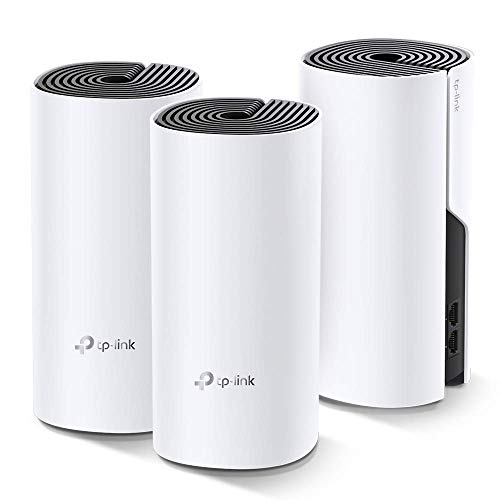


- The simplest way to guarantee a strong Wi-Fi signal in every corner of your home up to 5, 500 sq. Ft.
- Incredibly fast AC1200 speeds makes the deco capable of providing connectivity for up to 100 devices
- Deco units work together to form one unified network for seamless roaming. Devices connect automatically to the fastest connection throughout the home.
- Setup is a breeze with the Deco app available on your Android or iOS device
- Industry leading 2-year warranty and 24/7 technical support
-
Information
-
Twitter
-
Pinterest
-
Youtube
-
Facebook
Roxane Goodfellow
Easy, Secure & Reliable! What a Beautiful System!
Almost a week with it and I'm in love already. Super easy to setup (about 10 minutes including a firmware update). No more dead spots, no more worries about virus and intrusion attacks with the built-in Trend Micro solution (3 notifications so far), easy parental control setup and options, QoS allow you to prioritize your favorite and/or important online activities (in my case streaming and downloads) and with the Deco app you have remote access to configure and monitor your system. All my equipment (20+) working fine so far. My only negative comment is that they should come wall mountable since probably when you're looking to kill dead spots there are chances that you should be able to hang it.
Nerwin De Vera
Excellent coverage, easy set-up (maybe Amazon can get the right reviews on the right item)?
Wow! Went from traditional cable company wired house to a wireless system, cut the cord too. I went from two wireless modems, one as an extender, to this TP-Link Deco M4. Two of the three units are on the first floor, one unit upstairs. Wireless signal in the basement works off of the units on the first floor. Previously I would get drops and slowdowns on my ROKU sticks with the traditional wireless modems. Now with this M4 system I get excellent wireless on every device in the house, and there are plenty! Set up was simple, just required a bit of patience while the units connected to themselves. Follow the instructions when it says to connect the units while having them close to each other (same room), then relocate them as needed. I have one unit in the far corner on the first floor, this is hard wired to a cable modem in the basement. A VOIP device is also hard wired to this unit and a telephone lead is wire. into the house phone wiring. A second M4 unit is on the other side of the house connected wireless to the first unit. This is wired to a 5 port switch and feeds a laptop, printer, back up hard drive, and a wire to a smart TV in another room. The third M4 unit supplies signal to the top floor of the house: ROKU, cell phone (wireless plan: Republic), Alexa dot, and a tablet or two. The TP-Link M4 is affordable and works great for a home wireless system. (two old routers slowly croaking made a change necessary) also: each of the three unit can act as the main router, too easy.
Sharon Perkins
Great low-cost wireless mesh solution.
I just installed this system (Deco M4) with 1000/40 Mbps cable internet service using Motorola MoCA 2.0 1Gb ethernet backhaul and it's been performing brilliantly. I have over 50 devices of every conceivable type connected at any one time and nary an issue so far. I have 300-400+ Mbps speeds on wireless on all 3 floors of my house. Wired ethernet speeds to my PC clock in at 940/40 Mbps. I replaced a Google TP-LINK OnHub/ Google Wi-Fi mesh system that gave me intermittent issues such as web pages/ apps losing connectivity at random times. This router is blazing fast. Things load up noticeably quicker. The only thing that lets the system down is the very limited management app. It has very limited functionality and lacks things I’ve grown used to with Google WiFi such as mesh speed tests, indication of Ethernet vs. wireless backhaul, useful bandwidth displays per device, ability to designate your own network IP, DHCP scope, etc. It does have more robust parental controls, which was my primary reason for switching.
Usman Jehan
Way better than Orbi
I have owned Orbi for 1 1/2 years. Paid more than $400 for 2 pack set. Hoping that I could get stable fast wifi in my home. Boy, could I be more wrong. Orbi is cable of deliver really fast speed. However, this system is extremely unstable. I have frequented Orbi forum for solutions. I realized there are many users like me who experienced same issues. Throughout the years, we all hope that all the problems will be resoved by firmware updates. Netgear did push numerous updates. But, up till today, my wifi still experiences hiccups, drops. Like many others, I finally give up. Ordered deco to replace Orbi. Having used it for one day, my initial impression is great. The speed it on par with Orbi. But it's way more stable than Orbi. Orbi required me reboot my router almost daily. For the first time, I was able to complete a video call witout lag or drop. That's how unstable Orbi is. I haven't had a chance to test other features. As far as the WiFi, I am happy with its performance.
Inez Rubio
Works great, easy set-up and works fine with FiOS Triple Play. Bye-bye Orbi!
Bought this as a replacement for the disappointing Orbi. As many Orbi owners have complained, those units, though supplying very fast wireless speeds, constantly dropped connection and had me pulling my hair out re-booting the units 5 to 6 times (or more) a day, so after a week I returned that and after much researching and exploring, settled on this TP-Link Smart Hub & Whole Home Mesh WiFi System (Deco M9 Plus). I've had mine for a week now (2 units, base and a satellite) and have not had one drop! I have blazing fast internet throughout my 3 story town home. My speeds range anywhere from a minimum of 75 megs on the far end of the 3rd floor, up to as much as 365 megs per second on the 1st and 2nd floors (I even get Upload speeds of over 300 Megs!). Now I have FiOS Gigabit connection, and have as many as 13 to 20 devices (between computers, TVs, cell phones and home security devices) sharing bandwidth at once, and I consistently get these speeds 24x7. As is required for FiOS Triple Play, I have retained my FiOS Router and have this TP Link system set up in access point mode with wireless turned off on the FiOS router. Set up was quite easy with the Deco App. I did have to download a firmware update for each unit during setup. But even then I was up and running with blazing fast whole house speeds within an hour of unpacking the units. Now since I have this in access point mode I cannot use all the features this unit has, but for the fast, dependable wireless speeds I get, I still feel it is well worth the price. I will update this review moving forward if things change but so far I am very impressed and pleased. I only hope this great performance continues, but I for 1 am a very satisfied customer.
Sharon Tribe
Wifi Game Changer - Give me the mbps!
WiFi mesh changed my entire wireless networking experience. We live in an older home built in the 70s (i.e., faraday cage). We've tried a host of router options over the past few years, with Apple's Airport being the best at providing WiFi coverage, albeit lacking coverage on a second floor at the opposite end of the house. Coverage outside was good only for a few feet from the house as well. We tried powerline extenders and even have some devices connected via Cat 6, too, and while they added a little umph, it just didn't result in remarkable change. Enter the TP-Link Deco M9 Plus. The app made this a simple, truly step-by-step setup. The only problem I had was that there were no instructions regarding the password parameters when setting up an account. After a few guesses, I got beyond it and into setup. Each step matched my action exactly. I'd estimate about 10 minutes total setup, including unpacking and the password gaffes. Add 4 minutes more for a firmware update and all was good. Scratch that. All was great. My internet download speed skyrocketed. While the Airport could pull 150 mbps+ wireless within 20 feet, that number dropped throughout the house, with some rooms struggling to pull 15-20 mbps, despite pings under 18 ms. With the Deco M9 Plus, I average 160-165 mbps across the entire house. I'm hitting 180-190 mbps standing next to the primary unit next to the modem (and this unit is still not placed in the ideal location due to my modem's location). And get this, outside my house, on the deck, I've pulled down 239 mbps. Heck, I'm hitting 120+ mbps at the end of the driveway. I'm running a simple Netgear 300 mbps modem (no bells and whistles) with Comcast service. I can now run multiple streaming services, FaceTime, and conduct internet browsing concurrently without lag or impact. I am only running the two units this mesh system includes. I almost bought an additional M5 so I could ensure further coverage (you can add multiple components from different TP models to the M9 and link them via the app), but there's no need in this ~2600 sq ft home. Sure it's only been a week (barely), and yes, I rarely write reviews (I don't write reviews). I spent a lot of time looking at PCMag, CNET, etc reviews and went back and forth between Google's mesh, Orbi, and other products. I went to a number of brick and mortar stores to talk WiFi shop with salesfolk (Orbi came highly recommended), but I'm really happy with the immediate change I'm experiencing with TP-Link. After the improvement I experienced moving from a Motorola WiFi router to the Apple Airport, I figured I'd just stick with Apple, but it doesn't compare any longer. Sure, the Deco M9 Plus is pricey, but I really feel like this is a good investment and the effects justify the expenditure. I'm interested to see where I'm at in a year with this, but if current performance is any indicator, then I should remain satisfied.
Sminer Codef
After two months, working as hoped
This device and its competitors all seem to have a mix of conflicting reviews so I was concerned about replacing my ~6 year old Apple AirPort Extreme. I’m pretty comfortable around Information Technolgy, but I still appreciate Apple’s easy to use products. This one hits on easy to use, but misses on power user features like administration via a web browser. Not a big deal for me since the phone app to which users are captive does what I want. Does it work, yes as expected. I have a pretty slow 12Mbps line because I’m grandfathered in on a good deal and it meets my needs most days so I can’t speak to maxing out the router speed. However, the two access points does cover my 3200 sqft, two story plus basement, as well as areas outside my house effectively. I get good to excellent coverage inside and fair coverage outside according to some utilities I used on my iPad. Here’s a feature I really like: you can monitor each device’s bandwidth. This helps me determine if I have a service problem or if a device is hogging all of my bandwidth. When I first installed the product, I had to inspect each device individually to see its bandwidth, which wasn’t too bad. On their website,I asked for a feature enhancement of allowing the bandwidth of all devices’ on one screen. Today my Hulu was lagging and I went the the TP Link app and was pleased to see the screen pictured here. Immediately, I could see my PlayStation hogging all of the bandwidth on one of its updates. I’ve gone through at least one firmware update and experienced no problem. Overall, this product meets all expectations and I like it better than the discontinued AirPort Extreme.
Beatriz Madero
A true mesh home network with seemless roaming capabilites!
I started my mesh network with the Deco M5s and I chose them over other mesh products because they supported WIRED back channel connectivity (something Orbi, Google, etc. did NOT support at that time). Sine my home is wired for Cat5e it would been silly not to have utilized it. FYI the Deco M9s tri-channel are now even better suited to wireless placements than the M5s were before. The M9s also add a smart home hub (but for me it does support enough devices yet to justify replacing my Samsung "SmartThings" hub). My TPLink mesh network easily supports mixed M5s and M9s, mixed wireless and wired back channels, and all work flawlessly together. There are NO remaining dead zones at my home and my numerous smart devices all stay connected. My Ring.com cameras work better with this system compared to the other mesh network gear I have tired (most of which were indeed problematic with smart cameras like Ring). My roaming devices (e.g. iPhones, tablets, etc.) all work better with my M5/M9 mesh setup compared to the results I see when I'm visiting family and friends (who have other mesh products) where the cutover between those units can hang quite noticeably. I especially like the included virus software, it has been a life-saver to have protection at the network level which has gone a long way to protect both the kids and less 'tech-y' adults in the home from... well let's just say themselves. I also love the the QoS, usage summaries, attack summaries, and user profiles groups. The APP is easy to use, it supports all the key features needed and I find that I like it a lot. You will have to be ok with the APP as there is no HTTP interface to this system. There is also a small lag when the APP starts but I do not personally find that to be an issue. All the mesh systems I have seen have many pros and cons as MESH is still an evolving space. Most of my tech buddies have eyed up other systems like Google, Orbi etc. (at greater cost) chasing the fastest aggregate speed specs they can find. All this despite the fact their devices won't even get to use it as their cable modem connections are slower (aka none of they have Gbit service with their internet providers yet). In summary, TPLink is truly a hidden GEM in the MESH system arena. It just works! Additionally, it supports what is important to most the households holds (that I I know of) e.g. numerous devices, roaming that really roams, wired or wireless, 4K streaming. Add in it’s very affordably cost which reduces any fear about buying enough units to eliminate all dead spots in any sized house. Quite frankly I have it found to be the best value in mess by far!
Waji Faizy
WOW. Just, WOW. Would give 6 stars if that was an option!
I LOVE THIS PRODUCT! I could NOT believe how easy to set up this was. I put my CenturyLink garbage DSL Modem/Router into bridge mode and then powered it off. Connected the Deco and turned everything back on. With the Deco app on my iPhone, I was up and running in about 60 seconds. Unbelievable! And I have NEVER had WiFi coverage this good in my home in 15 years. We have a blanket of WiFi everywhere now that is strong. It's awesome. The parental controls are great. I have discovered several things my kids were hiding from me thanks to the Deco app. For example, even though we banned Fortnite in our home, my oldest went and bought his own Nintendo Switch so he could play it in his room when we thought he was asleep. The Deco app alerted me about this and I discovered his secret Nintendo Switch and over 350 hours that he had been playing Fortnite on that device without our knowledge. NO WONDER HE WAS SO TIRED AND CRANKY ALL THE TIME! More on Parental Control I can lock it down tight if I choose, create different groups with filtering / time access rules and add as many devices to each group as I want. Canned content filters seem pretty good, although I can't figure out why I'm getting alerted when a Windows PC tries to connect to Windows Update. That shouldn't be filtered... Overall this is a SOLID product that has been VERY WELL THOUGHT OUT. You can tell they've put in the effort to make a GOOD USER EXPERIENCE from the time you open the box until you're up and running online. I was VERY IMPRESSED. Speed? SOOOOO much faster. I had one of those ASUS Nighthawks with a bajillion antennas and the coverage was no where near as good. Not to mention the speed. Wow, speed is much better with the Deco M9 mesh system. My kit came with two units which is great for our two floor small home. Have not tested the smart home hub features of this system yet, but I'm getting some Hue lights for Christmas so we'll update this review when I've had time to try those out on this system. Great job and kudos to TP-Link, their hardware engineers, software engineers, and product owners. WOW. Very impressed, would love to see more granular control on notifications for parental control groups, so i can turn off getting notified about Windows Updates every time a PC wants to connect to that (I'm not filtering for that?) but otherwise I have nothing to complain about!
Crystal Howell
Very good first impressions
Update (02/20/19): Using this for 8 months now and still rock solid. Most of the negative (or neutral) reviews are due to reviews lack of knowledge, or their disappointment that it's missing some advanced feature that 99.999% of home users could care less about. I'm very tech savvy, 25+ years as a network/telecom systems integrator, designing and configuring business network and telecommunication systems from the ground up. The last think I want to do at home is work on my network.... I just want to plug it in, configure a few settings and it work. That's exactly what this is. Original Review: This product was just released and installed, so these are my initial thoughts... I will update this review if/when my experience changes. First, I can't imagine a router installation being any simpler. The included Quick Start Guide, is a booklet about the size of a business card, with one simple instruction repeated in every language known to man... That instruction is (I'm paraphrasing) "Download the app, and follow the instructions". Anyone who can download an app and read, can have this up and running in no time. I AM NOT EXAGGERATING! The app is very well done, and makes advanced features like QOS, and Parental Controls simple for anyone to configure and use. With this app, you can manage your network using your mobile device from anywhere in the world, assuming you have an internet connection. I'm not sure if you can configure/manage through other means (web-browser, etc...); I haven't attempted it, because the app is so convenient and includes everything I need (much better than the Linksys app). Although it's still early in my testing, performance is noticeably improved over my previous router (Linksys AC3200/EA9200 Tri-Band). I have A LOT of devices on my network... (6-Laptops, 1-PC, 1-NAS, 8-SmartPhones, 3-Tablets, 1-XBOX One, 1-PlayStation 4, 1-Nintendo Switch, 7-Bose SoundTouch Speakers, 5-Arlo Cameras, 4-Tivo's, 1-SmartThings hub, 3-Amazon Echos, an Ecobee thermostat, a Rachio Sprinkler Controller, and some WiFi light switches). In my household (of 6), it's not uncommon to have 2 or 3 online gaming sessions, streaming videos, streaming music, and web surfing all happening simultaneously. After installing the Deco's, the first thing I noticed was my Bose SoundTouch app and speakers (which have always been flaky) became very responsive and trouble free (again it's still early). Also, there's a noticeable improvement in areas were the WiFi signal begins to drop off. With the Linksys, in areas where my device would indicate a weak signal (25%-50%) the device would be very slow (1-5 Mbps downloads) and unstable, switching between WiFi and LTE. With the Deco, in areas where devices indicate a similar weak signal, it's still very stable, and performance is decent (20-30 Mbps downloads). Also... These areas of degraded signal strength are further out with the Deco's compared to my previous router, as the Deco's do cover more area. For reference. I live in a single story, brick home (constructed in 1971), with 2800 sq ft of living space, plus an attached 2 car garage, and covered patio. I first connected only a single Deco, and tested coverage. The single unit was able to provide WiFi coverage to my entire living space. It would begin to drop off outdoors and in the garage. The single Deco's coverage was about the same (maybe a little better) as my single Linksys, but was much more stable. Adding the second Deco, increased the coverage and extended it to my outdoor spaces, garage, driveway, etc... I'm still playing around with placement of the second unit. I bought these on "Prime Day", and while several other mesh systems were discounted that day (Netgear Orbi, Linksys Velop, etc...) and I could have saved almost $100 with one of those, I choose the TP-Link. The main reasons was the security features offered. This system includes 3 years of Antivirus, Intrusion Prevention, and Content Filtering, in addition to some pretty slick QOS and Parental Control features. Having these security features on your router doesn't mean you don't need antivirus on your computers. It's meant to be an extra layer of protection and for protecting internet connected devices that can't have antiviurs installed, like smart TV's, WiFi Speakers, and Smart Home Hubs/Devices, etc.... The Deco M9 also has a built in Smart Hub, which allows to to connect zigbee devices such as sensors, light bulbs, light switches, etc... and create automations and notifications based on triggers. I did set up an automation to notify me when a network security threat is detected, but haven't had any triggers yet, so I can't say how well it works. I probably won't use an other automation features, as I already use Samsung SmartThings and I think it has more features and supports more devices than the Deco M9. Although, it can be a great way to introduce your self to this technology without having to invest a smart hub. So to recap...the system is super easy to install and manage, looks good, performs well, covers a large area, and includes a comprehensive and robust suite of security, QOS, and Parental Control features, plus a built in smart hub. Oh.... and it also has a 2 year warranty (most have 1 year, or worse 90 days). What more do you want? If there is one negative that I found, it's that the units are not wall mountable without purchasing a third party wall mount kit. Seems like they could have easily included some mounting holes on the bottom to give customers that option.