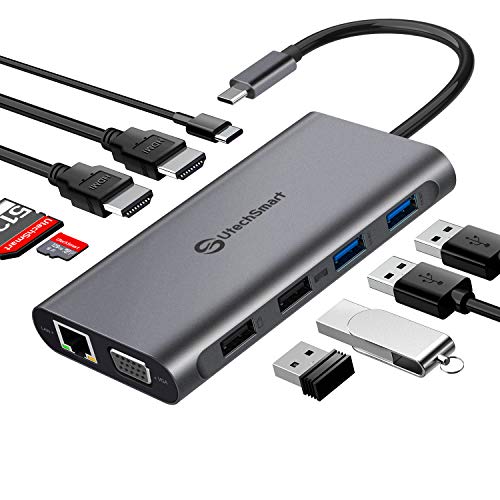
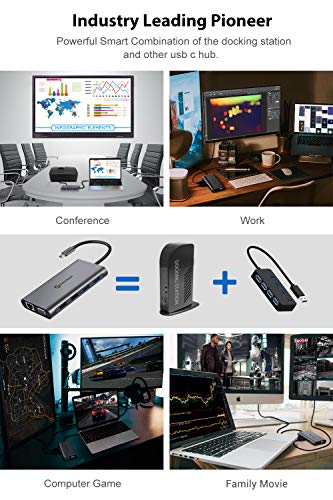
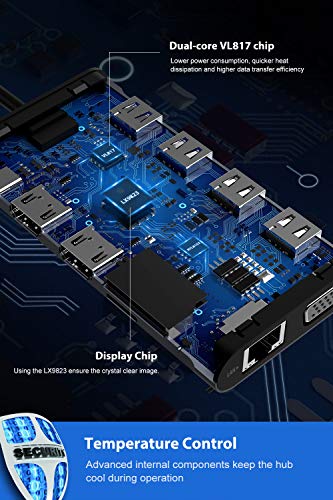

- Industry Leading Pioneers with Worldwide Patent: This is the first Triple Display capable USB C hub available on the market today. Our UtechSmart innovation USB C hub is designed from rolled aluminum to be durable yet lightweight making this an ideal portable docking station. Multi-display has been a major challenging technical issue in usb c hub industry, UtechSmart conquers this technical barrier and provides more interface options to expand your monitors.
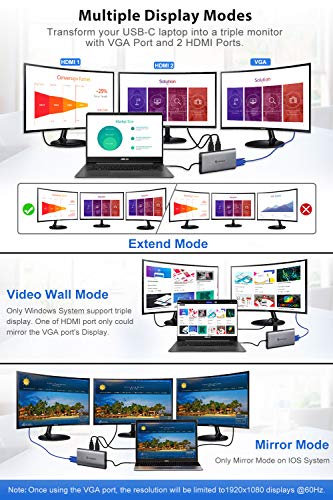
- Triple Display Flexibility: Triple display modes boost your efficiency 3 times. UtechSmart triple display hub supports single and dual HDMI displays up to 3840x2160@30hz, or triple displays up to 1920x1080@60hz. Three display mode options available (Mirror mode, Extend mode & Video Wall mode.). Attention: OS system doesn’t support Extend mode. One of HDMI port only could mirror the VGA port's Display.
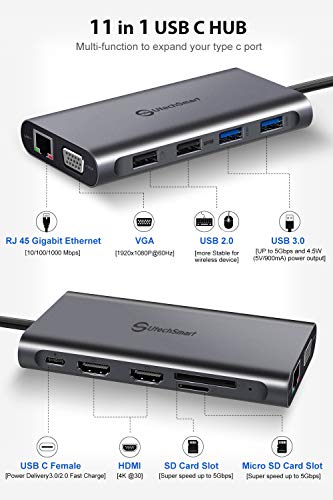
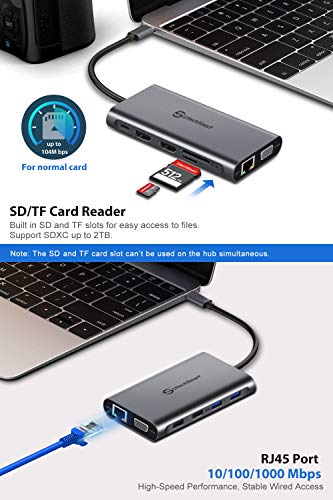
- Ultra Portable & Discreet Powerful Workstation: We designed the UtechSmart USB C hub to be slim and compact without any compromise on accessibility. Lighten your load and ditch the extra cable adapters, consolidate them with this USB C hub! The slim portable design of the UtechSmart USB C hub equips with Thunderbolt 3 port (supports PD charging), Gigabit RJ45 Port, two 4K capable HDMI ports, VGA port, SD/TF Card Slot, 2x USB 3.0 Ports and 2x USB 2.0 Ports. With simple Plug and Play connectivity, this USB C hub turns any MacBook or USB C capable PC laptop into a mobile workstation!
- PD 3.0 (Power Delivery) Technology & Smart Safety: The UtechSmart USB C hub is rated at 87w and supports Power Delivery 3.0 technology (backwards compatible with PD 2.0) which allows significantly shortened charging times when compared to a non-PD charger. This USB C hub is equipped with our next generation intelligent microchip which provides a slew of safety features including: internal overload protection, over-volt protection, short circuit protection, voltage regulation, temperature protection, and over-current protection. With these comprehensive protection strategies, feel safe when your devices are connected to the UtechSmart USB C hub!
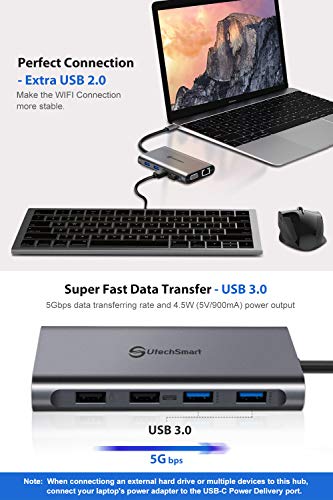
- Advanced Networking & Blazing Fast Data Transfers: Both Power Users and Gamer will appreciate the Plug and Play instant access to the blazing fast 1000m Ethernet port. Download movies quicker, transfer files faster, reduce latency in games . The UtechSmart USB C hub is ultra fast with speeds of 5GBPS for 2x USB 3.0 ports, one SD and one TF Card Slot, extra 2x USB 2.0 ports for your keyboard, mouse, or charging devices. Ensure the WIFI Connection more stable.
-
Information
-
Twitter
-
Pinterest
-
Youtube
-
Facebook
Wanda Dodge
Reliable, fast, useable power
As the owner of a Macbook Pro 2016, I know how important a good hub is, since the computer itself isn't useable without one or two. In fact, one brand of hub I have been using before, did not even deliver enough power to use my external keyboard. While this hub powers my keyboard and two old external hard drives. Also I find the data throughput is not limited by the hub which can be the case. The hub is as fast as the cables and drives allow on the few tests I have done so far, although I cannot get the USB C Thunderbolt to plug in to the USB C port on it. But its very useful for my older hard drives, keyboard, Yeti Blue Mic and all my other non Thunderbolt peripherals. Also it hasn't failed yet. Other, more expensive hubs with less ports, would often fail or become intermittent after a couple of weeks. This has been reliable for daily use since I got it at least a month ago. I would totally get this one. I have a drawer full of other ones most of which don't work. But this one handles most of my critical peripherals leaving 3 USB-C, thunderbolt ports open for my eGPU and fast external drives.
Leslie Roland
Really great portable product!
I really like this product, it arrived on time and protected well and in great condition. It comes in nice packaging, and even comes with its own velvet protection pouch to keep it in. The hub is very very light and portable and is great to take on the go. It is more of a “space gray” color rather than bright aluminum, as shown in one of my pictures. Also, I included a picture of the item next to my MB Air (silver) and it is about the thickness of the laptop closed, and about the length of the keyboard (see pics for reference). It is a great USB-C hub that you can use for many different USB devices and HDMI inputs, so the laptop can be used with many different accessories. I definitely recommend the product, as it seems sturdy but light and portable, and has a ton of different ports. It also matches the space gray color of the new MB pro/air laptops and looks really nice with it.
Ricardo Correia
Power, Ports, Portability.
UtechSmart 11 in 1 USB-C Hub UCN3270. I bought this hub seeking to expand the functionality of my Lenovo Yoga C930. As with most newer laptops, there's this trend of disappearing ports for smaller form factors. USB Type C enables people to use one connection from their laptop to expand out to a hub or dock that allows them the usage of things like additional displays, RJ-45 connections, USB Type A ports, etc. Most of us have not fully converted over to the USB Type C for all of our peripherals, and that's where this awesome hub comes in. This hub is reasonably priced, for all of the features that you get. I’ve attached the spec sheet, but I’ll type it out for you: USB Type-C Port for charging- from the manual: Supports PD (power delivery) charging via USB-C female port (unidirectional) Max. 60W power pass through, power voltage identifies intelligently between 14.5/20v (You can plug your laptop’s adaptor into the hub and charge you laptop with it. The hub also works independently of the laptop’s power source, meaning you don’t have to plug an additional power source into it) VGA Port, max up to 1920x1080P@60Hz (I use this all the time, I haven’t upgraded to HDMI monitors yet.) Gigabit Ethernet Port (Standard RJ-45 jack) 2x HDMI 4K Output (I haven’t plugged this into my TV yet, but I have no doubt it would be fine. You could combine these two HMDI ports with the VGA port and use three auxiliary screens, or you could plug in an HDMI projector.) 2x USB 3.0 Type-A Ports (Obviously this is where you’d want to plug your USB Type A data devices, like an external hard drive) 2x USB 2.0 Type-A Ports (Why not four USB 3.0 ports? They have one of the USB 2.0’s labeled for “keyboard”, and the other for a mouse- and honestly, you typically don’t need USB 3.0 for those kind of devices.) SD Card Slot Micro SD Card Slot (I have not tested the speed of these yet, but they’re such slim ports that I am glad they were included to ensure that you have maximum functionality) Of note, this model removes the Microphone/Headphone 3.5mm jack that was present on the UCN 3265 model, but added an additional HDMI port that the same model lacked. Not a big deal to me, and most laptops/ultrabooks still have ports for these. Also, with the move towards Bluetooth headsets and headphones, these are becoming less common on mobile phones as well. You also get a user manual, if you needed help with set-up, a full layout of the specifications, and additional information regarding some settings that may have to be tweaked for optimal performance across other devices. All in all, this is a well made device that I use daily. For anyone that is seeking to extend the functionality of their USB Type C enabled laptop, this hub is a no-brainer.
Yoseph Shiferaw
Impressive Little Powerhouse!
I received this item in return for my honest review, so here it is... I am a heavy tech user and have several devices I carry with me on a daily basis. My MacBook Air, my Nikon DSLR camera, my iPhone 8+, multiple battery packs, and this does not include all of my son's devices (he's as bad as I am). I do not use the Ethernet so I have no use for that particular port, but I definitely use the USB, SD cards, and other multiple ports (all at the same time sometime!!). The first thing I want to mention are the aesthetics (not that that is what's important). The hub is encased in an aluminum material that is very sturdy and seems as though it will withstand a lot of wear and tear. The multiple ports are placed on the sides and around the perimeter with a nice bit of spacing between each to accommodate multiple plugs being used side by side. It also comes with a nice little velvet pouch to keep it stored when not in use, or to transport and prevent it from being scratched. I leave the permanent cord on the end sticking out of the pouch so as not to scratch the hub's casing. With this device, I can download pictures/video from my nikon, charge a phone or battery pack, import pictures from sd cards, etc... all at the same time. The only thing you have to look out for is the hub does tend to get pretty warm with multiple things going on at the same time. So far, so good! I recommend purchasing this if you are a high tech user and need multiple ports for multiple devices at the same time. This is compact and small, and easily transportable. This makes traveling with your devices so much easier and more convenient. This particular one is a little pricier than others listed on Amazon, but they also offer an 18 month guarantee/warranty by either refund or replacement. This definitely would give me peace of mind about spending this amount of money!
Bishandassgupta
USB C hub that also works as external graphics driver
This is my second USB C hub from UtechSmart and I've been very happy with both. The previous version (B07KYL58Q1) was great, but one limitation of that hub was that the HDMI and VGA port could only mirror the display and to connect two monitors to my laptop in extended mode, I had to use an external display driver (B00L3Z7E3W). But this new USB C hub solves that problem because I can connect one monitor to VGA and another monitor to one of the HDMI ports and run both in extended mode. I don't use my laptop screen when connected to monitors, but if I want I can have all 3 (laptop + 2 monitors) in extended mode. This is great for multitasking! And the price of this hub isn't much higher than the previous version so if you're looking for something that works as a hub that lets you run two external monitors in extended mode, get this one. It would have been great if the second HDMI port also supported "extended" display so that 4 monitors (including the laptop screen) could be run in extended mode. I'm hoping a newer version (or maybe a firmware/driver?) will address this. The cable is a little short though, would have been nice if it was about a foot long or (even better) detachable so that if the cable breaks over time, it can be easily replaced. Overall, this is a great multi-functional USB C hub - all ports work as they're supposed to and have served me very well paired with my Dell XPS.
Precious Sufiah
VERY impressive product, throwing away all my other dongles!
I was skeptical about this product at first, given the seemingly complex nature of all the functions they put into it (dual HDMI, networking, fast charging, USB ports, card readers, YIKES!) - but, after a few days of HEAVY use and testing, I can verify that this hub is, in fact, the real deal. So much so that I am tossing my SD card reader, old USB hub, HDMI splitter, network adapter, AND charger for my HP spectre 360 and switching to just this. PROS: 1. Small. It's VERY small, particularly impressive given everything that's crammed into it. 2. Quality feel. It has a high quality feel, too, nice and solid without the usual cheap plastic feel of similiar products being sold these days. The ports are all rock solid, no wiggle, and plugs & memory cards click firmly into place. 3. Speeds are verified. USB 2.0 and 3.0 speeds match specs. This is actually quite rare in USB hubs, even high-priced models from more recognized brands. The speeds even seem to hold up during multi-card transfers (IE, copying data from an SD card, USB 2.0 stick, AND USB 3.0 external HDD simultaneously - something I do pretty frequently). As a professional photographer, this kind of speed actually makes a difference in my workflow, and enables me to simultaneously copy photos off my card and back them up to an external HDD at full speed. 4. Warranty. This little wonder has a 12-month warranty, and I actually know from experience that utechsmart stands behind their warranties (they will usually just ship you a new one, very few questions asked). 5. HDMI outs. I plug my HP Spectre 360 into this, and BAM, I am outputting on two monitors. SO COOL. I cannot verify the 4K nature of the HDMI ports, but it definitely works at 1080P without a problem. CONS: 1. Price. It is a little expensive for what, at first, appears to be "just" a USB hub - BUT, if you use this as intended (to replace a docking station for something like a HP Spectre 360), you will see that it is SO much more than just a USB hub and also VERY reasonably priced. If you are looking for just a USB hub, there are definitely cheaper options. 2. Temperature. It gets pretty hot during use, especially when charging the laptop and using 2 monitors simultaneously. Not sure if this will affect the long term effectiveness of the unit. 3. SD card speed. While the USB ports definitely transfer files at full spec speed, the SD card reader is linked to the USB 2.0 bus and is therefore slower than you might expect. If you need faster SD card transfers, find a USB 3.0 SD card dongle and plug it into this unit's USB 3.0 port. So that's about it. Great little unit! Highly recommended, if you are in a position to use all the features. Of course, they also make smaller units with less/different features, so check out their full lineup to find something that might meet your needs a little better (if this one doesn't).
Jessica Bohannon
Pretty good, feels a bit pricy
I got this as an Ipad/Desktop add-on. For my desktop, My Wacom Cintiq 16 has USB-c ports which are more useful with different ports. more USB-A ports are nice and are useful and the Micro SD/ SD slots work well. I don't have a need for the Ethernet port BUT when plugged into my Ipad Pro 2018 it does pop up as 10/100/1000 possible connection. Officially, it does NOT support Ipad Pros, but it kind of does. the ports all work for the Ipad, plug in a micro sd/SD card and it will open up the photos app to import pictures. If you plug in a keyboard to the USB- A ports (normal USB ports) the keyboard will work. If you plug in any USB hard drive/ flash drive it will not work correctly but that is an apple issue. My two complaints are minor, I wish it had an AUX port. More Apple devices are ditching AUX and adding that in somewhere would have been a better move than a micro sd slot since most micro SD cards come with an adapter to SD. It also seems to require additional power when connecting the Ipad to a monitor, which is fine since it has USB-C power in, but you need to plug it in this order: HDMI, USB-C Power, USB-C to the device. Edit/Update: After talking to their support we discovered that a setting on the ipad needed to be turned on and then it would support 4k. Works great just wish it was a little cheaper. Pros: Works well Fast connections Easy to use Nice/ Simple Design 4k Support Cons: No Aux port too many video output options (and using VGA downgrades the HDMI to only 1080p option for all monitors) Gets fairly warm when used for long periods of time under heavy workloads.
Misty Rene Freudenberg
Quality, TRUE Triple Display USB-C station, built very well of rolled aluminum (not plastic!)
John Clark
Solid hub at a good price. Very useful. Could be tweaked a little to improve.
About 6 months ago, I bought a Microsoft Surface Book 2, which has a USB C port. Given my love of multipurpose hubs, and the fact that this was my first computer to have a USB C port, a few months later I decided to purchase a USB C hub. Around 7 weeks ago, I bought this UtechSmart 11-in-1 hub and connected it the same way I had always connected USB hubs. (Connect hub to computer. Connect devices to hub. Simple, right?) Unfortunately, the empty USB C port on the hub wouldn't talk to an external USB C NVMe SSD or a small USB C monitor I connected. Being very busy at the time, I gave up on this hub and put it on a shelf. Very recently I bought another USB C hub to try. At first, I had the same issues which seemed unlikely to be the result of pure chance. However, this time I found the information saying that the USB C port on the hub was power-only. This tidbit of knowledge made all the difference. I found I really liked that second hub, once I understood that it wasn't a USB C data port. Because I had never seen a "power-only" port when using a hub based on any previous version of USB, it took me by surprise. So, I sat pondering the absurdity of any power-only port being labeled as USB (Universal Serial Bus,) when it provides no data communication function whatsoever. Then, I remembered this UtechSmart hub which I originally thought didn't work. I pulled it out again to try it and I'm happy to say, I was wrong. It does work - and quite well. So, I wanted to share my discovery. I must admit, if I had more carefully read the product info, I would have realized it was power-only much sooner. "Power delivery" was a bit nebulous to me, since I knew all USB ports carried power as an ancillary function to data transport. In a nutshell, this UtechSmart hub is working perfectly. I was just using it wrong. The hub wouldn't talk to my devices because, like the second hub I tried (and also reviewed with high marks,) I incorrectly assumed the USB C port on the hub was a full-spec, data-capable USB C port. Personally, I think "power input port" would be a more accurate label for this port than calling it "USB C," but that's just my 2 cents. I wish they had used a regular barrel plug and power brick for the power input. Then there would have been no confusion. Anyway, once I realized it had this restriction, I decided to give this hub another chance to impress me. This time around, it succeeded. Pros: 1. Like many multipurpose hubs, this one has separate SD/TF and micro SD card readers built-in. Carrying one device which does everything you need keeps your carry bag clear of clutter. 2. A short cable to attach it to your computer is permanently attached to the hub, so you won't ever need to search for a cable just to use your hub. 3. It has two HDMI ports. This can give you a semi-portable three monitor workspace if you carry a couple of extra slim flat panels along. For example, I have two 5mm thick 13 inch HD flat panel displays attached to a small hospital-style rolling bed table using tablet mounts. Placing my laptop in the middle and connecting a single cable gives me a 3 monitor system I can use to do a little work before I even get out of bed in the morning. 4. There is also a VGA port. This could be considered a pro because you could theoretically connect a fourth display. In my mind, this is only a pro if you are still stuck using an ancient VGA monitor (Remember CRTs?). The vast majority of people will never use the VGA port, but if you need it, it's there. 5. It has a gigabit ethernet port on it. WiFi is nice for free-ranging connectivity, but when you're at a desk, nothing beats having a hard-wired gigabit connection to your network. You can never have too much connection speed available. 6. This hub has two USB 3.0 ports on it. USB 3.0 ports are still probably the most widely compatible ports for communicating with peripheral devices, so having a couple of extra ports is a no-brainer benefit. They are also backward compatible with the older USB 2.0 standard. 7. There are also two USB 2.0 ports. Having more USB ports can always be considered a pro, but these would be a more significant pro if they were USB 3.0, like the other two. Why take up space on a compact hub with two slower USB ports when you could just have four fast ports which are backward compatible in the same space? 8. I debated whether to include this as a pro or a con, but there is a USB C power-only port on this hub. I included it as a pro because many may find it useful. Personally, I wish they had used a more appropriate barrel-type power connector with a 19V power brick or similar for the power input. A (universal) serial bus port which has no serial bus port functionality just seems odd to me. Why have two different versions of one physical port which share the same label? Cons: 1. I listed the power-only USB C port as a pro, for those who need it. For me, a power-only USB C port seems like a wasted opportunity. I also wonder why there aren't many USB C hubs which actually give you additional USB C ports for connecting more pieces of equipment. USB 3 hubs let you plug multiple USB 3 devices into a single USB 3 port on your computer. The same was true for USB 2. It seems like most companies have overlooked that functionality when designing "USB C hubs." 2. I wish the VGA port wasn't taking up space that could be used for more USB ports or something else. 3. The hub gets pretty warm when running two monitors and many other activities at once. Here's a tip: Don't lay a chocolate bar on top of it by accident. It will quickly transform into a chocolate puddle. Really, the first two cons are personal opinion and many will disagree. In addition, neither of them is a deal breaker. Converter cables can be used to connect just about anything to this hub with no issues. Once I got past my own confusion about the power-only USB C port, this hub works very well. I'm getting really good transfer speeds to and from my external USB C NVMe M.2 SSDs with them connected to the USB 3.0 ports on this hub using converter cables. With all the ports this hub has, I'm also able to leave my bedroom work area intact when removing my laptop to leave. This hub gives me a one cable connection to two extra monitors and a variety of other devices. Overall, I have a new appreciation for how functional this hub can be as the center of a workspace. I just needed to wrap my head around the idea of power ports being labeled serial ports, when they really aren't. In conclusion, this is actually a really nice hub for a very reasonable price. Just bear in mind that this hub isn't a way to expand the number of USB C ports on your computer like hubs for past versions of USB. Keep that in mind when looking at it and you'll encounter no surprises. This is really a hub for plugging numerous non-USB C devices into one USB C port on your computer. If that's what you need, then I can recommend this as a high-quality 5-star hub. Click to let me know if this information was helpful.
Emii Codilan
MacBook's best friend, solid device
Great hub! Especially for MacBooks. Be sure to read the description above for compatibility with your device. It's solid, fast, and well built. I'm guessing here, but as far as the attached connector at first I didn't like the idea but that may help it to be faster and more reliable connectivity. It's not flimsy at all, the connection point to the hub is sturdy, it should last well. There's an 18 month warranty so I'm not too worried. I am concerned about the length of the connector cord because it's very short - attaching things to and into the hub means moving it around, jiggling, which can ultimately damage the C port on the MacBook, in my case. I don't allow pulling, hanging weight, etc. on my device ports, especially the charging port. I'll see once I'm using it more. If I can use it with minimal movement then it's fine. I have a 12" MacBook that I love, insanely portable and powerful, but it only has one C port. This hub let's you connect a crazy range of technology and get power at the same time. Makes my MacBook far more useful on the go too. I was showing a friend the hub, pointing out all of the ports - she asked why you'd want an Ethernet port? I had bought an Ethernet dongle. Direct Ethernet connect is the ONLY option if your WiFi/network goes wrong and you have to log into the router or modem to access settings.