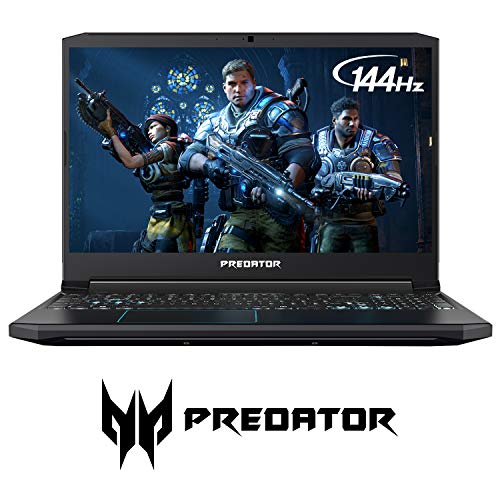




- 9th Generation Intel Core i7-9750h 6-Core Processor (Up to 4. 5GHz) with Windows 10 Home 64 Bit
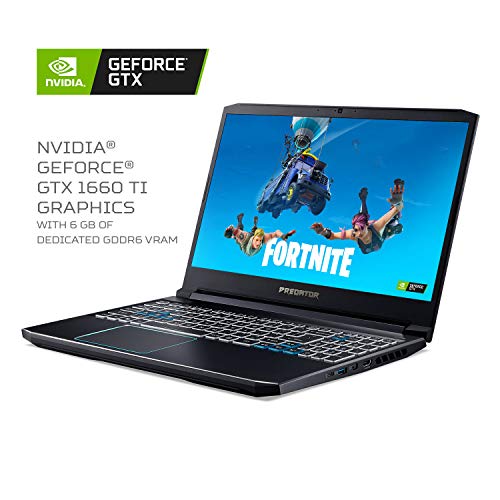
- Nvidia GeForce GTX 1660 Ti graphics with 6GB of dedicated GDDR6 VRAM
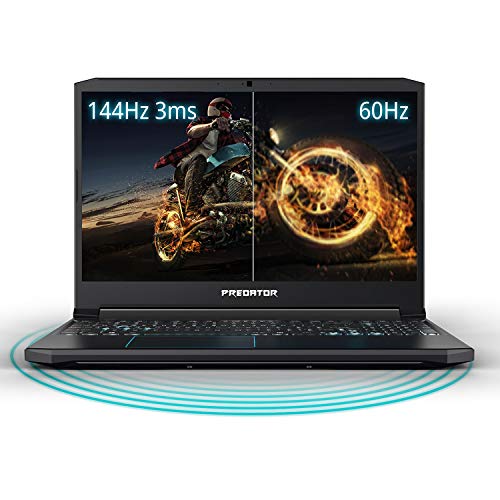
- 15. 6" Full HD (1920 x 1080) widescreen LED-backlit IPS display (144Hz refresh rate, 3ms Overdrive response time, 300Nit Brightness & 72% NTSC)
- 16GB DDR4 2666MHz Memory (2 x 8GB), 256GB PCIe NVMe SSD (2 x PCIe M. 2 slots | 1 slot open for easy upgrades) & 1 - Available hard drive bay
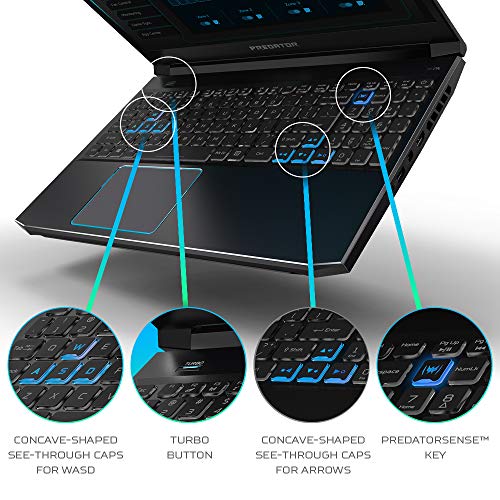
- Backlit keyboard | LAN: Killer Ethernet E2500 10/100/1000 Gigabit Ethernet LAN | wireless: Killer DoubleShot Pro Wireless-AC 1550 802. 11AC | 4th gen All-Metal AeroBlade 3D fan
-
Information
-
Twitter
-
Pinterest
-
Youtube
-
Facebook
Caleb Rawlins
Very fast machine
This is a gamer's dream machine. It works fast and it has great camera quality. As well, the screen quality is perfection and the keyboard is smooth and easy to type on. The mouse is a wiz, moves everything easily. The battery life is long and the wall-plug in keeps it strong.
Bryan Soon
Great screen, great capabilities
What I like most about the Predator laptop is the wide, clear and bright screen which is not only great for gaming, but for any visuals such as art, photo editing, watching videos, etc. However, this is just one of the many features. The charging port is on the left side – I’d have preferred it in back as to not have the cord looping around if the nearest power source is on the right. Also on the left side is a Kensington lock slot (sorry, have no idea what that is), an AC adapter jack, an ethernet port, two USB ports and the headphone jack. The right side has a USB Type-C port, a USB port that allows power-off charging, an external display port and a HDMI port. Speakers are angled to the rear on either side of the laptop base for stereo sound, which is crisp and clear. Both left and right sides as well as the back edge have multiple ventilation vents for the cooling fan. The underside also has an expansive ventilation area. The fan, though not loud, appears to be powerful as I did not experience any notable heating of the laptop components. The keyboard is brightly backlit with a bluish white light. At the top on the left side is the Turbo button, which allows you to switch the overclocking and fan level. There is also a “PredatorSense” key which launches the PredatorSense software by which you can monitor and change those settings as well as customizing your gaming profile. The camera window above the screen has a reasonably clear picture, and there are two internal stereo microphones on either side. The wide buttonless touchpad is quite sensitive, though you can modify this. I know that I may be old school in this but I do wish it had dedicated left and right-click buttons. Comes with Window 10 preloaded and with Cortana personal assistant.
Thet Myat
Awesome laptop!
First off, I'm not a gamer, but a video editor. This laptop is obviously marketed to gamers. But the same features that make a computer good for games makes it good for video editing; in other words, fast CPU (this has an awesome chip), great GPU (graphics card), yes, top-notch here as well. Unboxed this little monster, charged it before I did anything else, as the very simple, short and sweet manual requests you do (common sense). It booted right up. I did have one glitch setting up the machine; the Cortina-voiced procedure got hung-up halfway through. I had to start over, and this time everything installed without a problem. I loaded up my favorite screenwriting software, added Open Office and an antivirus (it comes with Norton, which is an excellent antivirus package). Really the only problem I ran into was dealing with Windows 10 (which the machine comes with). But that's on Windows, not this very cool laptop. I did have to spend about two hours getting all of my software loaded on, but, again, it's Win 10 that made it a bit difficult. Visually, the machine is all 'bad ass'. It's got a cool Predator logo on the screen (upside down so it looks right from the back, a bit confusing to me at first). The keys are backlit this cool blue color. The keyboard works great, very nice tactile feeling. The layout of the keyboard is the standard QWERTY with all of the standard buttons, laid out a bit different from my Acer Desktop. The track pad works fine, but I did find I had to press the pad harder than I expected to select an item. Of course, you can use the enter key, which I ended up doing most of the time. The Predator has three 3.1 USB connectors, which is excellent, and fast. My old Lenova laptop has...one. So annoying! Those USB ports come in handy, because I hate tracking pads, so I plugged in an external mouse, which I love. (Wireless mouse would be great). Hooking up my WiFi was a bit of a problem, took me three times, but I chalk that up to Win 10 again. Once connected, this machine is FAST. Such a joy to use. I've not tried editing. I use Davinci Resolve, and that is a system hog. I loaded the software fine, and it works (albeit slowly) on my old desktop, so I'm excited to see how good it will be. This is one of the reason to have a powerful laptop if you are a filmmaker. You can haul this bad boy to a film set, and download all the video cards and audio cards while on set, and give the cards back to the cinematographer and the sound mixer. Ask them pretty please not to erase the cards until you get home and save the data on a RAID or other backup system. It's going to be great to do that; my current laptop just doesn't have the input to do that (you do need a card reader for the cards.) All in all a great machine. Fast, 16gb memory, etc. One thing, the SSD (!) is fairly small. Swapping that out will probably be necessary if I do a lot of editing on the machine. Highly recommended.
Cho Pyone
Make sure to switch to nvidia 1660 card
I've had this laptop for about 24 hours now and am seriously impressed with it. One thing I did have to do was to go into the nvidia control panel to set the Global Settings to use the nvidia 1660 graphics card. It defaults to the integrated graphics which is not as good as the nvidia card and why you are getting this laptop. I can only compare it to my only other Windows desktop which has the GTX1060 3G card from last year and this laptop is so much faster it is unreal. In one of my games I was getting over 100 FPS during FPP gameplay. Even over WiFi the laptop is responsive. The built in trackpad is okay. You'll definitely want an external mouse. The included software like Predator Sense is particularly interesting as it provides the ability to overclock the GPU and easily. So far I haven't needed to but as far as having the software already preloaded is neat. Fan noise even without overclocking is noticeable but expected considering how much work this laptop is doing during game play. Audio through my bluetooth headset is really good. The Waves NX technology with my old bluetooth headset does make gameplay a lot better making it easier to hear which direction opponents are coming from. I'm seriously considering getting a NX enable headset to see how much better it could be. WiFi is solid and I'm connected to 5G for gameplay. I've also ordered a PCIe NVMe M.2 module to expand the drive space. The stock NVMe had about 190G available on it so still plenty of space but it is nice being able to expand with the extra empty M.2 slot.
Sohail Imdad
Great for gaming, overall a lot of laptop for the price
Overview: This machine does a pretty good job living up to its advertised capabilities. This review is based on my impressions after a couple of days with the unit - I may update it later if anything relevant occurs long-term. Testing Methodology: I don't have a lot of sophistocated instruments for measuring the actual brightness, color gamut etc... In general I stuck to sofware based tests and my somewhat subjective eyeballs. Construction: The top (back of the screen) is metal, as is keyboard and palm-rest area, the screen bezel and bottom are plastic. This was a pretty good design decision as it keeps the bottom from turning into a hotplate in your lap. The hinge feels solid and moves very smoothly. Screen: The screen is rated about 300 nits. Just based on comparisions with others with similar ratings this screen seems like it might actually be a little brighter than it's rated. It's perfectly visible outside in daylight as long as there isn't direct sunlight on the screen. The 144hz refresh rate is a really nice feature and allows for some rock-solid motion. The contrast and color gamut are very effective and pleasing to the eye. I don't have a tool for measuring the colors so this could just be clever engineering, but nothing here feels like a compromise. The screen does suffer from uneven backlight blooming so on a completely dark image, there are bright splotches around the margin, but this is pretty typical for an IPS LCD. GPU: The GPU seems to be able to take just about everything I've thrown at it on the most insane settings and I haven't noticed any performance problems. The Witcher 3 and Darksiders Warmastered Edition look amazing in motion, with the latter running at a V-sync'd 144hz with no problems at all. It pulled a very respectable score of 14,000+ on the Final Fantasy XIV Stormbringer Benchmark with everything turned up to maximum and every optimization turned off. The laptop comes pre-configured with an overclock setting called "Turbo" mode which is activated by a button to the upper-left of the keyboard. You can, of course, create your own overclocking profiles. In order to more efficiently use power, conserve battery, and cut down on fan noise, as with most contemporary gaming laptops, the Predator Helios 300 uses Intel Optimus. In a nutshell, Intel Optimus switches dynammically between the considerably less powerful and less power-hungry integrated Intel GPU and the GTX-1660ti. The system will attempt to guess which GPU should be used for a given process, but you can deliberately control this in a couple of different ways. From the Nvidia Control Panel, you can set the GPU to use for a given application so that whenever that program (i.e. your games) are launched it automatically does so under the Nvidia card. Alternatively you can tell the system to favor the Nvidia card for everything (not a great idea unless you want to listen to the fan all the time and watch your battery level drop before your eyes). And Lastly, there's a context menu item called "run with graphics processor" that lets you select which to use by right-clicking on an application before you launch it. So Optimus is pretty useful for balancing performance, but it somes with a couple of unfortunate tradeoffs. There is no "Display" option in the Nvidia control panel because Optimus dynamically manages those settings, and G-Sync and Fast Sync options are not possible though technically the GPU is capable of using them. Keyboard: The keyboard is, for the most part, great. The keys are spaced reasonably, slightly convex, quiet and just have a nice feel. I'm used to pressing harder so my fingers have a tendency to bounce and I wind up typing double letters occasionally, but it's nothing I can't adjust to. (I tried using the Windows "Filter Keys" setting to help with this but it's more of an accessiblity option and is too restrictive) The width of the keyboard allows for the incorporation of a 10-key keypad on the right, however the keys are much narrower than the rest of the keyboard, and the 0 key has been shifted to the center column to accomodate the arrow keys, so it's a bit of compromise. It's only really annoying when trying to type in a large string of numbers such as when entering a license key. Trackpad: The trackpad is generously large and very sensitive. There are no mouse buttons, but the bottom of the pad is clickable with the right and left corners representing the right and left mouse buttons. Sound: The laptop comes with a pair of down-firing stereo speakers that are okay for what they are. They're tinny and can't really get loud enough to overpower the fan noise when playing games. Noise cancelling or noise isolating headphones are pretty much mandatory for gaming or anything that drives the GPU. That said, the virtual surround effect is surprisingly convincing. Backlighting: They changed last-year's red backlight to blue, which I think is somewhat more pleasing to the eye, but it's kind of a deal breaker in the use-it-in-bed scenario because the blue light spectrum interferes with your ability to achieve REM sleep. It's a thing, look it up. Battery: It runs on a 3720mAh battery which is about 25% more capacity than last year's model. Trying to give a "it lasts this many hours" number is kind of pointless in my opinion because it's affected by background processes, screen brightness, what you're doing with it, the age of the battery, etc. Let's be honest though, no one is buying this laptop for its battery life. Nvidia has several settings which seek to improve battery life while gaming, but they all involve framerate throttling. If you want to game while not connected to mains power, then you're probably playing games that would work just fine on a laptop with a fraction of the power of this thing. Webcam/Mic The webcam maxes out at 720p30. That resolution also holds for still images so it seems like that's the geometry of the sensor itself. It works okay in relatively low light - with the brightness gain cranked all the way up, the glow of the screen is enough to allow it to capture a usable amount of detail in a dark room. In a normally lit room the image is a bit darker than what you would see with your eyes, and as with most webcams, colors are little washed out. And like most pinhole cameras, the brighter the lighting the clearer the picture and the more faithful the colors. This would be perfectly serviceable in a well-lit office, or outdoors. The stereo microphone picks up voices clean and clear. Network: The "Killer" WiFi chip in this machine is amazingly fast. My Internet service tops off at around 25MB/s, and this Wi-Fi card easily hit 23MB/s (that's bytes, not bits) when downloading games from GOG Galaxy. I was pleased to see that the laptop also maintains an RJ-45 for wired ethernet connnectivity - it uses a clever hinged port to maximize space while there's nothing plugged in. Hardware Accessibility/Upgrade difficulty: Unlike last year's model, there are no quick access ports - if you want to get at the Wi-Fi, M.2, Memory or SSD area, you have to remove the entire bottom of the shell. Fortunately everything important is within reach after you take out the 10 philips screws and pull the bottom cover off. Cooling: This is by far the best vented laptop I've ever seen. The heatsink fins and fans are clearly visible through the myriad slits on the bottom, sides and back. The fans are as noisy as any laptop I've ever used, but not worse, though when you hit that Turbo button to kick in the overclocking profile and those fans crank up, it sounds like a jet preparing to take off, so if you're doing any moderate to heavy gaming, noise isolating or noise cancelling headphones are not optional. Storage: A 256GB PCIe M.2 drive is installed. It tops off around 1.5Gbps which is a pretty respectable speed and pretty performmant. It's not a lot of space though so it's fortunate that there's another M.2 slot to install another card later on. There's also a bay for a 2.5" drive, but the bracket and SATA connector kit comes with a warning that Acer no longer considers this a user serviceable operation and implies that your warranty may be voided by attempting to install it yourself. Instructions/Documentation: The documentation for the hardware was honestly a little disappointing. It gives you a tour of the ports and the keyboard, but doesn't include anything about how to install M.2 devices, upgrade memory or install a 2.5" drive - these aren't exactly rocket surgery, but it still feels like an oversite that Acer doesn't want to show you what goes where. The SATA adapter for the 2.5" drive requires connnection to a proprietary ribbon socket which they altogether fail to tell you how to locate on the motherboard. Other Stuff: I had to chuckle when I saw the "Turbo" button. I'm old enough to remember when that was a thing on the Intel 386 CPUs, and unironically it does pretty much the same sort of thing here. The BIOS is about the most bare-bones affair I've seen recently, with no options for controlling and/or disabling the integrated GPU. The system came with Norton Ultimate installed. Thankfully that's about the only piece of garbageware installed by Acer. Microsoft's default "Windows Defender" is far superior to Norton and unlike Norton it won't waste a ton of CPU cycles for no good reason. Windows Defender is already part of Windows 10 - just uninstall Norton and reboot to activate it. It's better protection and doesn't expire and beg for more money in a year. I've attached an image of the installed applications to this review so you can see what it comes with. Summary: Pros: - Looks and feels sleek and solid - That 144hz screen is fantastic - 300 nits is not MacBook bright, but it's usable in daylight - Comes with fast PCIe M.2 Storage - Wi-Fi is incredibly fast - Powerful GPU - Very effective cooling - I never saw it break 46C Cons: - Blue backlighting is bad for bedtime use - Fans get loud when the system is under a load - No option to disable Optimus and enable GSync (so no GSync) - Norton Ultimate - seriously? Updates: (As I encounter new things that I think are relevant, I'll update the review here) - The USB-C socket is not wired to the video card so it's not possible to output video. The laptop provides HDMI and a mini-DPort so it's not lacking in output options, but still.