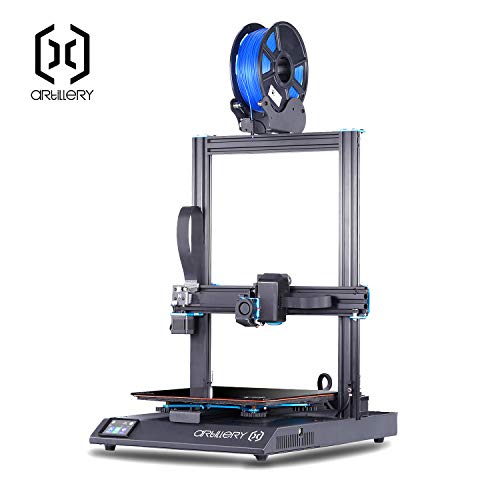
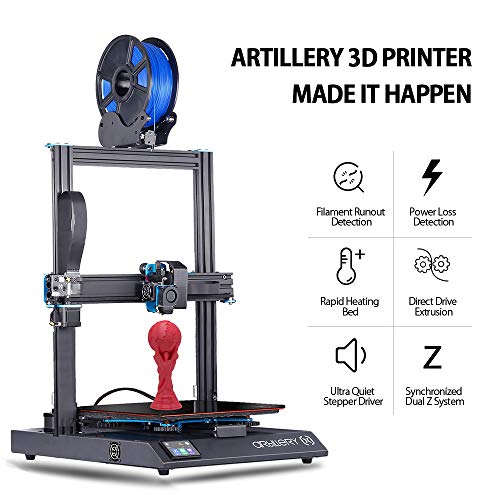
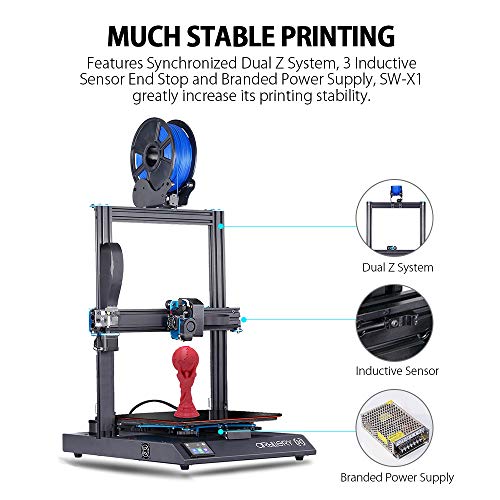


- MUCH STABLE PRINTING: There are 3 inductive sensor end stop separately set on XYZ axis while those non-touch, high-precision limit switches can automatically calibrate and maintain good stability under high-speed printing. Most importantly, features Synchronized Dual Z System, SW-X1 greatly increase its printing stability, also, the built in branded power supply ensure stable and sufficient power. Spend more time making without having to manually adjust the print bed.
- RUNAWAY PROTECTION HEATBED: The printer has a direct drive extruder and a fast heating AC heat bed with built in thermal runaway protection, even if the board or the SSR malfunctioned, the bed won’t heat up endlessly until bad things happen. Additionally, the heated bed can heat up to 80C in 2 minutes and it only takes the 0.4mm nozzle about five minutes to heat up to 110°C. With the Lattice glass smooth headbed surface, it makes all types of filaments can be easily stick on.
- QUIET TO USE: With a 300 x 300 x 400 mm build volume, the Sidewinder X1 3D printer has a hushed operating sound even working at fast speeds, thanks to its exclusive ultra-quiet stepper drivers which significantly reduce the noise level. SW-X1 overhauled the motion system on the Z, replacing the leadscrews with a belt-driven system, which not only reduces the noise level but also allows for faster print speeds. Feel free to work on other things while the machine is printing beside you.
- FILAMENT RUN-OUT+ POWER LOSS DETECTION & RECOVERY: Have you ever tripped over the power cord and lost a long hours print? SW-X1 will save you from the loss of power. When it recover from a power failure, the machine will continue to print. Also, it will automatically pauses your 3D print and notifies you when you've run out of filament, saving you time and money.
- FAST AND PRECISE: The print speed can reach up to 150 mm/s, and with the Direct Drive Extruder, SW-X1 makes high quality print, especially for flexible filament. When it arrives on your doorstep, the Sidewinder X1 comes 95% pre-assembled, which makes installation easy as can be.
-
Information
-
Twitter
-
Pinterest
-
Youtube
-
Facebook
Varsha Payaal
Everything is looking very promising on the Sidewinder X1.
I just received the Sidewinder X1 from Artillery 3D earlier this week. The packaging is top-notch. I could drop this off a freight truck and there would not be any damage to the printer. We all know how important this is, as it is shipped from China and can take a lot of abuse. Setup is very straight forward and takes about 15 minutes from unpacking to setting up. The instructions are self-explanatory and easy to understand. Furthermore, there is an accessory bag with some welcomed spare parts included with the Sidewinder X1 that we have not seen come with any other printer before. I heated the bed and adjusted the bed level knobs. Once I levelled the bed, I did a couple of test prints to get an idea of how well the bridging and overhangs are. This is thanks to the blower fan and overhangs also maxed at 65°. I did not have any line or walls issues, but time will tell with more prints.
Nabila Sherin
Faster 3d printer I ever seen
Serge Nekipelov
Perfect print 15 minutes from unboxing UPDATE
This came super well packaged. Setup was 1 2 3 easy. From unpacking to first print was 15minutes. no joke. Home Machine, Adjust the carrier wheels, level bed. Insert provided USB stick, touch the test print icon. hit print. After about 3 hours of fine tuning, this thing prints non stop. Hardly ever fails, and prints good quality and accurate. I can't believe it was only 430 dollars. I use Cura 4 for a slicer. Brillaint.
Racketstar Lavracq
Absolutely great printer!
Absolutely great printer! I have purchased/built/used 10 printers now. This is the best one I've owned in the 3 years I've been 3D printing! I'm not exaggerating when I say this is without a doubt my new favorite 3D printer. Thats not to say that it is perfect. No 3D printer is. But Artillery clearly has taken a lot of care to be sure it works very well. This is without a doubt the quietest 3D printer I've ever owned. The one I received has the new upgraded base fan that is whisper quiet. The fans are much more quiet than most printer's fans I've owned. I don't hear them hardly at all. I don't know what motor drivers they used for the 4 xyz motors but I can hardly tell they are even running. The extruder is also quiet. No whine or reving sounds. Once in a while, it uses it's really fast travel speed that is audible, but otherwise very quiet operation. Its quieter than some printers I've used that were encased in enclosures. One setting in Cura Slicer software that can drastically cause more noise is the checkboxes for enabling acceleration control and jerk. On this printer, if you enable these boxes without further doctoring their subsettings, the hotend and carriage will vibrate fearcely when filling in narrow gaps in walls at higher speeds. These two settings turned on but unadjusted, will also make the hotend thump at the end of a line of filament. So either keep these 2 settings off (unchecked) or further tweak them in the subsettings to avoid noises. It uses ribbon cables in most locations. They stay cool and bend in on themselves as printing. So they look and perform really well. The newest version uses all pressure inserted ribbon connectors instead of the earlier versions which required little levers to hold them down. Be sure you insert these cables all the way in or they could come loose. There's one non-ribbon cable I do have an issue with. Thats the 110V bed cable going between the chassis back and heatbed. Out of the box it drags on the rail system, base, and Y induction sensor and can even get caught between the Y induction sensor and the bed, stalling the printer and killing any print running. It's happened twice to me. It was also kinking in a way that I can see was likely to break eventually. I printed a heat bed cable guide part from Thingiverse to remedy this. If you see the cabling inside the chassis, you will be amazed at how well its cabled. Very clean well routed cabling. Also a small 8A power supply is all that's needed because the heatbed now runs from the 110V line voltage. (Or 220V if you have the non-USA model.) It prints very nice. Whatever those driver chips are, they produce nice smooth prints while the volcano clone hotend and Titan clone extruder allow you to print faster. The clone volcano nozzle is currently a 0.4mm bore but you can put larger volcano nozzles on it if you want to print even faster at lower detail. If you like the high precision look, stick to the .4 nozzles. You can also go down to 0.2mm if you want super hi-res but long print cycles. The Titan clone direct drive extruder is wonderful! No more jams and loading and unloading issues you get with Bowden tubes. This direct drive also does really well with TPU flexible filament if you are willing to slow down the print speeds. It's tension on the filament is adjustable and you don't have to deal with filament jams nearly as much as Bowden tubes because there's only about 2" between the feeder gear and the nozzle. At 300 X 300 X 400mm, you can produce some really large prints! Ive done only one really large one since purchasing this that took two days to print. (The vase pictured was tall but in vase mode so very thin.) That same print on my JGAurora A5 took almost 4 days to do it and failed to finish several times before finally succeeding. This one was my second print on this Artillery and it just whisked through it at a higher speed finishing in half the time I was used to. And it looked great when done. Also the bed heats up fast! Because it's running from line voltage (110V/220V) it's really quick to get up to temp. I tested it all the way up to 110 degrees C but don't normally run at any higher than 60 to 75 degrees C. It only takes a couple of minutes to be at full temp. And it seems to be consistant at temps although the center of the bed (like most heat beds) will tend to be a bit warmer than the edges. It also has a thick insulation pad stuck to the bottom of the bed to keep it from leaking heat. This means it turns on heat to the bed less often than wothout it. Now there is some bad news if you like to conserve electricity. While most printers with a standard 12V/24V heat bed have power supplies that suck 200-350 watts from your electrical supply, this 110V/220V one can easily pull 600W when running. So it's not going to be as cheap to run as other printers without the line voltage heat bed. But frankly, I'd rather have the increased power consumption than waiting 30 minutes for the beds to warm up to 100C like on my other printers. Be sure you have bought filament with it or before hand. Keep filaments sealed and dry. You get no sample filaments at all with this printer. If you are a beginner to 3D printing, start with PLA filament till you learn the basics. It goes fast when you are learning as you will likely have several failed prints. Bargain basement priced filaments may not work too well, so stick with the mid-priced PLA. Get at least a couple of kg rolls of PLA. Remove and put filament back into air tight containers when you are done printing. In some humid or very dry places, even being out in the air a couple of days could ruin them. Once you get better at understanding slicer program settings effects, you can then branch out into other types of filaments which are more complicated to print. Only change one setting at a time when attempting to dial in the best settings for you and your printer. If you change several settings at once, it's difficult to figure out which change caused negative effects or which one just fixed the problem you were working on. Also beginners need to understand there is NO operation guide or manual for this printer at this time. Just an assembly guide and a guide for setting up a seldom used slicer software package. You will need to learn to print by doing, making mistakes, and getting advise from others online. You will need to learn to send Gcodes and setup lots of software settings to get this printer to perform well. This is still a hobby, not yet a plug and play kind of product. You must do your homework to get good at using it. There is always more expense after the initial purchase. This unit was packed really well by Artillery then put in another outer cardboard box by Amazon that was packed very poorly. The well packed Artillery packaging made it from China AOK. But once the second poorly packed outer enclosure was added, UPS beat it up badly because it was not sized well, packed well or taped well. The outer box I got took far more damage in the US than the inner one did from China. The outer box was destroyed. The well packed inside box was in good shape wirh only a few dings and protected the printer. So check for damage before using it. Check all your screws and parts to see they are aligned and tightly connected before using. Your V-slot wheels will likely need to be realigned before using. Minor issues aside, I'm absolutely loving this printer! If it lasts a reasonable amount of time, I might get another one and sell some of my other printers. This is the one I've been waiting for for years. Thanks for making a good product Artillery! (I guess that's Evnovo now?) Its hard to get a 5 star rating from me for any printer. I'm very critical of every printer I review. But this is one that definately deserves the full 5 stars.
Dawn Scholl
Print Beautifully
Prabha Radhakrishnan
OMG! I didn't even think I could find such great quality at that price!
They really did hell of a job at this company: Not only it's the fastest of all printers I've had in my possession, but it's incredibly silent, it barely reaches the sound level of a whisper. I've had it only for one day, but I'm already impressed. I don't work for them, I'm not sponsored by this company, I swear, I'm THAT enthousiastic about it and I want more people to buy more of these so crappy Creality and other Tevo's will think twice before charging so much for base level quality. I hope those other brands are aware of the presence of this printer on the market, because they really kick asses! This is DEFINITELY the printer you've been looking for. It's not Open Source, but there's some serious software and engineering involved here! You won't be disappointed. Fast, incredibly silent, high end hardware, software...
Sanjay Duhlani
Great printer for the price, fun to do large prints
This printer prints beautifully. It arrived on time in great condition (excellent packaging). The machine has been printing some amazing stuff (I am printing precision fit parts) and I am very pleased with the choice I made. For those that like to bring their stuff out and do upgrades, this is perfect too since there are many many aftermarket parts available. Just want to show my own design pencil holder. Over the weekend print. good print. All in all, I made the right decision going with this printer and will get another one as my production needs increase.
Monalisa Basu
Great Printer for any level of experience.
After much research being an absolute newbie, I decided to go with almost ready for use and avoid a long uncertain journey to the first good print. I wanted a "starter" printer that wasn't expensive but still had decent quality. This printer is it! I really was unsure what to expect with this printer with it being a new brand, but for the price for the build volume I really could just not pass it up. I was so impressed with how much thought went into the design to make it easily build-able and have tight tolerances! The quality is really good and the build time was super-fast. I will be updating this review in the future after I do more prints. I would definitely recommend this for either a beginner or somebody with experience looking for a large print volume.
Adam Escorial
Excellent Seller Support
I was going back and forth between this one or the Tevo but chose the Artillery because the support is amazing. A member of the Facebook support group for the printer offered a quick solution as I wait for the setup guide. The seller is directly involved in the Facebook group and is available to answer questions and provide support. The machine operates like any normal 3d printer and produces excellent prints. I am surprised this machine isn't in the high price range but the competition with other brands must be keeping the price down. The machine has some features that set it apart from others such as a perfect glass print bed, a filament detector and dual Z axis. If you are looking for a 3d printer, you can buy a smaller one, but eventually, you will want to buy a larger one as your needs grow. Save yourself some money from the start and buy a large printer such as the SW-X1 and you will be satisfied you made the right choice.
Balsam Bachoua
Best First Time Experience EVER! Well Worth it!