
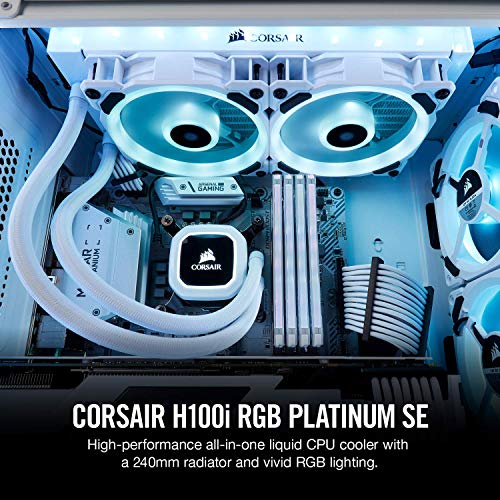
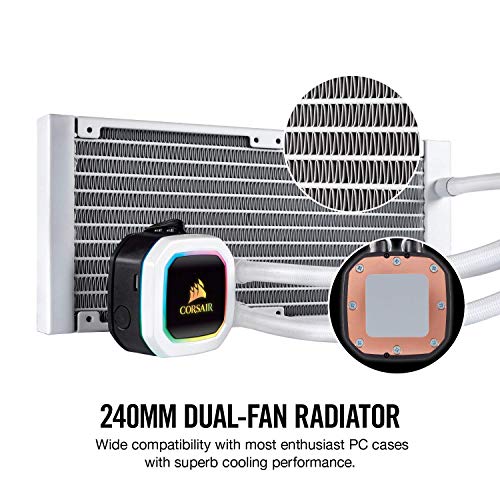


- Rgb PWM fans: two Corsair LL120 RGB White PWM fans deliver a blast of color from 16 LEDs each, along with improved airflow for extreme CPU cooling performance.
- Special edition style: SE features brilliant white fan housing and radiator to accent your system's style and better reflect your RGB lighting.
- Dynamic Multi-Zone RGB pump: 16 individually addressable RGB LEDs light up the pump head to produce stunning, customizable lighting effects to match your build.
- Extreme CPU cooling: experience incredible Corsair Hydro Series cooling performance, with each Fan running from 360 to2, 200 RPM while in operation.
- Zero RPM mode: zero RPM cooling profiles In Corsair iCUE software allow fans to stop entirely at low temperatures, eliminating fan noise.
-
Information
-
Twitter
-
Pinterest
-
Youtube
-
Facebook
Andy M Johnstone
Easy to install, great performance, low noise
Ive previously avoided water cooling because I did not want to get involved in the DIY nature of building your own cooling loop. I was really excited to try an AIO when I decided to build a new system, and I had a wonderful experience. The unit performs well, was easy to install, and is very quiet. Even trying to cool an OC'd 9900K. Note there is a bug in the iCUE software for this device currently, that causes the lighting to reboot occasionally. The performance of the pump itself is not impacted by this bug. Its an annoyance for sure, but one I can live with until they update the software. And note the software is not required to operate this device - only if you want to customize the lighting.
Nathanial Lovgren
First time gaming PC builder...
I have never built a computer before. With that said, watching an installation video for this unit was all it took for me to get it installed within 30 minutes. I installed this unit after my motherboard, CPU, and RAM were attached into the case. Made it a lot easier to manage the tubes and hide the fan wires. The unit keeps my Ryzen 2600x hovering around 28-32c under idle and about 38-40c when stressing it out on a game using Ultra settings. The fans have 4 modes: not operating, quiet, balanced, and extreme. I find balanced to be the best when it comes to both performance and low noise. The extreme setting is pretty loud and sounds like a box fan turned on medium. The extreme setting cools the processor down pretty quickly though from hotter temps. You can control the colors and the fan/pump through the iCue software.
Mim Blank Nonnemaker
Works great, and does work for LGA 1151
I love it so far. has some really cool effects to it and keeps my i9 cool at 5ghz. The only problem with it is when you go to install it. There's a 115x bracket. The bracket, at default, doesn't fit the LGA1151 slot until you adjust the screws by moving them inward a bit. There's a rubber grommet over it so you can't see that they do move. So when you go to install, it'll freak you out thinking you made a mistake. Lots of reviews for this are kind of like that. However, you just move the screws inward or outward as you need and it fits perfect.
Brad Wales
There's a lot to like about this cooler, even if it's a bit noisy.
When designing a cooling system, most companies these days optimize for low noise. Corsair optimized for performance, which is great! It does a fantastic job at keeping my i7 9700k cool - in fact, it is quiet aggressive at that. My annoyance is that for the money Corsair is asking, you get super thin wiring that kinks immediately, connectors with super sharp edges, and the fan shrouds aren't even really polished. Shoot, I'll go out on a limb - I believe Delta uses a higher quality finish on the fans that go in Dell servers. Corsair still needs to work on iCue, too. It works great - when it works. EVERY TIME I go into iCue for the first time on a boot, I have to close it and reopen it to see my devices. Ahh. That high quality software I paid so much for.
Yvonne Campbell
Pump is not loud, it is the RGB
When I first installed this cooler, it was running at very high rpms and was very loud. I tried a number of things, install drivers, etc, but nothing seemed to help, until I notice that the temperature sensor on the cooler was warmer than the temperature sensor on the CPU which is ridiculous. I googled this and sure enough, a couple of people noted that the warmer temperatures were coming from the RGB. So in the end, the RGB was completely useless and I had to turn it off to get the fans to quiet down. I am not disappointed since I didn't care much about RGB but others might. I am still giving this product 5 stars since it meets my needs and I figured out how to fix my problem. I noticed a lot of reviewers complaining about the loud noise, so I thought I might chime in to add my two cents to the mix. I am a little sad that the company shipped this out without any indication or warning that using the RGB would cause my fans to spin louder than expected. Maybe it is a bug and they haven't figured it out yet.
Drella Johnson
the best AIO liquid CPU cooler money can buy!
This is an amazing liquid cooler. The quality material they used is top-of-the-line. And the RGB lighting is off the chain lol. It cools my 8700K well. I have all six cores at 4.7 GHz idles at 30 C. And on stress test doesn’t go above 63 Celsius. One of the best coolers money can buy its the best cooler corsair has ever made so I would recommend this cooler!
Brian Mackenzie
Corsair does not disappoint
Facts in numbers.... Ryzen 2700X idles at 23c. Under gaming load, runs at 29c -32c with fans close to 50% If you put fans on 100% (which Is amazingly quiet) under load you will remain under 30c. The pump is also extremely quiet. To top it off, corsairs software works great, is easy to use, and allows lots of customizations for all you RGB loving folks. Buy it.
Camille C. Campbell
Love it
I went from a air cooler to this platinum water cooler. I originally wanted to go with NZXT's water cooler but, their software isn't as great as Corsair's. NZXT's water block was also too big, it would of interfered with my first Ram slot. I am using this cooler with an i3 8350k (1151 socket). With cpu at 100% utilization using an air cooler, temps would reach a max of 60 degrees Celsius. After switching out to this liquid cooler my temps max out at only 45 degrees Celsius at full load. Now that I have a great liquid cooler, I overclocked my cpu to 5Ghz no problem. The fans and pump are extremely quite and beautiful to look at. I'm glad I choose this liquid cooler over NZXT. On a separate note. I was also considering the corsair h100i pro . At the end of the day the Platinum comes out on top with its optimized cold plate and low-noise pump design. That, plus more lighting control. I would definitely buy again.
Cristina Bucad
Great product
First, when I got this - the rgb on the block does not work. Amazon is hooking me up with a new one, no worries. The install is pretty easy - if you have intel - the bracket standoffs slide up and down for different standards. Took me a min to figure that out haha but after that, install is straight forward. Quality is great and is works PERFECT, really kept my temps down even on a stress load
Francis Soh
Perfect AIO
I’ve been using for a month or two now. Its extremely quiet and keeps my i7 9700k nice an cool, even when OC’d to 5ghz. I see a lot of complaints about the mount, so when I went to use it, it seemed to small! I was upset. BUT, what isn’t made clear is that the screws are on a sort of rail, so they can be slid out, and their position can be adjusted just fine. It works out of the box exactly as you’d expect, its quiet, its cool, and of course the RGB is pretty. Way better than ugly metal fins, in my opinion. I attached some pictures of my build so you can see. Because the fans attach to a the pump block above the CPU, and not the motherboard, you cannot monitors your radiator ran speeds. Unless, of course, you get Corsair’s iCUE software. There you can set pump speed, fan speed, and modify the RGB. The downside is that app will run in the background and use a very small amount of CPU power. Still, I used it for a month without iCUE, and everything was fine! Definitely recommend.