
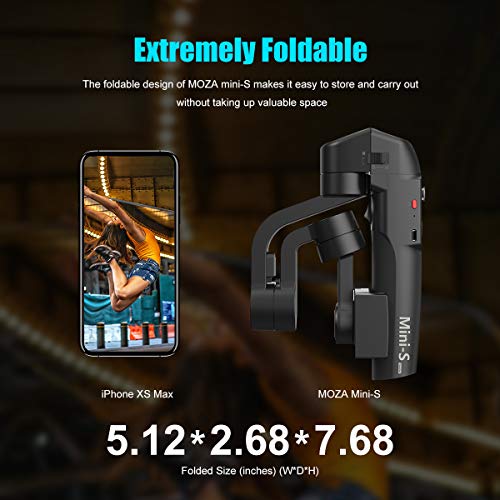
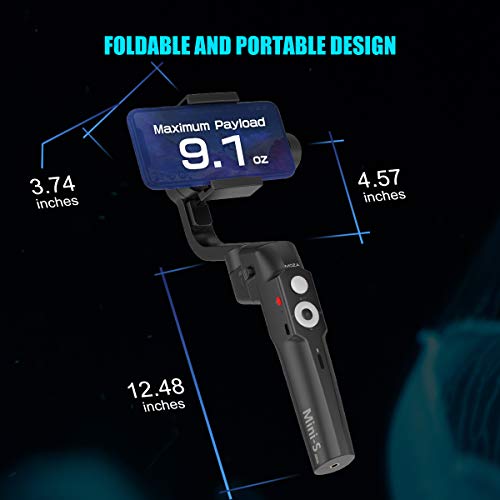
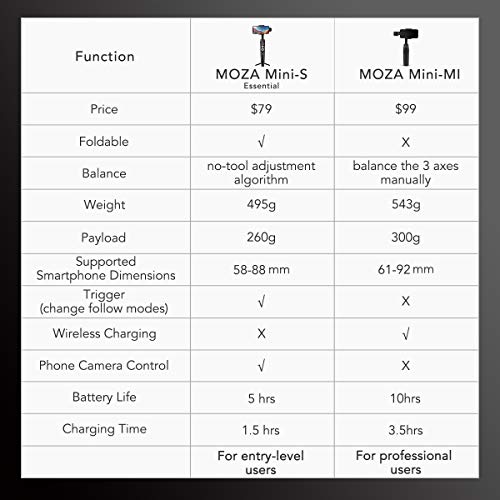

- 【Foldable & Lightweight】Advanced phone gimbal with a perfect slim body, easily to be folded for carrying outside. Folded size-5.1"*2.7"*7.7" as a short folding umbrella, 1.1 oz lighter and half smaller than Zhiyun Smooth 4. Great choice for travel, holiday, party or fashional gift!
- 【Anti-shake Technique】A built-in sensor and a rare-earth permanent magnet brushless motor effectively mitigates the shake caused in motion shooting. Maximum payload 9.1 oz, phone's size from 2.3"-3.5". Fits for iPhone Xs/Max/Xr/X/8/7/6 Plus Samsung Note 8/S8 Huawei, etc.
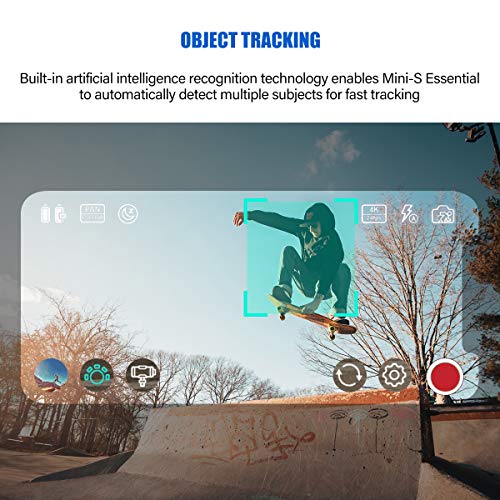
- 【Quick Object Tracking】With built-in artificial intelligence recognition technology, MOZA Mini-S Essential can be automatically detect multiple subjects for fast tracking, producing smooth continuous frames for you
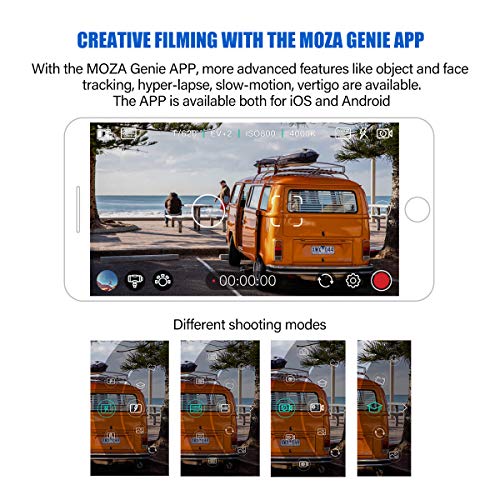
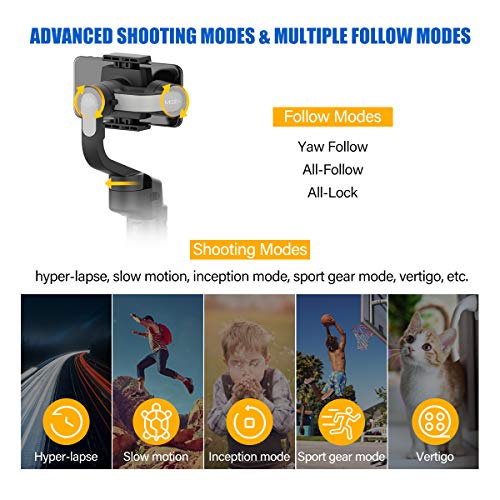
- 【Creative Filming with Official Support】Via MOZA Genie APP (iOS & Android), advanced features and different shooting modes like hyperlapse, slow-motion, vertigo can be achieved, just enjoy more excellent filming time!
- 【Convenient Control】360° rotation from 3 axes based on customized setting. One button zoom&focus control sets your hands free. Lower price yet high-end hardware, especially for shooting beginners! 【As a official MOZA Distributor, we offer 12-Months Hassle-Free Warranty and 24H friendly customer service】
-
Information
-
Twitter
-
Pinterest
-
Youtube
-
Facebook
Drella Johnson
SmartFunctionNewTech AA+.Quality/ RECOMMEND!
Ok I own another Camera Gimbal, and I honestly bought this one for 2 reasons originally: 1. Compact size/ Foldable, & 2. Strong added Filmmaking features I really wanted. Ok: This portable / Foldable compact gimbal is totally unassuming, the controls have multiple triggers, and there’s and Added headphone jack to micro usb that plugs into the unit/ via phone or (iPhone adapter cable), and provides lag free file transfer capability, as youyre using. To start the unit balances and works many options right out of the box. The box btw, comes w/ usb -C charging cable, and a micro usb to headphone jack cable. Carrying pouch, and it’s packaged very classy. Right away for @$80 I tell this is a solid unit. As solid as my $189 unit I already have. Screw in base Tri legs, and after charging, adding android/iPhone, (I used both they work = as well), and power up and ..... I’m eating my previous words, but it’s Phenominal! ***Please watch / read a full training resource, here isn’t where to tell you about single / double click triggers on each button,( ie. Zoom/focus, double click, auto zooms in or out! ), I’ve done this 100 times,w/ a zoom pull wheel, and nothing is as smooth as this button. It also adds vertigo effect, as well as Timelapse, special timelapse, ***Note the MOZA app allows you to access the phones settings, even 240fps! *** but here’s the real deal make for this money, I can’t find anything with a thumb toggle pan/tilt motor, to adjust to your moving subject, w/out moving the base. *Did I mention Subject TRACKING MODE! Yup set it, tap on your subject and it will track it without any user input. Follow lock, trigger, is tight,( as tight as gimbal should be, and ADD THIS; tap power but and the entire gimbal recenters itself. I own several units, my latest and real , user doesn’t have this. Once it loses connection, I’m dead in the water. This works in portrait for pano shots, landscape and it just works smooth. I can’t fault this unit, and frankly I’d like to to justify my more expensive unit, but the MOZA is now my ‘daily driver’, for its strength, portability, modes, multi function triggers, smooth zoom focus pull, and quality all around. I might suggest get slightly beefier tri legs, *** but I broke 1 of the legs on my more costly gimbal with bigger legs, so I guess, they figured that too. I stake my reputation on my feedback of my reviews, and I stand behind this one. 100%
Marina Egorova
SUPER AWESOME GIMBAL!
Jenn Wilson
Very easy to use and feels sturdy in the hand
Having used a couple of other non-motorized gimbals in the past, I was concerned that this one might be difficult to set up and use. It was very easy to get started with clear instructions. It even comes with a bag, so that when you put it with your other gear, the gimbal doesn't get scratched. The controls are intuitive, and if you want more information, there are good videos on YouTube showing how to use it. Great phone gimbal!
Melanie Timothy
Fits my Galaxy S9+ w/ case
Thomas Kitchens
This Gimbal opened up my eyes!
This takes the selfie stick game to another level. I watch a couple of reviews on YouTube before I decided to purchase this. I’ve always been curious on how people film quality videos using their phones. Until now.... The gimbal is very cool, I can see myself taking this on vacation and leaving my GoPro at home. You can control your phone’s camera with the joystick and buttons on the gimbal. I downloaded the app and it was pretty simple to use, might have to watch more YouTube videos to figure out the rest of the features. I like the fact that it has an anti bounce like feature when you record a video. If you’re hiking and recording, it’ll keep your camera balanced and makes the video look a lot more smoother. I know there are other big name gimbals out there, but they are also more expensive. It really feels like high quality in your hand and doesn’t feel cheap. I will do a follow up review in a month when I take this on a hike or trip.
Sarrah Johnson
Impressed!
Wow! For only $75 I was not expecting this. This is amazing. It is very sturdy and has some heft, so it feels like a quality product. I love that it folds so that it’s compact enough to fit in my tech bag without taking up too much room. This thing works great with my iPhone X, there is no jittering like some users reported with other stabilizers and your video is very smooth and professional looking. I love the fact that it’s rechargeable and it recharges quickly too. My only issue is the phone app for itself. The colors are way off on their app, so I recommend using the stock camera or another camera app. Hopefully they fix this, but I didn’t deduct any stars for this since the product itself is perfect and you don’t need the app to use it.
Laurie Patino
Easy to use- great product
I purchased this to take on a trip to Europe. I have played with it some before I prepare to leave and the videos I am taking are fantastic. They just flow. This Gimbal is easy to use and folds up small enough that it is not a hindrance to take hiking. I have had no problem attaching it to my I Phone XR and it works great. I have already recommended it to other friends who have viewed my videos.
Andrew Webster
Smooth Gimbal with Many Features
I love how smooth this gimbal is. It was able to correct the choppy movements while I was walking and running with it. In the center is a button that allows you to move the gimbal in every which way. There’s a camera button that’s also located in the center of the gimbal, right above the button that controls the gimbal’s movement. When you press on it, the camera on your phone will snap a photo for you. However, when you use this device, make sure to plug the attachment cord that connects your phone to the gimbal. There’s quite some features to explore on this device, but overall, I believe this gimbal has a lot potential.
Sanam Shaikh
Does what I need it to do for far less $$$ than others I was considering
I am an online fitness professional and often do videos of myself for my social media. I was looking for a gimble mainly to be like my own photographer and track my movements as I create food and fitness videos. It took me a little bit to learn the basics (It's honestly so easy to use that I confused myself into thinking it was harder if that makes any sense so I struggled a bit with calibration and figuring out the object tracking mode) but once it clicked for me, I was off and running. All other models I was considering were at LEAST $50 more and had features I did not need. I am pleased with the design and ease of operation of this for my needs.
Crystal Howell
Great Gimbal for the Price
So I've always wanted a gimbal to add that incredible smoothness to my videos. I never really saw a need because they're so expensive. I came across and couldn't believe how reasonable it was. I ordered it expecting it to not function very well at all. Little did I know that this gimbal was incredibly functional for my needs. It adds that increased production value to my cellphone videos. Overall it's great for stabalizing your videos and makes your recordings look almost cinematic. Great buy. I'd purchase again.