
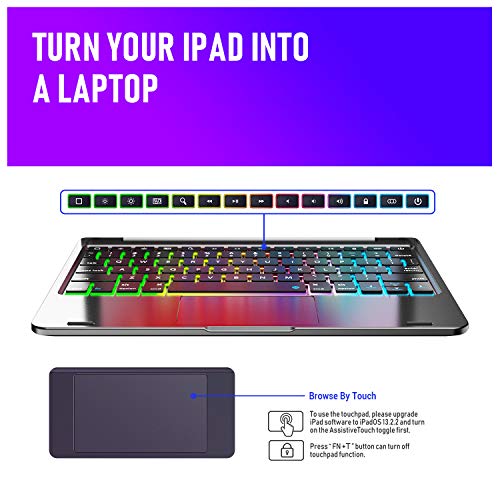
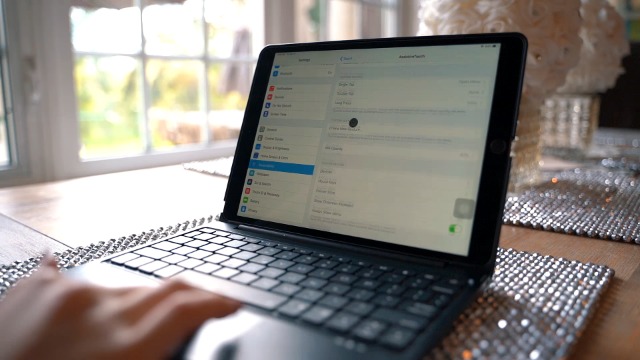

- FROM TABLET TO LAPTOP: With our keyboard case for all iPad 10.2”/10.5”, you can turn your tablet into a highly performant and easy to use laptop! The backlit tablet keyboard has a built-in touchpad for enhanced control and comfort of use. *Setting steps: 1. Extended press the power button to turn it on. 2. Extened press the pairing button to connect it with your iPad. 3. Upgrade Your iPad Software to 13.2.2 or above, and also turn on iPad AssistiveTouch toggle to access the touch pad function
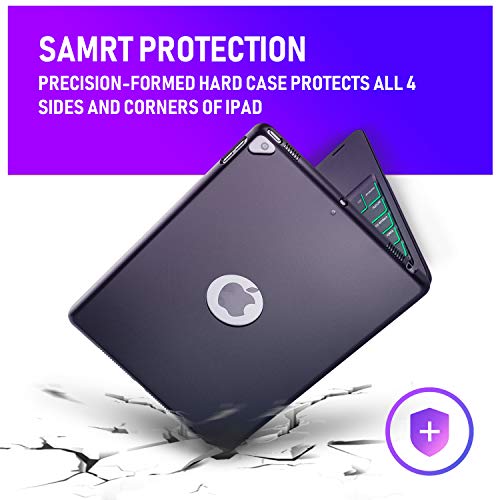
- ENHANCED PROTECTION: Unlike other tablet cases, our holder for iPad case has a precision-formed hard case that provides structural integrity for premium protection. The tablet holder has a special design that allows the pad to turn on and off automatically with the case, preserving its battery for longer. *Notice: The keyboard will enter into sleep mode if it doesn't work for 10 minutes, and it will disconnect with your iPad. It will wake up and connect to your iPad again when pressing any key
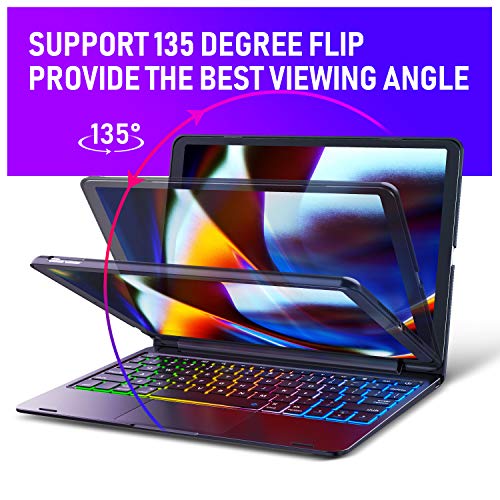
- COMFORTABLE USE: Our backlight keyboard case compatible with iPad 10.2 / 10.5 inch has a clamshell bracket design with built-in hinges that rotate to up to 130-degrees that ensure a comfortable viewing angle.
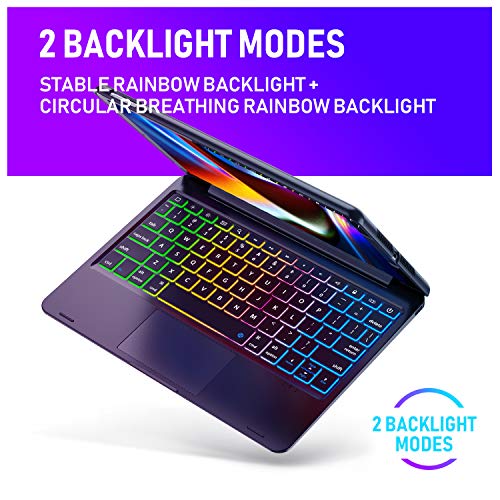
- BACKLIGHT MODES: This premium keyboard case for iPad comes with 2 backlit modes, one with stable rainbow light and the other with a circular breathing rainbow. It has 3 brightness modes and breathing rate adjustments for more comfort.*Notice: for power saving, if you don't touch the keyboard for 5 seconds, the backlit would go off automatically. It will light up again when you press any key.
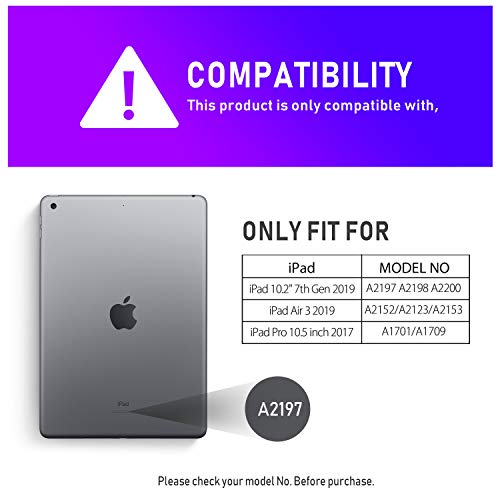
- PERFECT FIT: This premium slim keyboard case is perfectly compatible with 2019 iPad 7th generation (A2197 / A2200 / A2198), 2019 iPad Air 3 (A2152 / A2153 /A2123) and 2017 iPad Pro 10.5 (A1701 / A1709). and it does not prevent the use of any of its features. The keyboard case has a long battery life due to the lithium-ion battery that provides up to 350 h with backlit off and 3 h with backlit on of continuous operation.
-
Information
-
Twitter
-
Pinterest
-
Youtube
-
Facebook
Tyler Schwenk
Good keyboard+trackpad for iPad
The case is your standard polycarbonate hard cover case. It offers good protection against scratches though I do wish that it can be a tad stronger for better protection and maybe a little bit of padding around the corners and the back against scratches. The cutouts are nicely positioned against the ports and the openings. While others may like to show off their apple logo, I do prefer to have it fully covered back for maximum protection. I feel the hinge could offer wider angle adjustment because currently it only offers angle that is slightly bigger than 90 degree which I feel is not the most comfortable angle to work if you are using it on your lap. Ideally, it would be nice to have a 180 degree adjustment or even detachable option. Luckily, the hinge feels sturdy with iPad in it. Given this is a keyboard case combo, I am quite impressed with the keyboard. I like the fact it is charged via USB-C port, so one less cable to carry around. The keys are nicely laid out with good spacing between then. They have good travels with good feedback. The keystroke response is also good where the accurate keystroke is registered and so no latency when typing with a word documents. The standard apple special function keys (brightness, multimedia, option, command, etc) are located the same place as your Macbook which is great and should be quite familiar for those who also owns Mac laptops. One thing that bugs me is that the cap lock indicator is not built directly on the key, instead it is located on the lower right corner, which is rather inconvenient. The backlit is a nice touch and for the gamers out there, it can mimic your gaming keyboard with the rainbow or breathing effect. Luckily there is also monochrome option so you can look a bit more professional when needed. The trackpad is surprisingly nice and works quite well. It has decent size and quite sensitive. Not only that it is accurate and easy to use, the multi finger gestures for scrolling and others worked without any problem. It is in fact better than some cheap or midrange laptops out there, which is quite impressive. Pairing is super easy. Charging is easy (thanks to USB-C port). Though, I wish it has more descriptive light indicator than the blinking light. I like the fact it has standby mode so it will not drain battery while you are not using it. Overall, I like the keyboard case. I feel that it is a good option for those who use their iPad primarily as a laptop replacement and typically type on hard and flat surface. It is not perfect case (especially for those who like to detach their iPads when not using the keyboard) but considering the good trackpad and key response, I think it is one of the better option on a budget.
Hilario Castrejon
Can be used as a backup keyboard for your MacBook Air
I had wiped out the keyboard and trackpad function of my MacBook Air with a poorly timed spill of a cup of water. Replacing the keyboard from Apple would cost at least $700, and they could not guarantee the functionality (policy after water spills). After trying one other bluetooth keyboard that was a piece of junk (and now in the trash), I noticed the reviews for this one which were excellent. Thank you reviewers for that! Just got this and tried it out--it paired to my MacBook right away, and the keyboard and trackpad work very similarly to the Mac's. An excellent product and good solution to still get functionality out of the Mac. Worth the money, 5 stars.
Ben Fredj Sahar
Keyboard ipad
This is such a great product especially for students who prefer to use or have an iPad. We can either use pen or this great keypad to type things in easily and effortlessly. The keyboard light is pretty cool to play with too. I would definitely recommend purchasing this product.
Mya Shaw
Amazing product 🥰
I am very skeptical when it comes to buying items on Amazon just because you never know how good the quality will be. I am very impressed with this keyboard. I bought it for my significant other and he loves it! It was easy to set up, and functions great. I think the price is good as well for the quality you get. It was everything I expected it to be! Thank you 😊
Monica DeSousa
No regrets!!!
I had been debating on getting a keyboard for my iPad for awhile then iPad OS 13.4 came out with true trackpad support. This keyboard offers a trackpad while other more expensive brands do not. It's easy to pair and if your iPad is updated to the latest version, the trackpad works without a hassle. I hope to see a 360 hinge in the future so I can draw without taking my iPad out but other than that it's been totally worth it.
Raynaldo Aldaco
Reliable, Stylish and value for Money
I found this product very reliable, good quality. This keyboard case is better than my expectations and truly value for money
HasHim Javed
Great case and great value!
Great case! This case is very sturdy and it has turned my iPad into a small laptop! I love the back lit keyboard and the touch pad as well. Great purchase!!
Catherine Johnson Haligah
My Ideal Keyboard!!
This Keyboard seems like a really great buy right up front. It’s built solidly. The keys feel quality with a slight silky feel to them rather than a cheap plastic texture. Key response is accurate and fast. I love the fact there are many control on the keyboard itself to control brightness and volume. The touch pad feature is AMAZING! While using it I almost forget Im using my iPad at all it feels so much like a laptop. The touch pad is very responsive and smooth so far. It also has many other customizable gestures you can create and control within the accessibilty settings of the ipad itself. For instance to scroll I set the touch pad gesture to be and tap and drag and it scrolls very smoothly. I also love that theres a little faded out icon that is on the screen in connection with the touch pad that contains all the functions of the home button on the ipad so you never have to touch the ipad itself to do fuctions such as touch the home button physically ( as shown in the photos ) The backlighting is gorgeous!! It has three levels of brightness however dont expect to see much of the colors in a well lit room but that isnt really the point of backlighting now is it :) In a darkened room the colors are spectacular and very helpful although the lighting from my screen kind of takes care of lighting up the keyboard for me anyways. I dont have much to say about the battery life as I haven’t had it long but I will update as time goes on. The flexibilty of the angle of the screen is also amazing I think. I tried another similar keyboard where the screen only did a 90 degrees, very uncomfortable for viewing the screen. This one has a very comfortable angle to it, very natural. Also it’s worth mentioning the case comes with a lifetime warrenty and there was an option to get a free unbranded stylus as a bonus gift if I sent in my order number. Very cool keyboard so far!! The only two features this keyboard lacks that would make it a totally perfect would be a stylus holder on the side and if the angle option was 360. But for what it is I am really quite happy!!
Susan Jordan
Just What I Was Hopping For
I just received a new iPad A2200 for work and I spent time shopping around reading reviews and doing my due diligence seeking the "right" keyboard. I'm real particular about aesthetics, the type of keys on the keyboard and functionality. After 4-weeks looking online, at my local office/computer stores, at the different keyboard models my colleagues are using with their iPad's. I came across this wireless keyboard with case and touch-pad. The touch-pad was a bonus. Upon receiving the new keyboard I was impressed with the box the keyboard came in - I would say that the box the keyboard came in was at par with the clean, quality cardboard material that we are all used to seeing when we purchase an APPLE product. As for the keyboard itself, the design was sleek, clean, sharp, and sturdy. I'm real picky when it comes to the type of keys a keyboard has and these keys are perfect. Overall this keyboard has got a double-take look to it!
Jennifer Tucker
Very good upgrade & tool for ipad
This keyboard case won't transform your iPad into a full MacBook Pro, but it will give you a lot more features, including a mouse. You will have to enable the mouse feature on your device for this to work, which is pretty easy once you search for it... The case does seem to provide an adequate amount of protection without making it too bulky. Overall, this is a very good upgrade that adds some needed features to the iPad.